Loading
Get Il Il-941-x Schedule P 2021-2026
How it works
-

Open form follow the instructions
-

Easily sign the form with your finger
-

Send filled & signed form or save
How to fill out the IL IL-941-X Schedule P online
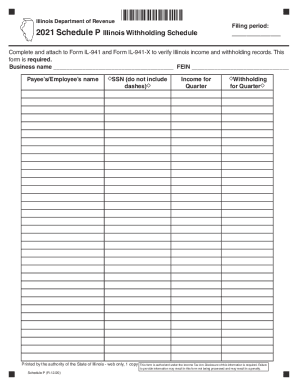
Filling out the IL IL-941-X Schedule P is an essential step in verifying Illinois income and withholding records. This guide provides clear instructions to help you navigate the form seamlessly.
Follow the steps to complete the IL IL-941-X Schedule P online.
- Click ‘Get Form’ button to obtain the form and open it in the editor.
- Enter the business name in the designated field. Ensure this is accurate as it will be used in association with your FEIN.
- Input the Federal Employer Identification Number (FEIN) in the appropriate section. Verify that this number is correct to prevent processing delays.
- Provide the payee’s or employee’s name in the corresponding field. This section is crucial for identification purposes.
- Enter the Social Security Number (SSN) of the payee or employee. Do not include dashes, as it is essential for the accuracy of the information.
- Fill in the income for the quarter in the appropriate field to reflect the correct earnings.
- After that, indicate the withholding amount for the quarter. This information is necessary for tax calculations.
- Review all entered information for accuracy. Ensure that all required fields are completed before proceeding.
- Once satisfied with the completed form, save the changes. You can then download, print, or share the IL IL-941-X Schedule P as needed.
Complete your forms online for a streamlined filing process.