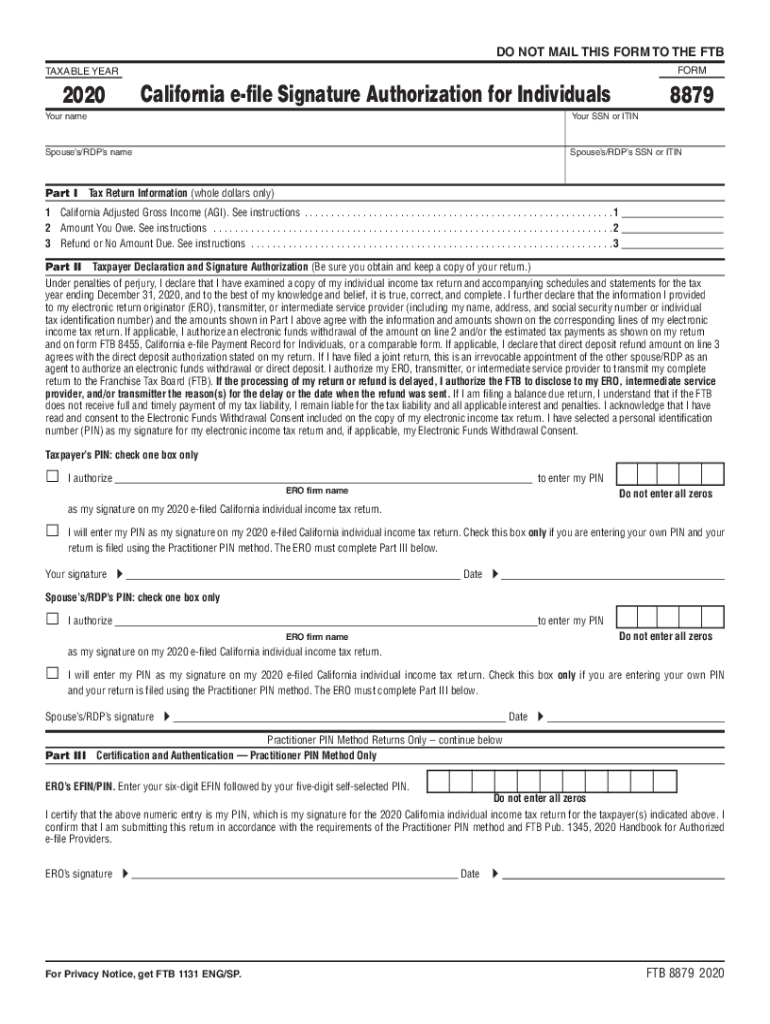
DO NOT MAIL THIS FORM TO THE FTB FORMTAXABLE YEAR2020California efile Signature Authorization for Individuals8879Your nameYour SSN or ITINSpouses/RDPs nameSpouses/RDPs SSN or ITINPart ITax Return.
Loading

Open form follow the instructions

Easily sign the form with your finger

Send filled & signed form or save
How to fill out the CA FTB 8879 online
The CA FTB 8879 form, also known as the California e-file signature authorization for individuals, is essential for electronically signing your tax return. This guide provides clear, step-by-step instructions to ensure users can fill out the form accurately and efficiently.
Follow the steps to complete the CA FTB 8879 form online.
- Press the ‘Get Form’ button to access the CA FTB 8879 form and open it in your preferred online platform.
- Enter your name in the designated field as it appears on your tax return.
- Provide your Social Security Number (SSN) or Individual Taxpayer Identification Number (ITIN) in the appropriate field.
- Fill in your spouse’s or registered domestic partner’s (RDP) name, if applicable.
- Input your spouse’s or RDP’s SSN or ITIN in the corresponding section.
- In Part I, input the whole dollar amount for your California Adjusted Gross Income (AGI) as directed.
- Next, input the total amount you owe, if applicable, in the specified field.
- If you are expecting a refund or have no amount due, complete that section with the respective amount.
- Move to Part II and read the declaration carefully before signing. Ensure it aligns with your tax return.
- Choose whether you will enter your own Personal Identification Number (PIN) or authorize an electronic return originator (ERO) to enter it on your behalf.
- Sign and date the form in the designated spaces provided.
- Complete the sections for your spouse or RDP, if applicable, mirroring the information you provided.
- If using the Practitioner PIN method, complete Part III with the required ERO’s number and signature.
- After completing the form, save your changes and download, print, or share the form as needed.
Complete your CA FTB 8879 form online today for a seamless filing experience.
Experience a faster way to fill out and sign forms on the web. Access the most extensive library of templates available.
Related content
Jul 15, 2019 - 2018 Personal Income Tax Booklet, Form 540. ... For more information go to...
The State of California (through the Franchise Tax Board) requires an annual report of...
Jul 5, 2014 — ... LSI LSIG LSI STR23SP SR53UP-Fb STR53UP-FTb STR53UP-FIb Ammeter LSIG...
Get answers to your most pressing questions about US Legal Forms API.
Can tax returns be electronically signed?
Taxpayers, who currently use Forms 8878 or 8879 to sign electronic Forms 1040 federal tax returns or filing extensions, can use an e-signature to sign and electronically submit these forms to their Electronic Return Originator (ERO). Can all taxpayers use the e-signature option? No.
How long do I have to keep Form 8879?
EROs are required to keep the signed Forms 8879 on file for three years after the date the return was received by the IRS or the due date of the return, whichever is later.
What is the purpose of Form 8879?
Form 8879 is an electronic signature document that is used to authorize e-filing. It is generated by the software using both the taxpayer's self-selected PIN and the Electronic Return Originator's (ERO's) Practitioner PIN. Form 8879 does not need to be mailed to the IRS, but instead is retained by the ERO.
Do both spouses have to sign Form 8879?
The spouses must sign and date the Declaration of Taxpayer (Form 8879) to authorize the origination of the electronic submission of the return to the IRS before transmitting it. New e-signature guidance allows taxpayers to e-sign Form 8879 from their home computer.
Who can sign Form 8879?
Taxpayers, who currently use Forms 8878 or 8879 to sign electronic Forms 1040 federal tax returns or filing extensions, can use an e-signature to sign and electronically submit these forms to their Electronic Return Originator (ERO).
Is Form 8879 a tax transcript?
It is not used when you file your tax return yourself with TurboTax. Form 8879 is called "IRS e-file Signature Authorization." ... Ask them if they will accept a Tax Account Transcript or a Tax Return Transcript from the IRS. Either of those does show that you filed as married.
What is a form 8879?
Form 8879 is an electronic signature document that is used to authorize e-filing. It is generated by the software using both the taxpayer's self-selected PIN and the Electronic Return Originator's (ERO's) Practitioner PIN. Form 8879 does not need to be mailed to the IRS, but instead is retained by the ERO.
Is the tax form 8879 the same as 1040?
No, 8879 is the e-signature authorization form, and 1040 is the actual tax form.
What is the tax form 8879?
Form 8879 is the declaration document and signature authorization for an e-filed return filed by an electronic return originator (ERO).
Use professional pre-built templates to fill in and sign documents online faster. Get access to thousands of forms.
If you believe that this page should be taken down, please follow our DMCA take down process here.
This form is available in several versions. Select the version you need from the drop-down list below.