26 27 Add line 25b and line 26. Continue to Side 2. 27 For Privacy Act Notice get form FTB 1131. 540NR99109 Form 540NR. C1 1999 Side 1 Step 6 Special Credits Nonrefundable Renter s Step 7 Other Taxes Step 8 Payments Step 9 Overpaid Tax or Tax Due Amount from Side 1 line 27. 70 71 AMOUNT YOU OWE. Add line 55 and line 69. Make a check/money order payable to Franchise Tax Board for the full amount. Write your social security number and 1999 Form 540NR on it. Attach it to the front of your Form 540NR and mail to 72 Interest late return penalties and late payment penalties. Print and Reset Form Reset Form California Nonresident or Part-Year Resident Income Tax Return 1999 FORM 540NR Fiscal year filers only Enter month of year end month year 2000. 67 62 California Firefighters Memorial Fund. 62 Interest and Penalties 66 Emergency Food Assistance 60 State Children s Trust Fund for the 65 California Mexican American 59 Rare and Endangered Species Refund or Amount You Owe 64 D.A.R.E. California....
Loading

Open form follow the instructions

Easily sign the form with your finger

Send filled & signed form or save
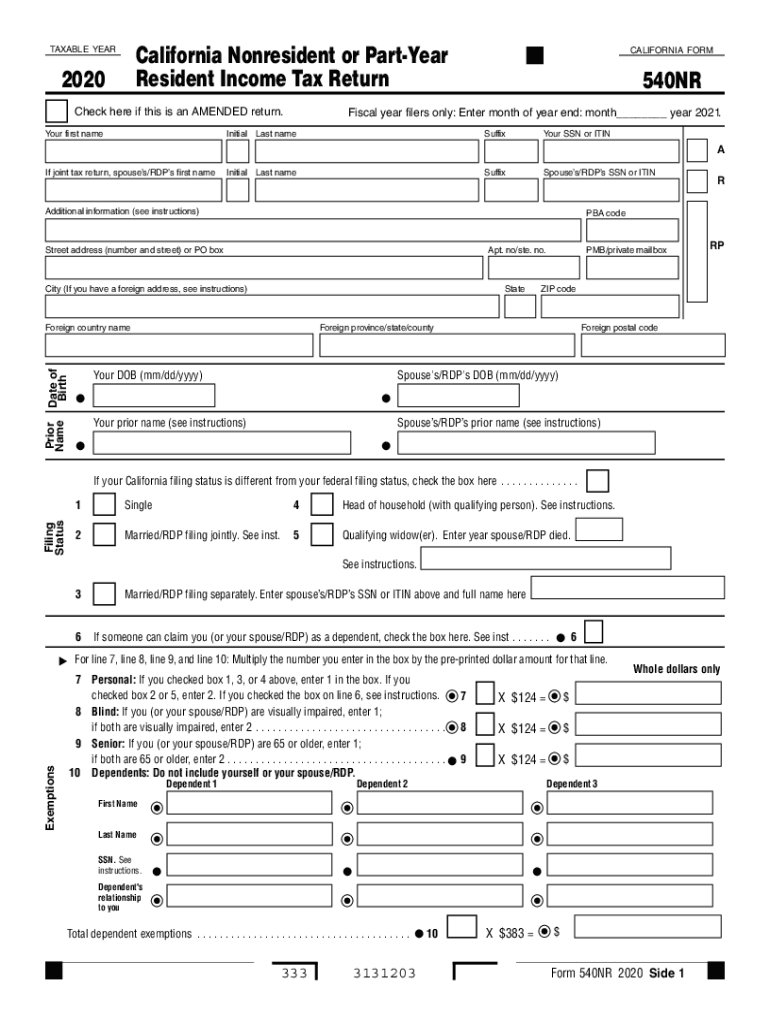
How to fill out the CA FTB 540NR online
Navigating tax forms can be challenging, especially for nonresidents or part-year residents. This guide aims to provide you with clear, step-by-step instructions on how to complete the CA FTB 540NR form online, ensuring all necessary information is accurately inputted.
Follow the steps to complete the CA FTB 540NR online effectively.
- Click the ‘Get Form’ button to obtain the form and open it in the editor.
- Begin by entering your personal information, including your first name, last name, and your Social Security Number or Individual Taxpayer Identification Number. If applicable, also provide your spouse’s or registered domestic partner’s information.
- Fill in your current address, including the street address, city, and zip code. If you have a foreign address, refer to the instructions provided for additional guidance.
- Indicate whether you are filing an amended return and provide your date of birth along with your spouse’s or partner's date of birth, if applicable.
- Select your filing status based on your situation. This includes options such as single, married filing jointly, married filing separately, head of household, or qualifying widow(er).
- Complete the exemption section. This includes personal exemptions, blind exemptions, senior exemptions, and dependents. Enter the number of applicable exemptions based on the instructions provided.
- Calculate your total California wages from your federal forms and enter this information in the corresponding section.
- Complete the income adjustment lines for California-specific adjustments. Follow the instructions for combining or subtracting various income amounts.
- Enter your total taxable income and calculate your tax based on the appropriate tax tables or forms.
- If applicable, enter credits for child and dependent care, as well as other tax credits. Subtract the total credits from the calculated tax to determine your final tax amount.
- Provide information about any payments, withholdings, and any overpayment or underpayment balances.
- Finally, check to ensure all fields are complete and accurate. Once finished, you can save your changes, download, print, or share the form as needed.
Get started with your CA FTB 540NR submission online to ensure compliance and avoid any hassle during tax season.
Experience a faster way to fill out and sign forms on the web. Access the most extensive library of templates available.
Related content
Oct 22, 2019 - Other agency forms. IRS · Employment Development Department · California...
FILING YOUR INCOME TAX RETURN FOR 1999 & I-CENTER TAX WORKSHOPS In previous years, all F...
Report your capital assets on Schedule D (540NR), California Capital Gain or Loss...
Get answers to your most pressing questions about US Legal Forms API.
What is the 540 tax form?
The Schedule CA (540) Form is a California resident income tax return form. You use your federal information (forms 1040, 1040A or 1040EZ) to fill out your 540 Form in TurboTax.
How many allowances should I claim de4?
Claim allowances with one employer. Do not claim the same allowances with more than one employer. Your withholding will usually be most accurate when all allowances are claimed on the DE 4 or Form W-4 filed for the highest paying job and zero allowances are claimed for the others.
What is the California Department of tax and fee administration?
The California Department of Tax and Fee Administration administers California's sales and use, fuel and tobacco taxes, as well as a variety of other taxes and fees that fund specific state programs.
What California tax form should I use?
Form 540 is used by California residents to file their state income tax every April. This form should be completed after filing your federal taxes, such as Form 1040, Form 1040A, or Form 1040EZ, because information from your federal taxes will be used to help fill out Form 540.
What California tax form do I use?
Form 540 is used by California residents to file their state income tax every April. This form should be completed after filing your federal taxes, such as Form 1040, Form 1040A, or Form 1040EZ, because information from your federal taxes will be used to help fill out Form 540.
Does California allow miscellaneous itemized deductions in 2018?
California did not conform with TCJA, and as a result, the Miscellaneous Itemized Deductions, such as union dues, are adjustments when filing a California return for 2018. For 2018, these expenses, after subtraction of 2% of federal adjusted gross income (Form 1040, Page 2, Line 7), are deductible for California.
What is a California Form 540?
A Form 540 is also known as a California Resident Income Tax Return. This form will be used for tax filing purposes by citizens living and working in the state of California. This form is used each year to file taxes and determine if the filer owes taxes or is entitled to a tax refund.
What is a Schedule CA 540?
Use Schedule CA (540), California Adjustments Residents, to make adjustments to your federal adjusted gross income and to your federal itemized deductions using California law.
Which CA tax form to use?
Form 540 is used by California residents to file their state income tax every April. This form should be completed after filing your federal taxes, such as Form 1040, Form 1040A, or Form 1040EZ, because information from your federal taxes will be used to help fill out Form 540.
Who must pay estimated tax?
Who Must Pay Estimated Tax. Individuals, including sole proprietors, partners, and S corporation shareholders, generally have to make estimated tax payments if they expect to owe tax of $1,000 or more when their return is filed.
Use professional pre-built templates to fill in and sign documents online faster. Get access to thousands of forms.
If you believe that this page should be taken down, please follow our DMCA take down process here.
This form is available in several versions. Select the version you need from the drop-down list below.