Tant Message Address City Complete Reverse Side Zip Code c No Nebraska ID Number 7-100-1975 Rev. 7-2020 Supersedes 7-100-1975 Rev. 2-2018 Read the attached instructions about Nebraska licensing or registration requirements and complete the information for all tax programs you need to be licensed or registered for. If you need to report a liability for periods prior to the date of this application, enter the earliest date (month, day, year) you need a return. Month/Day/Year 13 Sa.
Loading

Open form follow the instructions

Easily sign the form with your finger

Send filled & signed form or save
How to fill out the NE DoR 20 online
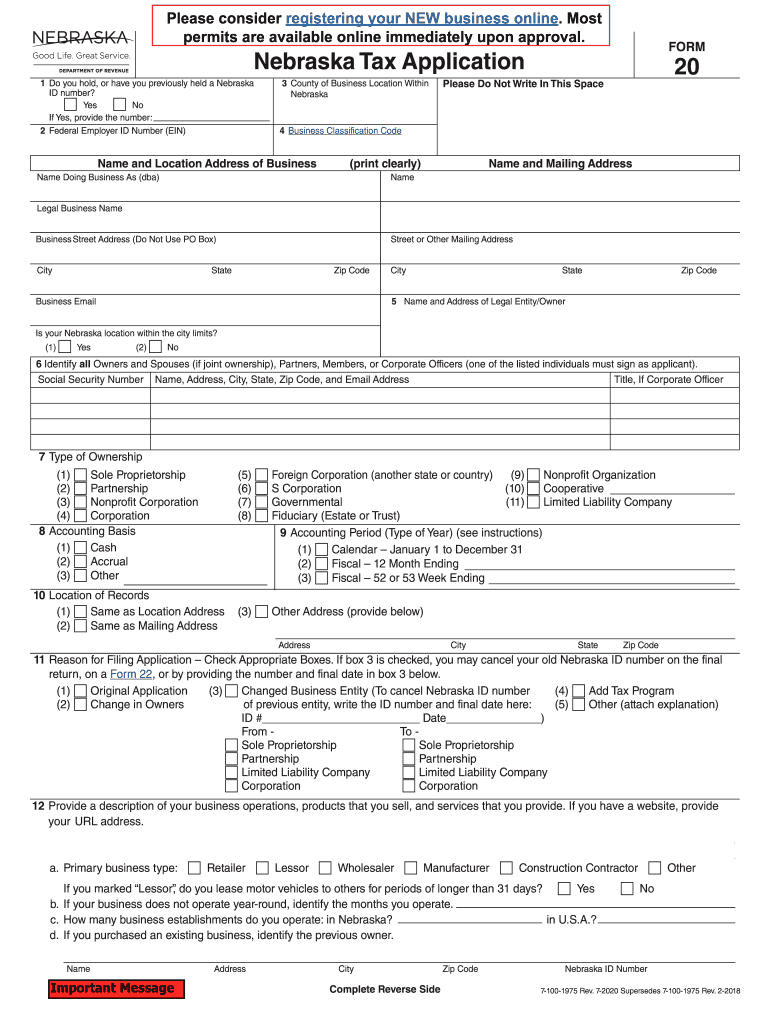
Completing the Nebraska Tax Application (NE DoR 20) online is a straightforward process that requires accurate information about your business. This guide provides step-by-step instructions to help you successfully fill out the form and ensure compliance with Nebraska tax regulations.
Follow the steps to complete your NE DoR 20 online application.
- Click ‘Get Form’ button to access the Nebraska Tax Application and open it in the editor.
- Indicate whether you hold or have previously held a Nebraska ID number. If 'Yes,' provide the ID number in the designated field.
- Enter the Federal Employer ID Number (EIN) in the provided field. If you do not have an EIN, ensure you apply for one prior to submitting your application.
- Specify the county of your business location within Nebraska.
- Provide the name and address of your business. Make sure to print clearly, avoiding use of PO Boxes.
- Fill in the Business Classification Code and the Name Doing Business As (DBA).
- Complete the section for the name and mailing address of the legal entity or owner, including business email.
- Indicate whether your Nebraska location is within city limits by selecting 'Yes' or 'No.'
- List all owners, partners, members, or corporate officers. They must provide their Social Security Number, name, address, and title.
- Select the type of ownership that applies to your business. You can choose from sole proprietorship, partnership, nonprofit corporation, corporation, and others.
- Choose the accounting basis that your business will use. Options include cash, accrual, or other methods.
- Identify your accounting period, whether it is calendar or fiscal.
- Specify the location of your records by selecting from the given options.
- State the reason for filing the application by checking the appropriate boxes.
- Provide a description of your business operations, including the primary business type and any previous owners if applicable.
- Indicate any required tax programs you want to be registered for, such as sales tax or income tax withholding.
- Designate an authorized contact person for the application and provide their contact information.
- Review all entries for accuracy, then sign and date the form before completing your submission.
- After finishing the application, save your changes, and utilize available options to download, print, or share the completed form.
Complete your NE DoR 20 tax application online today for a seamless business registration experience.
Experience a faster way to fill out and sign forms on the web. Access the most extensive library of templates available.
Related content
Form Title Form # Document Nebraska Tax Application, with Information Guide (02/2018) 20...
Bureau of Sociological Research, University of Nebraska-Lincoln, 2018. So many things I...
Get answers to your most pressing questions about US Legal Forms API.
How do I register a small business in Nebraska?
Step 1: Register Business Name. Nebraska Secretary of State (402-471-4079) ... Step 2: Get Tax Identification Number. Internal Revenue Service (1-800-829-4933) ... Step 3: Register Business. Nebraska Department of Revenue (1-800-742-7474) ... Step 4: Determine Needed Insurance.
Where can I get a tax ID number for my business?
Apply online at www.irs.gov. Obtain Form SS-4, Application for an Employer Identification Number from the Internal Revenue Service at 1 800 829-3676. Apply by phone by calling the Internal Revenue Service at 1 800 829-4933.
How do I get a sales tax ID number in Nebraska?
To apply for a Nebraska Identification Number, you can either register online, or complete the Nebraska Tax Application, Form 20. If you indicate that you will be collecting sales tax, you will be issued a Sales Tax Permit. The permit must be displayed at each retail location.
How do I get a Nebraska sales tax number?
Request it by calling 800-742-7474 (NE and IA) or 402-471-5729. You can also request the packet by email or in person at a Nebraska Taxpayer Assistance Office. You can now register for your Nebraska sales tax license online!
How do I get a tax ID number in Nebraska?
To apply for a Nebraska Identification Number, you can either register online, or complete the Nebraska Tax Application, Form 20. If you indicate that you will be collecting sales tax, you will be issued a Sales Tax Permit. The permit must be displayed at each retail location.
Does Connecticut charge sales tax on labor?
Assessment of Sales Tax on Labor in the State of CT. Connecticut assesses sales tax on exchanges of tangible goods and, since 1972, on the rendering of certain services. As of July 2011, the sales tax is generally 6.25 percent. You pay sales tax on labor when it occurs as part of a taxable service.
Does Wyoming charge sales tax on labor?
Are services subject to sales tax in Wyoming? "Goods" refers to the sale of tangible personal property, which are generally taxable. "Services" refers to the sale of labor or a non-tangible benefit. In Wyoming, specified services are taxable.
Can contractors charge tax on labor?
In most states, construction contractors must pay sales tax when they purchase materials used in construction. ... In some cases, this can be an advantage because any markup you charge to your customer on the materials, supplies and labor, won't be subject to sales tax.
Can labor be taxed?
Labor or service charges related to a nontaxable sale are not taxable. Tax does not apply to labor or services related to nontaxable sales, including sales for resale.
Is shipping taxable in NE?
In Nebraska, the method of delivery is highly significant when it comes to determining whether sales tax must be charged on that portion of the transaction. If the items being purchased are taxable and the buyer pays the delivery charge directly to the retailer, sales tax must be paid on the item.
Use professional pre-built templates to fill in and sign documents online faster. Get access to thousands of forms.
If you believe that this page should be taken down, please follow our DMCA take down process here.