Loading
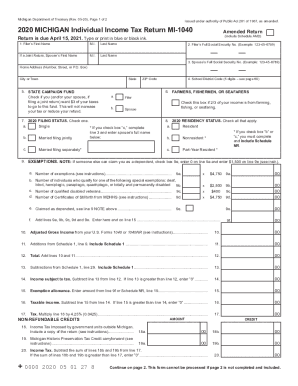
Get Mi Mi-1040 2020
How it works
-

Open form follow the instructions
-

Easily sign the form with your finger
-

Send filled & signed form or save
How to use or fill out the MI MI-1040 online
Filling out the MI MI-1040 form online can be a straightforward process when you have clear guidance. This comprehensive guide will help you navigate each section of the form and ensure that your individual income tax return is completed accurately.
Follow the steps to fill out the MI MI-1040 online effectively.
- Press the ‘Get Form’ button to access the MI MI-1040 form and view it in the online editor.
- Begin by entering your first name, middle initial, and last name in the designated fields. If you are filing jointly with a partner, also provide their first name, middle initial, and last name.
- Input both filers' full Social Security numbers accurately in the provided spaces.
- Complete the home address section by entering your street address, city or town, state, and ZIP code.
- If you or your spouse wish to contribute $3 to the state campaign fund, check the corresponding box. This will not affect your tax owed or refund.
- If you are a farmer, fisherman, or seafarer, check the appropriate box to indicate that two-thirds of your income comes from these sources.
- Select your 2020 filing status by checking one of the options: single, married filing jointly, or married filing separately. Ensure you follow additional instructions based on your selection.
- Indicate your residency status for 2020 by checking all applicable boxes: resident, nonresident, or part-year resident.
- List the number of exemptions for which you qualify in the exemptions section, including any special exemptions for disabilities or veteran status.
- Calculate your adjusted gross income as directed and enter it on the form.
- Follow the instructions to complete any required additions and subtractions to your income, leading to your taxable income.
- Compute your tax by multiplying your taxable income by the tax rate provided. Enter the result on the appropriate line.
- Complete the section for non-refundable credits, providing amounts as applicable from supporting forms.
- Input your total tax liability by adding together your income tax and any use tax as instructed.
- Fill in the refund or amount due section by performing the calculations indicated on the form to determine if you owe money or will receive a refund.
- Decide on direct deposit for your refund by entering your routing number, account number, and account type.
- Finally, sign and date the form, ensuring all information is accurate before submission. Review the completed form for any corrections.
Begin completing your MI MI-1040 online today to ensure timely and accurate filing.
Get form
Experience a faster way to fill out and sign forms on the web. Access the most extensive library of templates available.
Get This Form Now!
Use professional pre-built templates to fill in and sign documents online faster. Get access to thousands of forms.