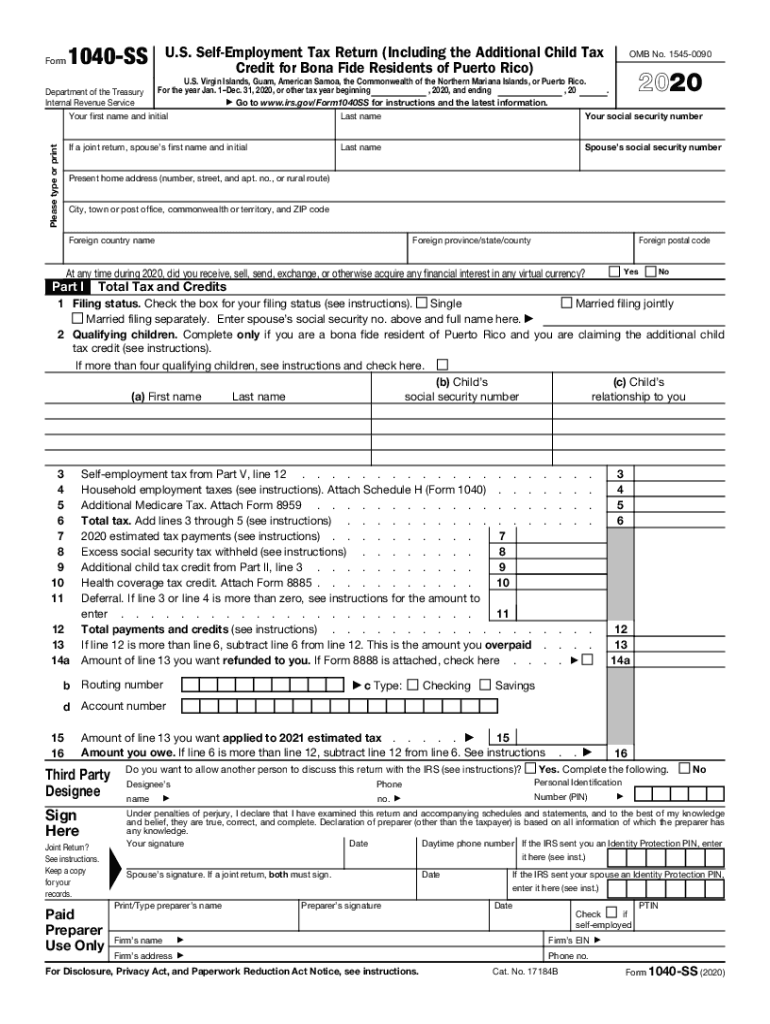
Form 1040-SS U.S. Self-Employment Tax Return Including the Additional Child Tax Credit for Bona Fide Residents of Puerto Rico OMB No. 1545-0090 U.S. Virgin Islands Guam American Samoa the Commonwealth of the Northern Mariana Islands or Puerto Rico. For Disclosure Privacy Act and Paperwork Reduction Act Notice see instructions. Cat. No. 17184B PTIN Form 1040-SS 2018 Page Part II Bona Fide Residents of Puerto Rico Claiming Additional Child Tax Credit See instructions. 2018 and ending For the year Jan* 1 Dec* 31 2018 or other tax year beginning Go to www*irs*gov/Form1040SS for instructions and the latest information* Your first name and initial Last name Your social security number Department of the Treasury Internal Revenue Service Please type or print If a joint return spouse s first name and initial Spouse s social security number Present home address number street and apt* no* or rural route City town or post office commonwealth or territory and ZIP code Foreign country name Part I Fo....

Open form follow the instructions

Easily sign the form with your finger

Send filled & signed form or save
How to fill out the IRS 1040-SS online
The IRS 1040-SS form is used by self-employed individuals in U.S. territories, including Puerto Rico, to report their income and calculate self-employment tax. This guide provides a user-friendly approach to completing the form online, ensuring that you capture all necessary information accurately.
Follow the steps to fill out the IRS 1040-SS online.
- Press the ‘Get Form’ button to obtain the IRS 1040-SS form and open it in your preferred editing tool.
- Enter your first name, initial, last name, and social security number in the provided fields. If applicable, include your spouse's details if filing jointly.
- Complete your present home address, including any necessary details such as city, territory or commonwealth, and postal code.
- Answer the question regarding virtual currency by selecting yes or no, based on your financial activities during the tax year.
- In Part I, choose your filing status by checking the appropriate box, and if you have qualifying children for an additional child tax credit, list their names, relationships, and social security numbers.
- In Part II, if applicable, report income derived from sources within Puerto Rico and calculate the additional child tax credit.
- Complete Part III if you are reporting profit or loss from farming activities, including details about income and expenses.
- If reporting income from business (sole proprietorship), fill out Part IV, providing details of the income and expenses related to your business operations.
- In Part V, calculate your self-employment tax based on the information from Parts III and IV, ensuring you follow all necessary instructions.
- Review all entries for accuracy, save your changes, and prepare to print, download, or share the completed form as needed.
Start completing your IRS 1040-SS online today to ensure timely filing and accuracy.
Experience a faster way to fill out and sign forms on the web. Access the most extensive library of templates available.
Related content
Feb 4, 2019 - Maximum income subject to social security tax for 2018. Optional methods to...
Sep 13, 2019 - Learn how the IRS protects your information and steps you can take to...
Check out www.irs.gov and click on “1040 Central” for the tax forms, .... Attach...
Get answers to your most pressing questions about US Legal Forms API.
Can I send my taxes in a regular envelope?
Yes, you can fold your return to put it in an envelope. When you mail a tax return, you need to attach any documents showing tax withheld, such as your W-2's or any 1099's. Use a mailing service that will track it, such as UPS or certified mail so you will know the IRS received the return.
What kind of envelope do you use for taxes?
You should, however, use an envelope which is approved for sending mail by the United States Postal Service. For small returns, a standard business-class envelope is usually acceptable.
Do I need to include Form 1098 with my tax return?
However, Form 1098 will only be filed to report the interest payment made on the second home. The $550 interest made on the first home can still be filed using the form, but this is optional. Interest payments made by a trust, estate, corporation, or partnership do not need to filed.
What do I need to bring to get my taxes done?
Prior Year Tax Return Copies. ... Personal & Dependent Information. ... Income Statements. ... Itemized Deductions. ... Retirement & Education. ... Health Care (New for Tax Year 2014) ... Stocks & Mutual Funds. ... Self-Employment.
What documents do I need to send with my tax return?
The filing instructions will say which copy of your W-2 to include, as well as the address to mail your return. Copy B of the W-2 is included with a mailed return. Assemble your tax return in the form order that it printed. If you efiled your return, then there should not be anything to mail in.
Is it OK to staple checks?
You can easily deposit a check that has other papers stapled to them. You need to claw off the staple carefully from the check to ensure it doesn't rip. If you happen to pull too hard, not only can you rip the check, you can also cause bodily harm to yourself and cause blood to spill over the check.
Do I staple my Massachusetts tax return?
Please do not attach checks or other documents to your return with staples or paper clips. It will definitely slow down the processing of your return. Enclose them instead, when you send by mail. Receiving your refund as a direct deposit to your bank account is a good idea.
Can I paperclip my tax return?
On forms like the W-2, the IRS explicitly tells you to avoid using staples to attach documents or checks ( Staple holes or tears interfere with machine reading. ) ... When we receive paperclips attached to paper returns, we simply re-use them, says an IRS representative.
Are you supposed to staple your tax return?
Staple all your forms and schedules together in the upper left corner. Attach W-2 and 1099 income documents. You'll receive a few copies of each income document that's mailed to you. ... Only staple these forms to the first page of your 1040 do not allow your staple to go through all the forms in your return.
Should you staple a tax return?
Though, if you're simply wondering if you can staple a tax return, the answer is sort of. According to the article, you can staple your W-2 and 1099 to the front of your 1040 (in the appropriate income section.) But, be sure it doesn't staple through the rest of the documents!
Use professional pre-built templates to fill in and sign documents online faster. Get access to thousands of forms.
If you believe that this page should be taken down, please follow our DMCA take down process here.
This form is available in several versions. Select the version you need from the drop-down list below.