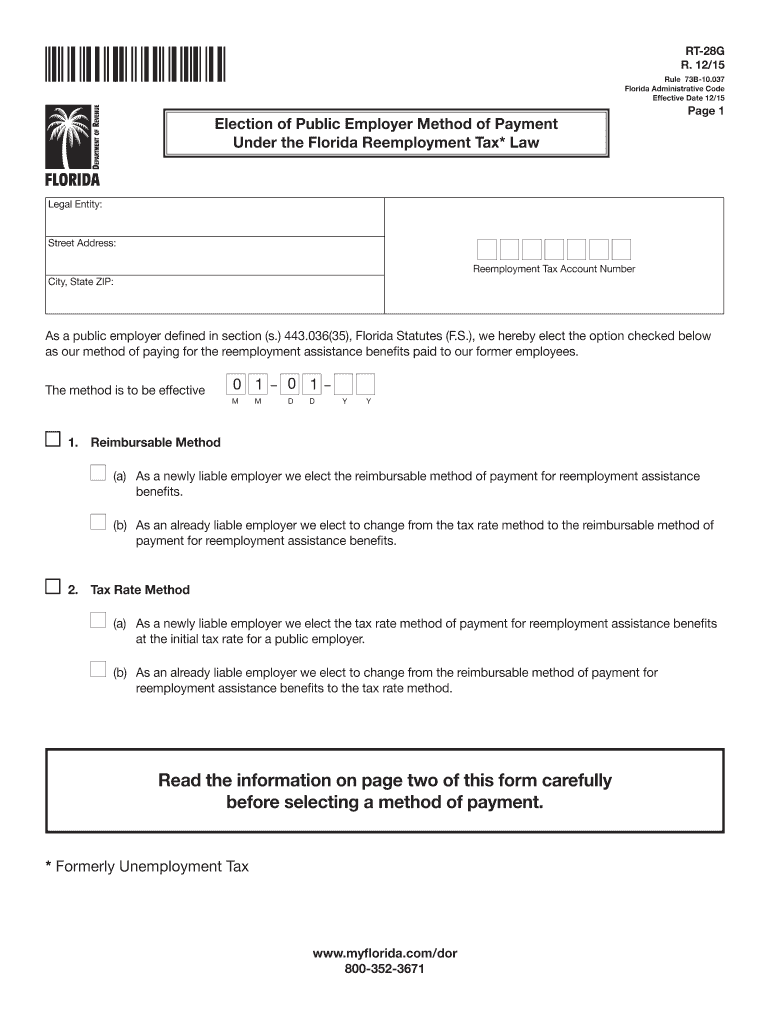
Ess: Reemployment Tax Account Number City, State ZIP: As a public employer defined in section (s.) 443.036(35), Florida Statutes (F.S.), we hereby elect the option checked below as our method of paying for the reemployment assistance benefits paid to our former employees. The method is to be effective 0 1 0 1 M M D D Y Y 1. Reimbursable Method (a) As a newly liable employer we elect the reimbursable method of payment for reemployment assistance benefits. (b).
Loading

Open form follow the instructions

Easily sign the form with your finger

Send filled & signed form or save
How to fill out the FL RT-28G online
Filling out the FL RT-28G form is essential for public employers in Florida to elect their method of payment for reemployment assistance benefits. This guide provides a clear, step-by-step approach to help you navigate the online form with ease.
Follow the steps to complete the FL RT-28G online.
- Press the ‘Get Form’ button to access the FL RT-28G online and open the document for editing.
- Provide the legal entity name in the designated field. Ensure that this is the registered name of your organization.
- Enter the street address associated with your reemployment tax account number. This should reflect the official address for correspondence.
- Input the reemployment tax account number in the appropriate field, ensuring accuracy to avoid processing delays.
- Fill in the city, state, and ZIP code linked to the address entered above.
- Select the method of payment by checking the appropriate option. You may choose either the reimbursable method or the tax rate method. Make sure to read the information on page two thoroughly before making your selection.
- If you are a newly liable employer, indicate your choice by checking the corresponding box for the method you wish to elect.
- If you are changing from one method to another, check the appropriate box for your current status as an already liable employer and confirm the method you are electing.
- Provide the effective date for the chosen method of payment in the format MM/DD/YYYY.
- Sign the form in the signature field and print your name and title below the signature.
- Add your telephone number in the specified area to facilitate any necessary communication.
- Review the entire form to ensure all sections are completed and correct, including the selection of the payment option on the front of the form.
- Once satisfied with the information provided, you can save changes, download, and print the form or share it as needed.
Complete your FL RT-28G form online today for quick and accurate processing.
Experience a faster way to fill out and sign forms on the web. Access the most extensive library of templates available.
Related content
Apply online for licensure, or mail applications to P.O. Box 6330, Tallahassee, FL...
Herzing University offers both online and on campus Healthcare, Business, and Technology...
Todas as tomadas de áudio digital são compatíveis com as frequências de amostragem de...
Get answers to your most pressing questions about US Legal Forms API.
How to file Florida employer's quarterly report?
To file your Florida employer's quarterly report, visit the Florida Department of Revenue's website and follow their designated procedure. You will need to input your employee payroll data and reemployment tax contributions. It’s essential to file on time to avoid penalties and ensure compliance with FL RT-28G regulations.
How do I find my Florida sales tax number?
To find your Florida sales tax number, review the paperwork you received after registering your business with the Department of Revenue. You can also look it up by logging into your account on their online portal. This number is essential for collecting and remitting sales tax in Florida.
How do I find my Florida RT account number?
To find your Florida RT account number, consult the documentation you received after registering your business with the Florida Department of Revenue. You can also access your account details by logging into your account on their website. This number is vital for managing your reemployment tax accounts effectively.
What are other names for unemployment tax?
Unemployment tax may also be referred to as reemployment tax or state unemployment tax. These terms can vary but ultimately refer to the tax that funds unemployment benefits for workers. Familiarizing yourself with these terms can help clarify your obligations as a business owner.
Is Florida reemployment tax the same as unemployment tax?
Yes, Florida reemployment tax functions similarly to unemployment tax, as it is used to provide benefits to unemployed workers. This tax is mandated for employers and is tied to contributions that fund unemployment benefits. Understanding your obligations regarding this tax is crucial for your compliance with Florida law.
Is a Florida tax ID number the same as an EIN?
A Florida tax ID number is not the same as an Employer Identification Number (EIN). The tax ID is specific to state tax obligations, while the EIN is a federal tax identification number for businesses. Ensure you have both to meet state and federal business requirements effectively.
Is SUTA the same as unemployment tax?
SUTA, or State Unemployment Tax Act, is essentially another term for unemployment tax. This tax funds state unemployment benefits and is crucial for businesses employing workers in Florida. By understanding SUTA, you can better comply with the FL RT-28G requirements for your business.
How do I find my Florida business partner number?
To locate your Florida business partner number, you should check your registration paperwork or online with the Florida Division of Corporations. If you have an account with the Florida Department of Revenue, you can also access your details there. This number helps identify your business partnership status for tax purposes.
Is Florida reemployment the same as unemployment?
Florida reemployment is not the same as unemployment benefits. Reemployment tax, also referred to as unemployment tax, funds reemployment services for individuals who lose their jobs. Understanding these differences helps you navigate the tax responsibilities associated with your business.
How do I apply for a Florida RT number?
To apply for a Florida RT number, you need to complete the online application through the Florida Department of Revenue's website. Gathering all necessary business information beforehand can streamline the process. After submission, you will receive your FL RT number, which is essential for fulfilling reemployment tax obligations.
Use professional pre-built templates to fill in and sign documents online faster. Get access to thousands of forms.
If you believe that this page should be taken down, please follow our DMCA take down process here.