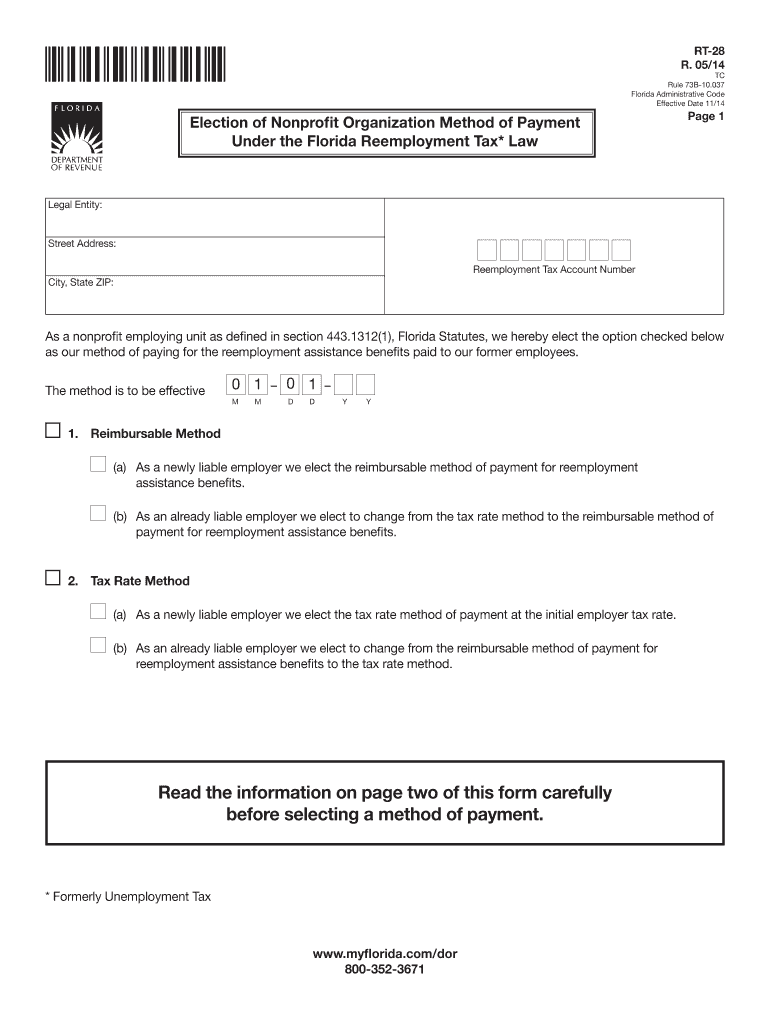
Ity: Street Address: Reemployment Tax Account Number City, State ZIP: As a nonprofit employing unit as defined in section 443.1312(1), Florida Statutes, we hereby elect the option checked below as our method of paying for the reemployment assistance benefits paid to our former employees. The method is to be effective 0 1 0 1 M M D D Y Y 1. Reimbursable Method (a) As a newly liable employer we elect the reimbursable method of payment for reemployment assistance be.
Loading

Open form follow the instructions

Easily sign the form with your finger

Send filled & signed form or save
How to fill out the FL RT-28 online
The FL RT-28 form is essential for nonprofit organizations in Florida to elect their method of payment for reemployment assistance benefits. This guide will help you navigate the process of filling out this form online with ease and clarity.
Follow the steps to fill out the FL RT-28 online effectively.
- Press the ‘Get Form’ button to access the FL RT-28 document and open it for editing.
- Begin by entering your legal entity name in the appropriate field at the top of the form.
- Input your street address, city, state, and ZIP code in the designated sections.
- Provide your reemployment tax account number in the specified area.
- Select the payment method by checking the appropriate box for either 'Reimbursable Method' or 'Tax Rate Method'.
- For the selected method, indicate whether you are a newly liable employer or if you are changing from the other method.
- Fill in the effective date for the method of payment using the date format provided.
- Include your signature along with your title at the designated signature field.
- Enter your telephone number in the required section.
- Before submitting, ensure you have checked the payment option on the front of the form and that all required fields are completed.
- Submit the completed form to Account Management at the Florida Department of Revenue via mail.
Start filling out your FL RT-28 form online today to ensure your nonprofit organization's compliance.
Experience a faster way to fill out and sign forms on the web. Access the most extensive library of templates available.
Related content
FL Trnpke MP 47 in Mirahar. US 1 in FL City. 47.90. 77.09. 12. X. X. SunPass ... Rt 28 (at...
(1) Each liable Tribe or tribal unit that elects to make reimbursements in lieu of...
Get answers to your most pressing questions about US Legal Forms API.
Who is exempt from paying taxes in Florida?
Certain groups may be exempt from paying state taxes in Florida, including some non-profit organizations and government entities. Individuals receiving specific types of social security, pensions, or veterans' benefits may also have exemptions. Understanding the nuances of FL RT-28 can aid in identifying any potential tax exemptions applicable to your situation. For personalized assistance, consider consulting with a tax professional.
What is an RT number in Florida?
An RT number in Florida refers to the Reemployment Tax account number assigned to businesses for unemployment tax purposes. This number is essential for tracking and reporting your SUTA contributions. If you own a business, familiarizing yourself with FL RT-28 will help you manage your RT number and fulfill your reporting obligations effectively. Always ensure that your RT number is accurately recorded on all official documents.
How to speak to a live person at Florida unemployment?
To speak with a live person at Florida unemployment services, you can call the customer service line during business hours. Be prepared to provide your personal information, such as your Social Security number and any case details. Utilizing resources like FL RT-28 can guide you through the process efficiently. If calling proves difficult, consider visiting a local office for face-to-face assistance.
Who qualifies for reemployment assistance in Florida?
In Florida, individuals who are unemployed through no fault of their own may qualify for reemployment assistance. This includes workers who have lost their jobs due to layoffs, company closures, or other economic factors. To determine your eligibility, you will need to provide your work history and reasons for unemployment. Additionally, understanding FL RT-28 requirements can help ensure you meet the necessary criteria.
What is an RT-6 form in Florida?
The RT-6 form in Florida is used for reporting sales and use tax for businesses. This form provides the Florida Department of Revenue with critical information regarding your sales activities and tax obligations. Completing and submitting the RT-6 form accurately is crucial for maintaining compliance under your FL RT-28 registration.
How do I get a Florida RT account number?
To get a Florida RT account number, first visit the Florida Department of Revenue website. There, you can complete the registration process, which usually involves providing details about your business and its taxation status. Once your application is approved, you'll receive your FL RT-28 account number, essential for sales tax collection and reporting.
How to apply for Florida RT account number?
Applying for a Florida RT account number involves completing the registration process with the Florida Department of Revenue. You'll need to fill out the appropriate forms that request local, state, and federal identification information. Once submitted, the department will process your application, and you will receive your FL RT-28 account number for tax purposes.
How do I set up an employer unemployment account in Florida?
Setting up an employer unemployment account in Florida requires you to register with the Florida Department of Economic Opportunity. Start by visiting their website and filling out the Employer Registration Form, providing all necessary details about your business. This step ensures compliance and allows for proper unemployment insurance contributions, often associated with your FL RT-28.
How do I get a Florida sales tax registration number?
To obtain a Florida sales tax registration number, you need to register your business with the Florida Department of Revenue. This process can often be completed online through their website, where you can fill out the necessary forms and submit them securely. Once your application is processed, you will receive your sales tax registration number, often linked to your FL RT-28 account.
How do I find my Florida RT number?
Finding your Florida RT number is straightforward. You can locate it on your business registration documents or tax return forms. If you are unable to find it, consider visiting the Florida Department of Revenue website for assistance, or reach out to them directly.
Use professional pre-built templates to fill in and sign documents online faster. Get access to thousands of forms.
If you believe that this page should be taken down, please follow our DMCA take down process here.
This form is available in several versions. Select the version you need from the drop-down list below.