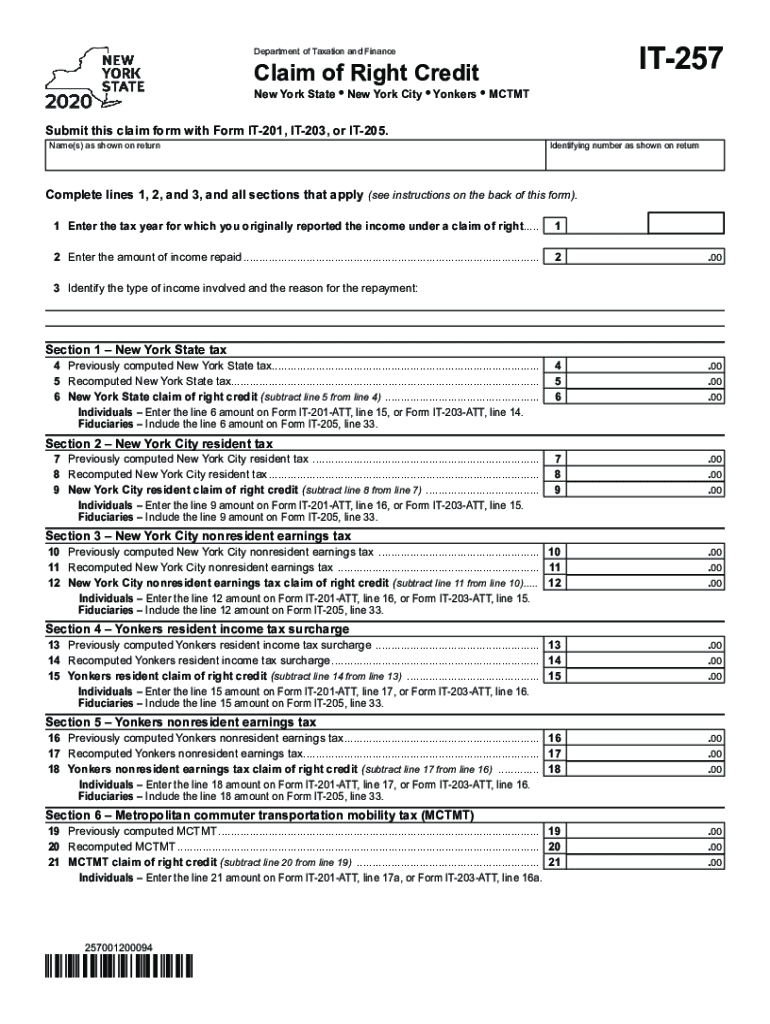
IT257Department of Taxation and FinanceClaim of Right CreditNew York State New York City Yonkers MCTMTSubmit this claim form with FormIT201, IT203, or IT205. Name(s) as shown on returnIdentifying.
Loading

Open form follow the instructions

Easily sign the form with your finger

Send filled & signed form or save
How to fill out the NY IT-257 online
Filling out the NY IT-257 form can seem challenging, but with the right guidance, it becomes a straightforward process. This guide will provide you with clear, step-by-step instructions to successfully complete the Claim of Right Credit form online.
Follow the steps to accurately complete the NY IT-257 form.
- Press the ‘Get Form’ button to access the NY IT-257 form and open it in the online editor.
- Begin by entering your name(s) as they appear on your tax return. This ensures your submission is properly attributed.
- Input your identifying number as displayed on your tax return. This could be your Social Security number or taxpayer identification number.
- Complete lines 1, 2, and 3, detailing the tax year for which you originally reported the income under a claim of right, the amount of income repaid, and the type of income involved along with the reason for repayment.
- For Section 1, fill out lines 4 and 5 with your previously computed New York State tax and recomputed New York State tax, respectively. Subtract line 5 from line 4 to calculate your New York State claim of right credit, which you will report on your tax return.
- Proceed to Section 2. Enter the previously computed New York City resident tax and recomputed New York City resident tax in lines 7 and 8, respectively. Calculate the New York City resident claim of right credit by subtracting line 8 from line 7.
- In Section 3, similarly complete lines 10 and 11 for the New York City nonresident earnings tax, and compute your claim of right credit by subtracting line 11 from line 10.
- Continue to Section 4. Fill lines 13 and 14 with the Yonkers resident income tax details and calculate the claim of right credit by performing a subtraction of line 14 from line 13.
- For Section 5, enter the necessary details for the Yonkers nonresident earnings tax on lines 16 and 17, and compute the claim of right credit accordingly.
- In Section 6, input the previously computed and recomputed MCTMT values on lines 19 and 20, respectively. Subtract line 20 from line 19 to determine your MCTMT claim of right credit.
- Once you have filled in all applicable fields and sections, you can save your changes, download the completed form, or print it for submission. Ensure to attach this form with your main tax return (Form IT-201, IT-203, or IT-205) when filing.
Complete your document online now to ensure a smooth and efficient filing process.
Experience a faster way to fill out and sign forms on the web. Access the most extensive library of templates available.
Related content
Aug 15, 2019 - IT-112.1 (Fill-in), Instructions on form, New York State Resident Credit...
If you were present in the U.S. during 2018, tax forms must be filed whether or ... If you...
With an estimated 2018 population of 8,398,748 distributed over a land area of about 302.6...
Get answers to your most pressing questions about US Legal Forms API.
What is NYC household credit?
You are entitled to this refundable credit if: Your household gross income is $18,000 or less. You occupied the same New York residence for six months or more. You were a New York State resident for the entire tax year.
Is NYC school tax credit taxable?
New York City school tax credit (rate reduction amount) are a New York City resident or part-year resident, cannot be claimed as a dependent on another taxpayer's federal income tax return, and. had New York City taxable income of $500,000 or less.
What is the New York School Tax Credit?
The New York City School Tax Credit is for New York City residents or part-year residents who cannot be claimed as a dependent on another taxpayer's federal income tax return. The amount of the credit varies. This credit must be claimed directly on your New York State personal income tax return.
What is NYC school tax credit?
New York City school tax credit (fixed amount) are a New York City resident or part-year resident, cannot be claimed as a dependent on another taxpayer's federal income tax return, and. had income of $250,000 or less.
What is the NYC school tax credit?
New York City school tax credit (fixed amount) are a New York City resident or part-year resident, cannot be claimed as a dependent on another taxpayer's federal income tax return, and. had income of $250,000 or less.
Who is eligible for the NYS Property Tax Relief Credit?
If you own your home, it is your primary residence, and your income is $500,000 or less, you are eligible for the Basic STAR credit. Senior citizens those who have one spouse or sibling who is age 65 by year's end can get Enhanced STAR.
Are you eligible for the New York City enhanced real property tax credit?
The New York City enhanced real property tax credit may be available to New York City residents who have household gross income of less than $200,000, and pay real property taxes or rent for their residences, or both.
What is a New York State household credit?
You are entitled to this refundable credit if: Your household gross income is $18,000 or less. You occupied the same New York residence for six months or more. You were a New York State resident for the entire tax year. You could not be claimed as a dependent on another taxpayer's federal income tax return.
What is the New York State Real Property Tax Credit?
The Real property tax credit may be available to New York State Residents who have household gross income of $18,000 or less and pay either real property taxes or rent for their residences. If all members of your household are under age 65, the credit can be as much as $75.
How do I apply for tax exempt?
Incorporate. ... Apply for an EIN. ... Provide a detailed business purpose. ... File Form 1023 with the IRS. ... Pay the necessary filing fees. ... When to file. ... Complete the state-level application (if applicable).
Use professional pre-built templates to fill in and sign documents online faster. Get access to thousands of forms.
If you believe that this page should be taken down, please follow our DMCA take down process here.
This form is available in several versions. Select the version you need from the drop-down list below.