Loading
Get Mo 53-v 2020-2026
How it works
-

Open form follow the instructions
-

Easily sign the form with your finger
-

Send filled & signed form or save
How to fill out the MO 53-V online
The MO 53-V form, also known as the Vendor’s Use Tax Return, is essential for reporting use tax liabilities in Missouri. This guide provides comprehensive, step-by-step instructions for users of all experience levels to effectively complete the form online.
Follow the steps to successfully complete your MO 53-V online.
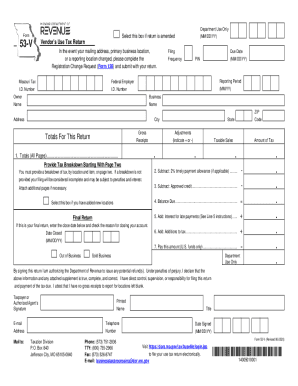
- Press the ‘Get Form’ button to obtain the document and open it in your preferred online application.
- Enter your Missouri Tax I.D. Number in the designated field. This eight-digit number identifies your business. If you haven’t obtained one, refer to the Missouri Tax Registration Application.
- Fill in the Federal Employer I.D. Number, which is a nine-digit number issued by the IRS.
- Indicate your filing frequency and due date. Visit the Missouri Department of Revenue website if you need assistance with due dates.
- Provide details about the owner and business, including the name, mailing address, city, state, and ZIP code.
- On line 1, calculate and enter totals for gross receipts, adjustments, taxable sales, and the amount of tax due for all pages. Ensure you have included detailed breakdowns required on subsequent pages.
- If applicable, check the box for adding new locations and provide the necessary location details on additional pages.
- Complete lines 2 through 7 calculating any timely payment allowances, credits, balance due, interest for late payments, and additions to tax as necessary.
- Sign and date the return, authorizing the Department of Revenue to process any potential refunds.
- Once all fields are filled accurately, save changes, and choose to download, print, or share the completed form.
Complete your MO 53-V form online today to ensure timely filing and compliance with state tax regulations.
The Missouri Department of Revenue accepts online payments, including extension and estimated tax payments, using a credit card or E-Check (Electronic Bank Draft). E-Check is an easy and secure method allows you to pay your individual income taxes by bank draft.