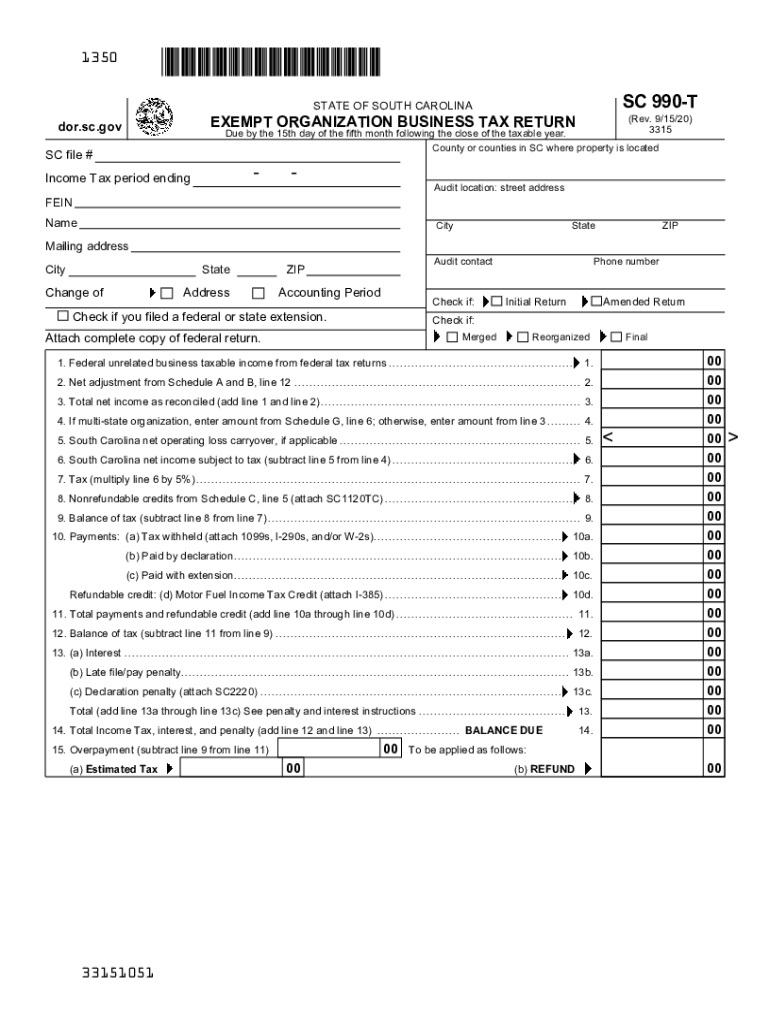
1350 SC 990-T STATE OF SOUTH CAROLINA EXEMPT ORGANIZATION BUSINESS TAX RETURN (Rev. 9/15/20) 3315 Due by the 15th day of the fifth month following the close of the taxable year. County or counties.
Loading

Open form follow the instructions

Easily sign the form with your finger

Send filled & signed form or save
How to fill out the SC DoR SC 990-T online
The SC DoR SC 990-T form is essential for organizations in South Carolina that generate unrelated business income. This guide will provide step-by-step instructions to ensure you complete the form accurately and efficiently online.
Follow the steps to complete your SC DoR SC 990-T online.
- Click ‘Get Form’ button to obtain the form and open it in the editor.
- Enter your name, mailing address, city, state, and ZIP code in the designated fields. Ensure all information is accurate to avoid issues with your submission.
- Provide your FEIN (Federal Employer Identification Number) in the relevant field. This number is necessary for identifying your organization.
- Indicate the income tax period ending by entering the appropriate date in the provided section.
- Mark the appropriate boxes to indicate if this is an initial return, amended return, final return, or if you have filed for an extension.
- Calculate your federal unrelated business taxable income based on your federal tax returns and enter it on line 1.
- Complete Schedule A and B by adding any additions to federal taxable income and deductions, inputting this information into the relevant lines.
- Complete Schedule C to summarize any income tax credits. Attach the relevant SC1120TC and tax credit schedules.
- Calculate and enter the total payments, refundable credits, and balance of tax as instructed in the corresponding lines.
- Provide the required signatures. Ensure that the appropriate officer of your organization signs and dates the form.
- After completing the form, you can save changes, download, print, or share the completed form as needed.
Start filling out your SC DoR SC 990-T online today to ensure timely and accurate submission.
Experience a faster way to fill out and sign forms on the web. Access the most extensive library of templates available.
Related content
Get answers to your most pressing questions about US Legal Forms API.
Does SC have a state tax form?
South Carolina Income Taxes and SC State Tax Forms. South Carolina State Income Taxes for Tax Year 2019 (January 1 - Dec. 31, 2019) can be completed and e-Filed now along with a Federal or IRS Income Tax Return (or you can learn how to only prepare and file a SC state return).
How do I file South Carolina state taxes?
Electronic filing using a professional tax preparer. Online filing using available commercial software. SCDOR website using participating vendors. Paper return.
Where can I get South Carolina tax forms?
If you qualify for a paper copy of a tax form based on these criteria, you can email your paper form request to forms@dor.sc.gov or call 1-844-898-8542 to speak to a representative. You will need to provide your name, address, and the form you are requesting.
Do you have to file state taxes in South Carolina?
If you are a South Carolina resident, you are generally required to file a South Carolina Income Tax return if you are required to file a federal return. ... Individual Income Tax returns are due April 15 of each year.
Is there a South Carolina state tax form?
South Carolina Fillable Forms is a FREE product and is only for filing your South Carolina return. South Carolina Fillable Forms provides the option to fill out your return online and mail it to the SCDOR OR to submit your return the SCDOR electronically.
Who must file a 990 t?
An exempt organization that has $1,000 or more of gross income from an unrelated business must file Form 990-T PDF. An organization must pay estimated tax if it expects its tax for the year to be $500 or more.
Do all nonprofits have to file a 990?
Most charitable nonprofits that are recognized as tax-exempt have an obligation to file an annual information return with the IRS. Most small tax-exempt organizations with gross receipts that are normally $50,000 or less must file the IRS form 990-N, known as the "e-postcard". ...
How do I file my SC state taxes for free?
Taxbrain.com offers online tax preparation and free IRS e-File for federal and state tax returns starting at $14.95. Enter Code SCS555 to save on your South Carolina return. Prior Year federal tax preparation is also available. Free Customer Support.
Who Must File Form 990?
More In File An organization that normally has $50,000 or more in gross receipts and that is required to file an exempt organization information return must file either Form 990 PDF, Return of Organization Exempt from Income Tax, or Form 990-EZ PDF, Short Form Return of Organization Exempt from Income Tax.
What happens if you don't file a 990?
The maximum penalty is $10,000, or 5 percent of the organization's gross receipts, whichever is less. ... An organization that fails to file the required information return (Form 990, Form 990-EZ, or Form 990-PF) or e-Postcard (Form 990-N) for three consecutive tax years will automatically lose its tax-exempt status.
Use professional pre-built templates to fill in and sign documents online faster. Get access to thousands of forms.
If you believe that this page should be taken down, please follow our DMCA take down process here.