Loading
Get Irs 1040-es 2021-2026
This website is not affiliated with IRS
How it works
-

Open form follow the instructions
-

Easily sign the form with your finger
-

Send filled & signed form or save
How to fill out the IRS 1040-ES online
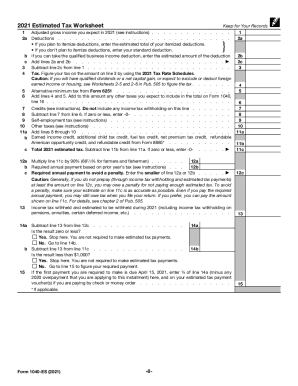
Filling out the IRS 1040-ES online can simplify your process for estimating and paying your federal income tax. This guide provides clear instructions to help you navigate each section of the form effectively.
Follow the steps to complete the IRS 1040-ES online.
- Use the ‘Get Form’ button to obtain the form and open it in the editor.
- Enter your personal information at the top of the form, including your name, address, and social security number.
- Compute your expected adjusted gross income for the current tax year by referencing your previous year’s tax return as needed.
- Enter any deductions you plan to claim. If itemizing deductions, provide the total amount; if claiming the standard deduction, enter that amount instead.
- Calculate your tax liability based on the expected income and deductions, utilizing the 2021 Tax Rate Schedules where applicable.
- Complete the self-employment tax section if you anticipate owing this tax based on your earnings.
- List any tax credits you believe you will qualify for. Subtract these amounts from your calculated tax liability.
- Determine your estimated tax payment by calculating the total required payment and any previous overpayments that can be applied.
Complete your IRS 1040-ES online today to ensure your estimated tax payments are accurate and timely.
You can pay your personal and business taxes to the Canada Revenue Agency (CRA) through your financial institution's online banking app or website. Most financial institutions also let you set up a payment to be made on a future date.