Loading
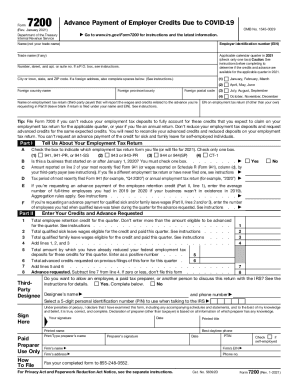
Get Irs 7200 2021-2026
This website is not affiliated with IRS
How it works
-

Open form follow the instructions
-

Easily sign the form with your finger
-

Send filled & signed form or save
How to fill out the IRS 7200 online
The IRS 7200 form is used to request advance payment of employer credits due to COVID-19. This guide provides clear, step-by-step instructions for users to fill out the form online while ensuring clarity and support throughout the process.
Follow the steps to complete the IRS 7200 online
- Click ‘Get Form’ button to access the IRS 7200 form and have it displayed in your editing interface.
- Begin with the 'Name' field—enter your legal name, not your trade name.
- Input your Employer Identification Number (EIN) accurately in the designated field.
- If applicable, include your trade name in the respective section.
- Select one applicable calendar quarter in 2021 by checking the corresponding box.
- Fill out your address details: number, street, apartment or suite number, city or town, state, and ZIP code. If you are entering a foreign address, provide the foreign country name, province or county, and postal code.
- If necessary, indicate the name on the employment tax return, particularly if it is a third-party payer who will report the wages and credits related to your request.
- Complete Part I by checking ‘Yes’ or ‘No’ regarding the advance payment of the employee retention credit and entering the average number of full-time employees during the specified years.
- In Part II, specify which employment tax return form you are filing by checking the appropriate box, and input the required details about past tax filings.
- Detail the credits and the advance requested, filling in all amounts accurately, especially those relevant to employee retention and qualified sick and family leave wages.
- Calculate and enter the total credits requested and check that all figures are correct.
- Indicate if you would like to authorize another person to discuss this return with the IRS by completing the designee's information, if applicable.
- Sign the form where indicated, ensuring all declarations are correct, and check the date.
- Review your filled-out form for any errors or omissions before completing your submission.
- Once satisfied, users can save changes, download, print, or share the completed form as needed.
Complete your IRS 7200 form online to ensure you're getting the credits you deserve.