Loading
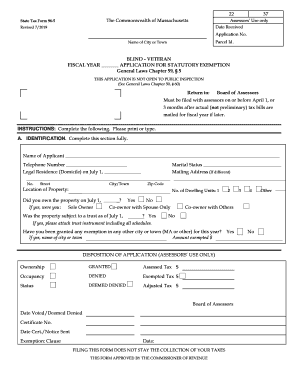
Get Ma Form 96-5 2019-2026
How it works
-

Open form follow the instructions
-

Easily sign the form with your finger
-

Send filled & signed form or save
How to fill out the MA Form 96-5 online
Filling out the MA Form 96-5 online is a straightforward process that can help you apply for a statutory exemption in Massachusetts. This guide provides step-by-step instructions to assist you in completing the form with clarity and accuracy.
Follow the steps to successfully complete the form online.
- Press the ‘Get Form’ button to access the form and open it in the online editor.
- In Section A, provide your identification details. Fill in your name, telephone number, legal residence as of July 1, and marital status. If your mailing address is different, include that as well. Provide the location of the property and indicate whether you owned the property on July 1.
- Next, complete the exemption status section (Section B). Check the appropriate box to indicate your status as a blind person, veteran, or veteran's spouse. Follow the prompts to provide additional information as required.
- In the same section, answer any questions related to your status. If applicable, attach any required documentation, such as a copy of a discharge paper or a letter from your doctor.
- Proceed to Section C, where you will need to sign and date the application. This confirms the accuracy of the information provided to the best of your knowledge.
- After completing the form, save your changes and download or print the document as needed. Ensure that you submit the completed form to the Board of Assessors before the deadline, which is April 1 or three months after the actual tax bills are mailed.
Complete your documents online today to ensure a timely submission!
Related links form
The Internal Revenue Service (IRS) began accepting and processing 2018 federal tax returns on January 28, 2019. The deadline to file federal taxes for most taxpayers was April 15, 2019, unless you filed for an extension.