Loading
Form preview
  • US Legal Forms
  • Other Templates
  • Tax Forms
  • Executive Department Treasury IRS Forms
  • Irs 8879-s 2020

Get Irs 8879-s 2020-2026

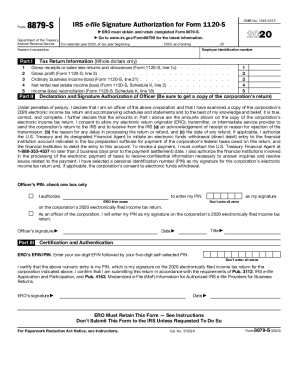
Art III Title Date Certification and Authentication ERO s EFIN/PIN. Enter your six-digit EFIN followed by your five-digit self-selected PIN. Don t enter all zeros I certify that the above numeric entry is my PIN, which is my signature on the 2020 electronically filed income tax return for the corporation indicated above. I confirm that I am submitting this return in accordance with the requirements of Pub. 3112, IRS e-file Application and Participation, and Pub. 4163, Modernized.

This website is not affiliated with IRS

How it works

  1. Open form

    Open form follow the instructions

  2. Easily sign form

    Easily sign the form with your finger

  3. Share form

    Send filled & signed form or save

How to fill out the IRS 8879-S online

Filling out the IRS Form 8879-S is an essential step for corporate officers who wish to electronically sign an S corporation's income tax return. This guide provides clear, step-by-step instructions tailored to users of all experience levels.

Follow the steps to complete IRS 8879-S online

  1. Click ‘Get Form’ button to obtain the form and open it in the editor.
  2. In Part I, enter the tax return information. Fill out the gross receipts or sales minus returns and allowances as indicated on Form 1120-S, line 1c. Ensure that you only use whole dollar amounts.
  3. Continue with Part I by entering the gross profit from Form 1120-S, line 3, ordinary business income or loss from Form 1120-S, line 21, and net rental real estate income or loss from Form 1120-S, Schedule K, line 2.
  4. For income or loss reconciliation, enter the amounts as they appear on Form 1120-S, Schedule K, line 18.
  5. Proceed to Part II to enter the employer identification number and the name of the corporation. Additionally, verify the income tax return details provided in Part I.
  6. In the declaration section, ensure that you are an officer of the corporation. Review the declaration and authorize the electronic return originator (ERO) to enter your PIN as your signature if applicable.
  7. Choose how to provide your personal identification number (PIN). Remember to check one box only and ensure that the PIN is five digits long and not all zeros.
  8. Sign and date the form in Part II, ensuring you include your title. This signifies that you understand and agree with the contents of Form 8879-S.
  9. Complete Part III by entering the ERO’s EFIN and your self-selected PIN. Do not enter all zeros in this section.
  10. Finally, review all entered information for accuracy. After verifying the form, you may save your changes, download a copy, print it, or share the completed form as necessary.

Start filling out the IRS Form 8879-S online today to ensure your electronic submission is properly authorized.

Get form

Experience a faster way to fill out and sign forms on the web. Access the most extensive library of templates available.
Get form

Related content

About Form 8879-S, IRS e-file Signature...
Information about Form 8879-S, IRS e-file Signature Authorization for Form 1120S...
Learn more
Tax Return & Related Documents - Confluence Mobile...
Jan 26, 2018 ... Although the IRS Data Retrieval Tool (DRT) may be used to import certain...
Learn more
Publication 4163 (Rev. 12 2017) P4163...
Publication 4163 Modernized e-File (MeF) Information for Authorized IRS e-File ...... For...
Learn more

Related links form

751 (E) Health Insurance Claim Form DENTAL CLAIM FORM - Britcay Construction Contract Cost Plus Or Fixed Fee - Alabama NHS Breast Screening Programme Failsafe Batch Guidance

Questions & Answers

Get answers to your most pressing questions about US Legal Forms API.

Contact support

A partner or member and an electronic return originator (ERO) use Form 8879-PE when the partner or member wants to use a personal identification number (PIN) to electronically sign a partnership's electronic return of partnership income.

The W-9 and W-4 forms may use e-signatures and the IRS rules around them are reasonable. The 1096/1099 e-file process does not require a signature, but certain companies may require you to attest to the accuracy of the 1099 information that you submit.

Taxpayers, who currently use Forms 8878 or 8879 to sign electronic Forms 1040 federal tax returns or filing extensions, can use an e-signature to sign and electronically submit these forms to their Electronic Return Originator (ERO).

A corporation can file Form 2553 after the due date and still receive IRS approval to make the election retroactive to the beginning of the corporation's tax year. ... But first, the corporation must make sure that it is eligible to make a late election.

IRS e-file Signature Authorization (Forms 8878 and 8879) (Updated 11/06/2014) ... EROs must not send Forms 8878 and 8879 to the IRS unless the IRS requests they do so. Note: Form 8878 is only required for Forms 4868 when taxpayers are authorizing an electronic funds withdrawal and want an ERO to enter their PINs.

Form 2553 is not a form that can be filed electronically. Form instructions states the Corporation needs to mail the original copy or fax it to the IRS. Important! You may attach Form 2553 to the corporation tax return, in PDF format, and submit it with the electronic tax return.

Taxpayers, who currently use Forms 8878 or 8879 to sign electronic Forms 1040 federal tax returns or filing extensions, can use an e-signature to sign and electronically submit these forms to their Electronic Return Originator (ERO). Can all taxpayers use the e-signature option? No.

How Long Should a Paid Preparer Keep Tax Returns? Even if your client keeps a copy of his tax returns, you're still obligated to retain his tax records. Internal Revenue Service Bulletin 2012-11 states that tax preparers must maintain tax returns, along with supporting tax documentation, for a minimum of three years.

EROs are required to keep the signed Forms 8879 on file for three years after the date the return was received by the IRS or the due date of the return, whichever is later.

If taxpayer is signing the return via handwritten signature, use Form 8453, California e-file Return Authorization for Individuals. Signing with a PIN: Form 8879, California e-file Signature Authorization for Individuals, is printed when taxpayer uses a PIN to sign the electronically filed return.

Get This Form Now!

Use professional pre-built templates to fill in and sign documents online faster. Get access to thousands of forms.
Get form
If you believe that this page should be taken down, please follow our DMCA take down processhere.
Get IRS 8879-S
Get form
  • Adoption
  • Bankruptcy
  • Contractors
  • Divorce
  • Home Sales
  • Employment
  • Identity Theft
  • Incorporation
  • Landlord Tenant
  • Living Trust
  • Name Change
  • Personal Planning
  • Small Business
  • Wills & Estates
  • Packages A-Z
  • Affidavits
  • Bankruptcy
  • Bill of Sale
  • Corporate - LLC
  • Divorce
  • Employment
  • Identity Theft
  • Internet Technology
  • Landlord Tenant
  • Living Wills
  • Name Change
  • Power of Attorney
  • Real Estate
  • Small Estates
  • Wills
  • All Forms
  • Forms A-Z
  • Other Templates
  • Legal Hub
  • About Us
  • Help Portal
  • Legal Resources
  • Blog
  • Affiliates
  • Contact Us
  • Delete My Account
  • Site Map
  • Industries
  • Forms in Spanish
  • Localized Forms
  • State-specific Forms
  • Forms Kit
  • Real Estate Handbook
  • All Guides
  • Notarize
  • Incorporation services
  • For Consumers
  • For Small Business
  • For Attorneys
  • USLegal
  • FormsPass
  • pdfFiller
  • signNow
  • altaFlow
  • DocHub
  • Instapage
Form Packages
  • Adoption
  • Bankruptcy
  • Contractors
  • Divorce
  • Home Sales
  • Employment
  • Identity Theft
  • Incorporation
  • Landlord Tenant
  • Living Trust
  • Name Change
  • Personal Planning
  • Small Business
  • Wills & Estates
  • Packages A-Z
Form Categories
  • Affidavits
  • Bankruptcy
  • Bill of Sale
  • Corporate - LLC
  • Divorce
  • Employment
  • Identity Theft
  • Internet Technology
  • Landlord Tenant
  • Living Wills
  • Name Change
  • Power of Attorney
  • Real Estate
  • Small Estates
  • Wills
  • All Forms
  • Forms A-Z
  • Other Templates
Customer Service
  • Legal Hub
  • About Us
  • Help Portal
  • Legal Resources
  • Blog
  • Affiliates
  • Contact Us
  • Delete My Account
  • Site Map
  • Industries
  • Forms in Spanish
  • Localized Forms
  • State-specific Forms
  • Forms Kit
Legal Guides
  • Real Estate Handbook
  • All Guides
Prepared for you
  • Notarize
  • Incorporation services
Our Customers
  • For Consumers
  • For Small Business
  • For Attorneys
Our Sites
  • USLegal
  • FormsPass
  • pdfFiller
  • signNow
  • altaFlow
  • DocHub
  • Instapage
Social Media
Call us now toll free:
+1 833 426 79 33
As seen in:
© Copyright 1999-2026 airSlate Legal Forms, Inc. 17 Station Street, Suite 303, Brookline, MA 02445
  • Your Privacy Choices
  • Terms of Service
  • Privacy Notice
  • Content Takedown Policy
  • Bug Bounty Program