Loading
Get Irs 14039 2020
This website is not affiliated with IRS
How it works
-

Open form follow the instructions
-

Easily sign the form with your finger
-

Send filled & signed form or save
How to fill out the IRS 14039 online
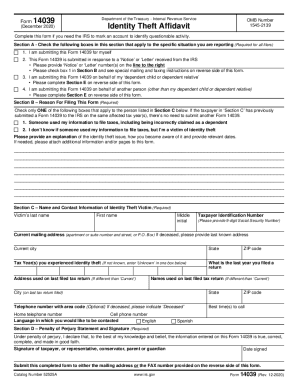
The IRS 14039 form, also known as the Identity Theft Affidavit, is essential for individuals reporting identity theft issues. This guide provides clear, step-by-step instructions for completing the form online, ensuring you can navigate the process with confidence.
Follow the steps to successfully complete the IRS 14039 online.
- Press the ‘Get Form’ button to obtain and open the form for editing.
- In Section A, mark the appropriate checkboxes that apply to your situation, such as submitting the form for yourself, in response to an IRS notice, or on behalf of a dependent.
- In Section B, select only one reason for filing the form. Provide any explanations regarding the identity theft issue, ensuring to include relevant dates.
- Fill out Section C with the identity theft victim's information, including their last name, first name, middle initial, and taxpayer identification number. Use the current mailing address, city, state, and ZIP code.
- Indicate the tax year(s) affected by the identity theft. Provide the address and names used on the last filed return as necessary.
- In Section D, ensure the penalty of perjury statement is completed by signing and dating the form.
- If you are completing the form for someone else, fill out Section E. Select the relevant checkbox and provide required information, including your relationship to the individual.
- After ensuring all sections are accurately filled, save your changes. You can then download, print, or share the completed form as needed.
Complete your IRS 14039 form online today to report any identity theft issues.
Get form
Experience a faster way to fill out and sign forms on the web. Access the most extensive library of templates available.
Steps to take if you become a victim Complete IRS Form 14039, Identity Theft Affidavit (PDF), if your e-filed return rejects because of a duplicate filing under your SSN or you are instructed to do so. Use a fillable form at IRS.gov, print, then attach the form to your return and mail according to instructions.
Get This Form Now!
Use professional pre-built templates to fill in and sign documents online faster. Get access to thousands of forms.