
Open form follow the instructions

Easily sign the form with your finger

Send filled & signed form or save
How to fill out the IRS 990 - Schedule G online
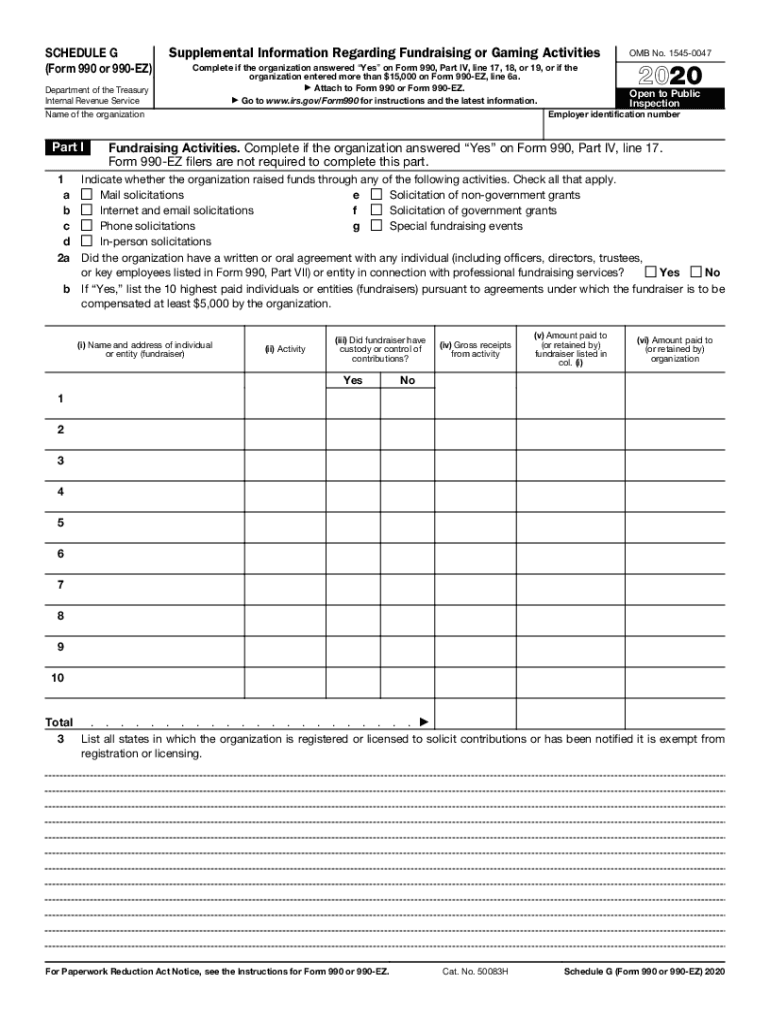
Completing the IRS 990 - Schedule G online can seem daunting, but this guide is designed to help you navigate the process with ease. Schedule G provides supplemental information regarding fundraising or gaming activities for organizations, ensuring compliance with IRS regulations.
Follow the steps to effectively complete the IRS 990 - Schedule G online.
- Click ‘Get Form’ button to access the IRS 990 - Schedule G form and open it in the online editor.
- Begin by entering the employer identification number and the name of the organization at the top of the form. This information is crucial for identifying your organization in IRS records.
- Move to Part I, which focuses on fundraising activities. Indicate whether your organization utilized various fundraising methods by checking the applicable boxes. Only complete this section if you answered 'Yes' on Form 990, Part IV, line 17.
- If your organization had agreements with individuals or entities for professional fundraising services, answer 'Yes' or 'No' to the appropriate question. If 'Yes', provide details for the ten highest-paid fundraisers, including their names, activities, and financials.
- In Part II, you will report on direct expenses related to fundraising activities. Start by entering the total gross receipts and then deduct contributions to arrive at your gross income.
- List any expenses incurred from fundraising events such as cash prizes, rent, food, and other costs in the respective sections. Ensure you categorize each expense accurately to keep financial records clear and compliant.
- Proceed to Part III if your organization engages in gaming activities. Report on games conducted, gross revenue, and any direct expenses incurred. Capture detailed information about licenses and compliance with state requirements.
- Finally, complete Part IV and provide any supplemental information as required. This may involve explanations for previous entries or additional details relevant to your organization's activities.
- After thoroughly reviewing all entries for accuracy, you can save changes, download, print, or share the completed form securely.
Complete your IRS 990 - Schedule G online today to ensure timely and accurate filing.
Experience a faster way to fill out and sign forms on the web. Access the most extensive library of templates available.
Related content
Information about Schedule G (Form 990 or 990-EZ), Supplemental Information Regarding...
Organizations that file Form 990 or Form 990-EZ use this schedule to provide ... Schedule...
Nov 20, 2019 - Since 2013, the IRS has released data culled from over 1.8 million...
Get answers to your most pressing questions about US Legal Forms API.
How do I fill out a 990?
1:06 2:31 Suggested clip Learn How to Fill the Form 990 Return of Organization Exempt from ...YouTubeStart of suggested clipEnd of suggested clip Learn How to Fill the Form 990 Return of Organization Exempt from ...
Is Officer Compensation deductible?
As a general rule, you can claim a tax deduction for the salary, wages, commissions, bonuses, and other compensation that you pay to your employees, provided the payments meet the following requirements. The compensation must be: ordinary and necessary, ... paid for services actually provided, and.
What is Officer Compensation?
When corporate officers perform services for the corporation, and receive or are entitled to receive payments, their compensation is generally considered wages. Subchapter S corporations should treat payments for services to officers as wages and not as distributions of cash and property or loans to shareholders.
What is IRS Form 1125 E?
About Form 1125-E, Compensation of Officers Certain entities with total receipts of $500,000 or more use this form to provide a detailed report of the deduction for compensation of officers.
What is Form 1125 A used for?
Form 1125-A is used by business return filers (Form 1065, 1120 and 1120-S) to calculate and then deduct the cost of goods sold by a corporation or partnership.
Is Form 1125 E required?
Form 1125-E must be completed and attached to Form 1120, 1120-C, 1120-F, 1120-RIC, 1120-REIT, or 1120S, if the entity has total receipts (defined below) of $500,000 or more, and deducts compensation for officers. For purposes of Form 1125-E, total receipts are determined as follows.
Where do I send Form 990?
Mail your return to the Department of the Treasury, Internal Revenue Service Center, Ogden, UT 84201-0027. If your organization's principal business, office, or agency is located in a foreign country or a U.S. possession, send the return to the Internal Revenue Service Center, P.O. Box 409101, Ogden, UT 84409.
What is Schedule O?
Purpose of Schedule A corporation that is a component member (defined below) of a controlled group must use Schedule O to report the apportionment of certain tax benefits between all component members of the group.
What is the purpose of Schedule O?
Purpose of Schedule A corporation that is a component member (defined below) of a controlled group must use Schedule O to report the apportionment of certain tax benefits between all component members of the group.
Where do you report dividends paid on Form 1120?
You'll report dividend income on your 2018 tax return in the following places: Ordinary dividends are reported on Line 3b of your Form 1040. Qualified dividends are reported on Line 3a of your Form 1040.
Use professional pre-built templates to fill in and sign documents online faster. Get access to thousands of forms.
If you believe that this page should be taken down, please follow our DMCA take down process here.