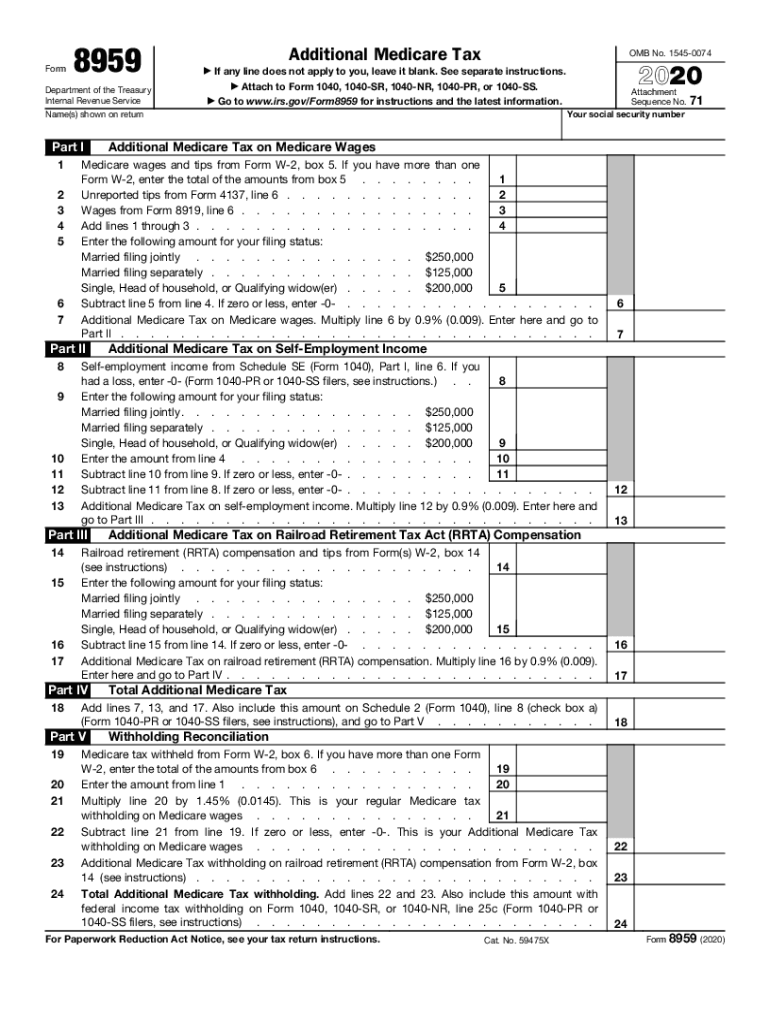
For instructions and the latest information. Go Name(s) shown on return Part I 1 2 3 4 5 6 7 8 9 10 11 12 13 15 16 17 20 21 22 23 24 Additional Medicare Tax on Railroad Retirement Tax Act (RRTA) Compensation 6 7 12 13 16 17 Total Additional Medicare Tax Add lines 7, 13, and 17. Also include this amount on Schedule 2 (Form 1040), line 8 (check box a) (Form 1040-PR or 1040-SS filers, see instructions), and go to Part V . . . . . . . . . . . Part V 19 Additional Medicare Ta.
Loading

Open form follow the instructions

Easily sign the form with your finger

Send filled & signed form or save
How to fill out the IRS 8959 online
Filling out the IRS 8959, which reports the Additional Medicare Tax, is an important step in ensuring compliance with tax obligations. This guide will walk you through the process of completing the form online in a clear and straightforward manner.
Follow the steps to complete the IRS 8959 online.
- Click 'Get Form' button to obtain the form and open it for editing.
- Begin by entering the name(s) as shown on your return in the designated field at the top of the form.
- Move to Part I, where you will need to complete the various lines with relevant income information, including Medicare wages and tips from your Form W-2.
- Proceed by recording any unreported tips and wages from Form 8919, line 6, and sum these for line 3.
- Enter your filing status thresholds for Additional Medicare Tax on line 4 and calculate the necessary Subtractions for lines 5 through 11.
- Continue by calculating the Additional Medicare Tax on Railroad Retirement Tax Act (RRTA) Compensation in Part II, recording any tax withheld from relevant forms.
- Complete Part III by following the instructions to assess your Additional Medicare Tax based on your self-employment income.
- Finally, review all entered information, ensuring accuracy, and proceed to save changes, download, print, or share the completed form as needed.
Start filling out the IRS 8959 online today to ensure your tax documentation is completed accurately.
Experience a faster way to fill out and sign forms on the web. Access the most extensive library of templates available.
Related content
Dec 10, 2018 - 2018 Form 1040 redesigned. The 2018 Form 1040 has been redesigned and is...
You may be able to take the EIC for 2018 if your adjusted gross income (AGI) is ... See...
If you're subject to the additional Medicare tax, your Medicare tax withholding that shows...
Get answers to your most pressing questions about US Legal Forms API.
What is a 8959 tax form?
Form 8959 (Additional Medicare Tax) is used to figure the additional 0.9% percent Medicare tax on the portion of wages, self-employment, and railroad retirement income that exceeds a certain threshold ($200,000 for individuals, $250,000 for spouses filing jointly, and $125,000 for spouses filing separately).
What is additional Medicare tax withholding?
Under this mandate, in addition to withholding Medicare tax at 1.45%, employers must withhold a 0.9% Additional Medicare Tax from wages paid to an employee once earnings reach $200,000 in a calendar year. ... Additional Medicare Tax is only imposed on the employee.
How is additional Medicare tax calculated?
When a portion of an individual's wages will be subject to the additional tax, but earnings from a particular employer do not exceed the $200,000 threshold for withholding of the tax by the employer, the employee is responsible for calculating and paying the additional 0.9% Medicare tax.
What is the additional Medicare tax for 2018?
The additional 0.9 percent Medicare tax on wages above $200,000 for individuals ($250,000 married filing jointly), which went into effect in 2013, remains in effect for 2018, as does the Medicare tax of 3.8 percent on investment (unearned) income for single taxpayers with modified adjusted gross income (AGI) more than ...
What is the Medicare surtax for 2019?
There is a maximum amount of compensation subject to the OASDI tax, but no maximum for HI. For 2019, the FICA tax rate for employers is 7.65% 6.2% for OASDI and 1.45% for HI. For 2019, an employee will pay: 6.2% Social Security tax on the first $132,900 of wages (maximum tax is $8,239.80 [6.2% of $132,900]), plus.
What is the additional Medicare tax for 2019?
For 2019, an employee will pay: 6.2% Social Security tax on the first $132,900 of wages (maximum tax is $8,239.80 [6.2% of $132,900]), plus. 1.45% Medicare tax on the first $200,000 of wages ($250,000 for joint returns; $125,000 for married taxpayers filing a separate return), plus.
What income is subject to Medicare tax?
Medicare payroll tax on earned income The Medicare payroll tax is 2.9%. It applies only to earned income, which is wages you are paid by an employer, plus tips. You're responsible for 1.45% of the tax, and it's deducted automatically from your paycheck. Your employer pays the other 1.45%.
Do you get Medicare tax withheld back?
If your withholding is more than the tax you owe, then you can claim a refund for the difference. ... In addition to income tax withholding, your employer will also withhold payroll taxes for Social Security and Medicare. Employees pay 6.2% of their wages in Social Security taxes and 1.45% in Medicare taxes.
What does Rrta compensation mean?
Railroad retirement (RRTA) compensation should be separately compared to the threshold. Your employer is responsible for withholding the 0.9% Additional Medicare Tax on your Medicare wages or railroad retirement (RRTA) compensation paid in excess of $200,000 in a calendar year.
What is fed Addl Med?
The Additional Medicare Tax applies to wages, railroad retirement (RRTA) compensation, and self-employment income over certain thresholds. Employers are responsible for withholding the tax on wages and RRTA compensation in certain circumstances.
Use professional pre-built templates to fill in and sign documents online faster. Get access to thousands of forms.
If you believe that this page should be taken down, please follow our DMCA take down process here.