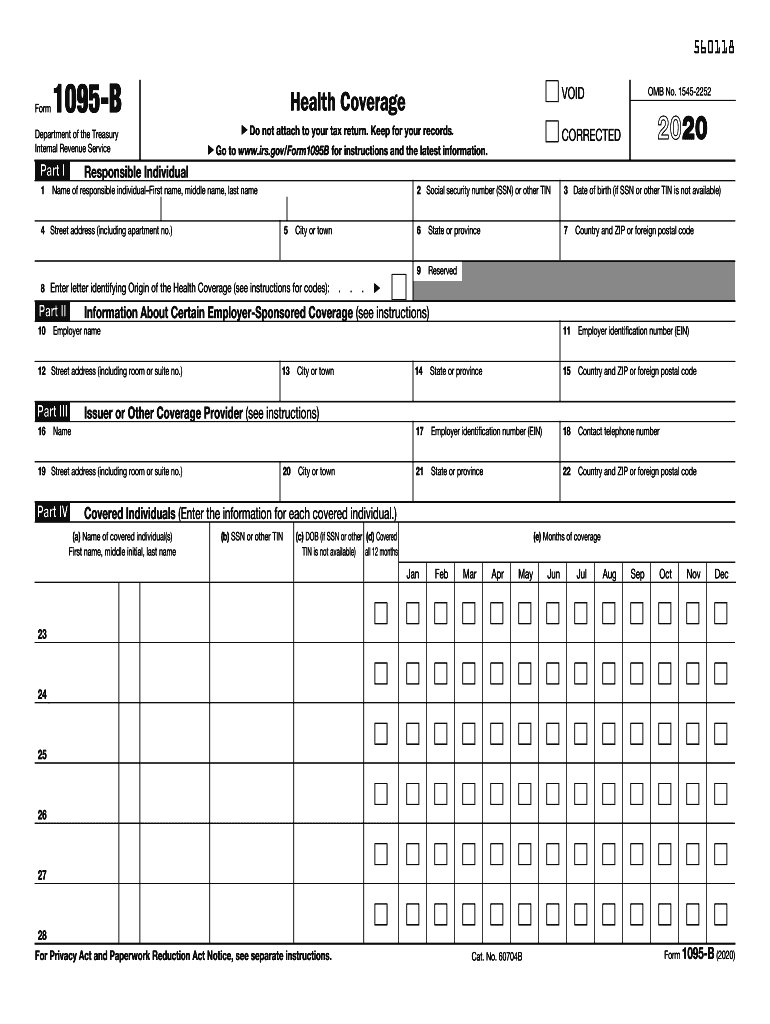
Mation. Part II 5 City or town . . . 2 Social security number (SSN) or other TIN 3 Date of birth (if SSN or other TIN is not available) 6 State or province 7 Country and ZIP or foreign postal code 9 Reserved 11 Employer identification number (EIN) Information About Certain Employer-Sponsored Coverage (see instructions) Employer name 12 Street address (including room or suite no.) Part III 13 City or town 14 State or province 15 Country and ZIP or foreign postal cod.
Loading

Open form follow the instructions

Easily sign the form with your finger

Send filled & signed form or save
How to fill out the IRS 1095-B online
The IRS 1095-B form provides essential information about your minimum essential health coverage. This guide offers a step-by-step process to help you accurately complete the form online, ensuring that you meet your reporting requirements with clarity and ease.
Follow the steps to accurately fill out the IRS 1095-B online.
- Click ‘Get Form’ button to access the IRS 1095-B online form and open it for editing.
- In Part I, enter your social security number (SSN) or other taxpayer identification number (TIN) in line 2. If you do not have an SSN or TIN, provide your date of birth in line 3.
- For line 8, choose the letter that corresponds to the origin of your health coverage from the defined categories (A through G).
- Proceed to Part II to provide information about your employer, including the employer's name and their identification number, if applicable.
- In Part III, supply details regarding the issuer or coverage provider, including their contact telephone number and address.
- When you reach Part IV, input the information for each covered individual. This includes their names, SSNs or TINs, dates of birth (if necessary), and the months they were covered.
- If you have more than six covered individuals, refer to the continuation sheets for additional entries.
- Review all entered information for accuracy. Make any necessary adjustments.
- Finally, save your changes and opt to download, print, or share the completed form as needed.
Start filling out your IRS 1095-B form online today for accurate health coverage reporting.
Experience a faster way to fill out and sign forms on the web. Access the most extensive library of templates available.
Related content
Form 1095-B is used to report certain information to the IRS and to taxpayers about...
Jan 31, 2019 - In the coming weeks, UC employees and retirees will receive 1095-B and/or...
Completing Affordable Care Act Related Forms 1095-A, 8962 and 8965 - 2016 ... Curso de...
Get answers to your most pressing questions about US Legal Forms API.
Can an employer require proof of health insurance?
The Employer Mandate for Large Employers Employers can require that employees contribute toward their insurance coverage, but they can't require them to pay more than 9.86% of their household income toward it.
Do you need insurance to file taxes 2019?
Starting with the 2019 plan year (for which you'll file taxes in April 2020), the Shared Responsibility Payment no longer applies. Note: Some states have their own individual health insurance mandate, requiring you to have qualifying health coverage or pay a fee with your state taxes for the 2019 plan year.
Do I need a 1095 to file my taxes 2019?
No, you do not need to send a copy of your 1095-C to the IRS when filing you tax return. However, you should keep the form with your tax records. If you have additional questions about your 1095-C, please contact your employer.
Do you have to show proof of health insurance when filing taxes 2019?
You are not required to send the IRS information forms or other proof of health care coverage when filing your tax return. However, it's a good idea to keep these records on hand to verify coverage. This documentation includes: Form 1095 information forms.
Is proof of health insurance required for 2018 taxes?
IRS Demands Proof of Health Insurance New guidelines will require taxpayers to address their health insurance status when filing taxes in 2018. The Internal Revenue Service won't process individual tax returns in 2018 unless taxpayers indicate whether they have health insurance coverage or an exemption.
Are 1095 forms required for 2018 taxes?
The IRS does not require you to include Form 1095-B with your tax return, so you may keep it for your records. ... You should generally receive the form by March 4, 2019 for 2018 Tax Returns.
Are 1095 forms required for 2018?
The Internal Revenue Service (IRS) issued draft form 1095-C that employers will use to report health coverage they offer to their employees as required by the Affordable Care Act (ACA). The form is for the 2018 tax year (for filing in early 2019). ... On the 2018 Form 1095-C the "plan start month" box will remain optional.
Who sends out 1095 B?
Form 1095-B is sent out by health insurance carriers, government-sponsored plans such as Medicare, Medicaid, and CHIP, and self-insured employers who aren't required to send out Form 1095-C instead. This form is mailed to the IRS and to the insured member.
Are 1095 forms required for 2019?
Employers subject to the Affordable Care Act (ACA) must distribute reporting forms to employees and file with the IRS early in 2019. ... Transmittal Form 1094-B to accompany Form 1095-B. Instructions for Forms 1094-B and 1095-B. Form 1095-C, Employer-Provided Health Insurance Offer and Coverage.
Do I need a 1095 A If I have a 1095 B?
Only the 1095-A gets entered into TurboTax in the Health Insurance section. If you have a 1095-B, a form titled Health Coverage, the IRS does NOT need any details from this form. You can keep any 1095-B forms you get from your health insurance company or the government agency that sponsors your plan for your records.
Use professional pre-built templates to fill in and sign documents online faster. Get access to thousands of forms.
If you believe that this page should be taken down, please follow our DMCA take down process here.