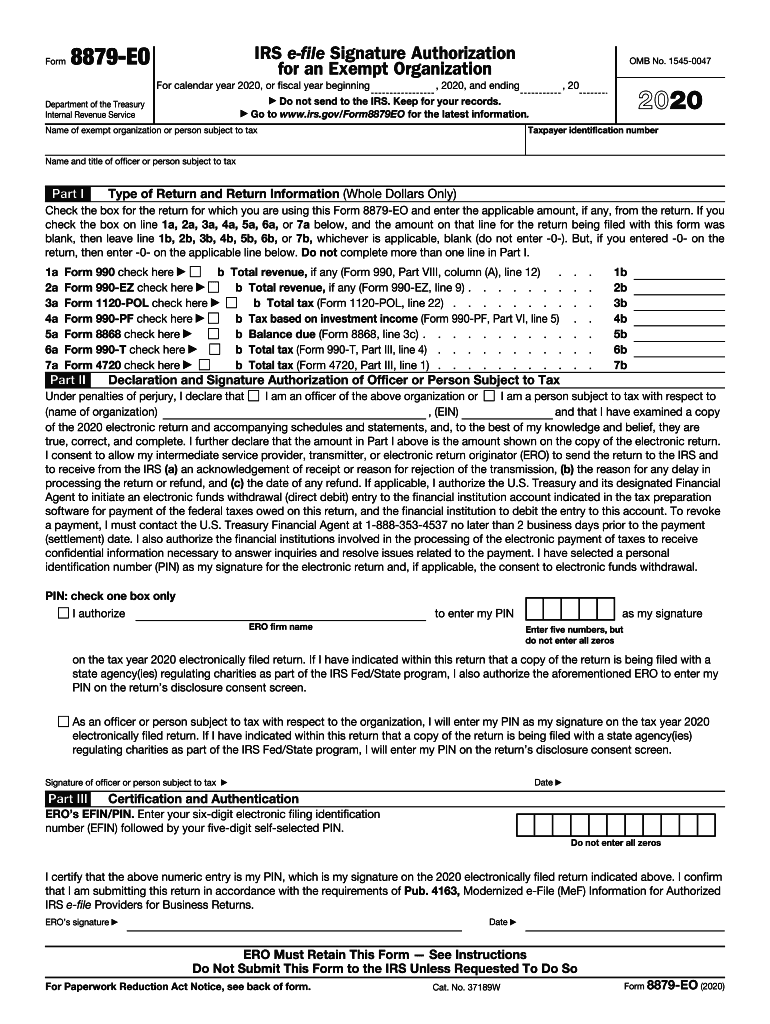
IRS. Keep for your records. Go to www.irs.gov/Form8879EO for the latest information. Department of the Treasury Internal Revenue Service Taxpayer identification number Name of exempt organization or person subject to tax Name and title of officer or person subject to tax Part I Type of Return and Return Information (Whole Dollars Only) Check the box for the return for which you are using this Form 8879-EO and enter the applicable amount, if any, from the return. If you check the b.
Loading

Open form follow the instructions

Easily sign the form with your finger

Send filled & signed form or save
How to fill out the IRS 8879-EO online
The IRS 8879-EO is an essential form for exempt organizations that enables an officer or person subject to tax to authorize the electronic filing of their return using a personal identification number. This guide provides clear and concise instructions on completing this form online, ensuring you understand each component.
Follow the steps to complete your IRS 8879-EO online.
- Click ‘Get Form’ button to access the IRS 8879-EO form and open it in the editor.
- Begin by entering the taxpayer identification number and the name of the exempt organization or person subject to tax at the top of the form.
- In Part I, check the appropriate box corresponding to the return you are filing, and enter the applicable amount if required. Remember, do not fill more than one box in this section.
- Move to Part II. Indicate the total revenue or tax amounts based on the applicable forms listed. Fill out the corresponding lines as needed, ensuring accuracy.
- Proceed to the declaration and signature section. As an authorized officer or individual, declare your position, confirm the accuracy of the return, and consent to allow the transmission of the return to the IRS.
- Choose your personal identification number (PIN) for signature purposes. Ensure it is five numbers, not all zeros.
- Provide the electronic return originator (ERO) with the completed form and authorize them to enter your PIN if applicable.
- Complete Part III by having the ERO enter their EFIN/PIN and signing and dating the form.
- After finishing all entries and ensuring the information is correct, users can save changes, download, print, or share the completed form for their records.
Start your online filing today and ensure your IRS 8879-EO is completed accurately and efficiently.
Experience a faster way to fill out and sign forms on the web. Access the most extensive library of templates available.
Related content
Form 8879-EO is used by an organization officer and an electronic return originator (ERO)...
... EK, EL, EM, EN, EO. 1, ARKANSAS. 2, Individual Income Tax Returns: Selected Income and...
Publication 4163 Modernized e-File (MeF) Information for Authorized IRS e-File Providers...
Get answers to your most pressing questions about US Legal Forms API.
Can Form 2553 be signed electronically?
Form 2553 is not a form that can be filed electronically. Form instructions states the Corporation needs to mail the original copy or fax it to the IRS. Important! You may attach Form 2553 to the corporation tax return, in PDF format, and submit it with the electronic tax return.
What is a 8879 PE?
A general partner or limited liability company member manager and an electronic return originator (ERO) use this form when the general partner or limited liability company member manager wants to use a personal identification number (PIN) to electronically sign a partnership's electronic return of partnership income.
Who can sign 8879 PE?
A partner or member and an electronic return originator (ERO) use Form 8879-PE when the partner or member wants to use a personal identification number (PIN) to electronically sign a partnership's electronic return of partnership income.
CAN 4506 t'be electronically signed?
IRS to Accept Electronic Signatures on 4506-T in January, 2013. ... The signature must be applied in a tamper-evident manner to ensure its validity; and. An audit log of the entire electronic signing ceremony must accompany the electronically signed 4506-T to establish non-repudiation.
Do tax returns need original signatures?
Even then, it is between the taxpayer and IRS, the preparer does not need an original signed copy (or any signed copy) of a paper filed return. Form 8879 does not require a wet ink signature and also is not normally sent to the IRS. ... If it looks mechanical or otherwise not pen and ink, they may reject the 2848.
Where do you sign your federal tax return?
Where do I sign my federal tax return for mailing. There is no signature line. The signature line on the new Form 1040 is located directly below the Dependent section, almost in the middle of the form.
Can you electronically sign a w4?
The W-9 and W-4 forms may use e-signatures and the IRS rules around them are reasonable. The 1096/1099 e-file process does not require a signature, but certain companies may require you to attest to the accuracy of the 1099 information that you submit.
Can I sign my tax return electronically?
There are currently two methods for signing individual income tax returns electronically (see Electronic Signature Methods, below). Taxpayers must sign and date the Declaration of Taxpayer to authorize the origination of the electronic submission of the return to the IRS prior to the transmission of the return to IRS.
Can Form 8879 be electronically signed?
Form 8879, IRS e-file Signature Authorization, authorizes an ERO to enter the taxpayers' PINs on individual income tax returns and Form 8878, IRS e-file Authorization for Form 4868 and Form 2350, authorizes an ERO to enter the taxpayers' PINs on Form 1040 extension forms.
Do both spouses have to sign Form 8879?
The spouses must sign and date the Declaration of Taxpayer (Form 8879) to authorize the origination of the electronic submission of the return to the IRS before transmitting it. New e-signature guidance allows taxpayers to e-sign Form 8879 from their home computer.
Use professional pre-built templates to fill in and sign documents online faster. Get access to thousands of forms.
If you believe that this page should be taken down, please follow our DMCA take down process here.