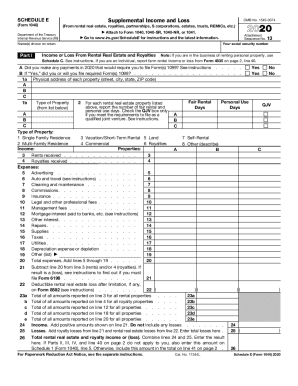
Service (99) Attach to Form 1040, 1040-SR, 1040-NR, or 1041. to www.irs.gov/ScheduleE for instructions and the latest information. Go Name(s) shown on return Part I OMB No. 1545-0074 Attachment Sequence No. 13 Your social security number Income or Loss From Rental Real Estate and Royalties Note: If you are in the business of renting personal property, use Schedule C. See instructions. If you are an individual, report farm rental income or loss from Form 4835 on page 2, line 40.
Open form follow the instructions
Easily sign the form with your finger
Send filled & signed form or save
How to fill out the IRS 1040 - Schedule E online
The IRS 1040 - Schedule E is used to report supplemental income and loss from various sources, including rental real estate and royalties. This guide provides a detailed, step-by-step approach to completing the form online, ensuring that users can navigate the process confidently and accurately.
Follow the steps to complete the IRS 1040 - Schedule E with ease.
- Click ‘Get Form’ button to obtain the form and open it in the editor.
- Begin by filling in your name(s) as shown on your tax return and your social security number at the top of the form. This information is critical for the IRS to process your submission correctly.
- In Part I, indicate whether you made any payments in the tax year that would require you to file Form 1099 by selecting ‘Yes’ or ‘No’. If you select ‘Yes’, ensure you indicate whether you have or will file the required Form(s) 1099.
- For each rental property, provide the physical address, including street, city, state, and ZIP code, along with the type of property. Specify if the property is a single-family residence, multi-family residence, commercial property, or another type.
- Next, report the number of days the property was rented at fair market value and the number of days it was used personally, if applicable. This information is important for accurately determining your income or loss.
- Report the rents received and royalties received in the designated fields on the form. Ensure to gather all relevant financial data from your records.
- List all expenses related to the rental property, such as advertising, cleaning, insurance, and depreciation. Each expense has a specific line where you must enter the amount.
- Sum up all your expenses and enter the total at the specified line. Then, subtract this total from your rents and royalties received to determine your net income or loss.
- If you have losses, make sure to address any limitations as noted in the form's instructions and determine if additional forms are required for filing.
- In Part II, report income or loss from partnerships and S corporations using the prompts provided. Be sure to check any boxes if there were distributions or loan repayments.
- Complete any additional required sections related to real estate mortgage investment conduits (REMICs) and trusts, as applicable.
- Finally, review your information for accuracy, then save changes, download, print, or share the completed form as necessary.
Start filling out your IRS 1040 - Schedule E online today to ensure you report your supplemental income accurately.
Experience a faster way to fill out and sign forms on the web. Access the most extensive library of templates available.
Related content
Dec 13, 2018 - Use Schedule E (Form 1040) to report income or loss from rental real...
Jun 29, 2018 - IRS officially unveiled its draft 2018 Form 1040 today, stating that it...
Get answers to your most pressing questions about US Legal Forms API.
Where do I report rental income on 1040?
If you rent real estate such as buildings, rooms or apartments, you normally report your rental income and expenses on Form 1040, Schedule E, Part I. List your total income, expenses, and depreciation for each rental property on the appropriate line of Schedule E. See the Instructions for Form 4562 to figure the amount ...
What is the difference between a Schedule C and a Schedule E?
The difference is in the type of income you are reporting. Schedule C is the attachment to a Form 1040 that's used by a self-employed person to report revenue and expenses from a business. ... Schedule E would be used for rental income from real estate and/or income from partnerships, S Corporations, trusts, etc.
What is Schedule E form 1040?
If you answered yes to any of those questions, you'll need to become familiar with IRS Form 1040 Schedule E. Schedule E is used to report income and losses from rental property, and income from trusts, estates, partnerships and S-corporations. This article focuses on income from rental property.
How do I report royalty income on 1040?
You report these on Schedule C of IRS form 1040. If you earn more than $400 through self-employment, including royalties, you must report that income on your tax return. Royalties from one-time earnings (a gig that isn't your primary job), or mineral interests, are reported on Schedule E of IRS Form 1040.
Is Schedule E income considered earned income?
Think of earned income as business income. ... IRS Schedule E is used for supplemental income which is generally considered passive income. As an investor, this is important because rental real estate generates passive income and, as such, we will report the income and loss from rental real estate on Schedule E.
What is passive income on Schedule E?
The purpose of Schedule E is to take Schedule K-1 income from a business owner and include information about whether the income was active or passive (was the owner actively involved in the business). Passive income is treated in a different way by the IRS (explained below).
What is reported on Schedule E?
Schedule E is used to report income and losses from rental property, and income from trusts, estates, partnerships and S-corporations. This article focuses on income from rental property. If you're receiving income from any of the pass-through activities, you should receive a Schedule K-1 from the entity.
What income is reported on Schedule E?
Use Schedule E (Form 1040) to report income or loss from rental real estate, royalties, partnerships, S corporations, estates, trusts, and residual interests in REMICs. You can attach your own schedule(s) to report income or loss from any of these sources.
Do you have to file a Schedule E?
What Is a Schedule E IRS Form? If you earn rental income on a home or building you own, receive royalties or have income reported on a Schedule K-1 from a partnership or S corporation, then you must prepare a Schedule E with your tax return.
Where do I put royalties on my tax return?
You report these on Schedule C of IRS form 1040. If you earn more than $400 through self-employment, including royalties, you must report that income on your tax return. Royalties from one-time earnings (a gig that isn't your primary job), or mineral interests, are reported on Schedule E of IRS Form 1040.
Use professional pre-built templates to fill in and sign documents online faster. Get access to thousands of forms.
If you believe that this page should be taken down, please follow our DMCA take down process here.
This form is available in several versions. Select the version you need from the drop-down list below.