Loading
Form preview
  • US Legal Forms
  • Other Templates
  • Tax Forms
  • Executive Department Treasury IRS Forms
  • Irs 8879-c 2020

Get Irs 8879-c 2020-2026

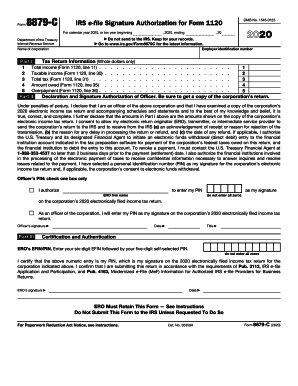
O to www.irs.gov/Form8879C for the latest information. Department of the Treasury Internal Revenue Service Employer identification number Name of corporation Part I 1 2 3 4 5 Tax Return Information (Whole dollars only) Total income (Form 1120, line 11) . . . . . . . Taxable income (Form 1120, line 30) . . . . . . Total tax (Form 1120, line 31) . . . . . . . . Amount owed (Form 1120, line 35) . . . . . . Overpayment (Form 1120, line 36) . . . . . . . Part II . . . . . . . . . . . . . . .

This website is not affiliated with IRS

How it works

  1. Open form

    Open form follow the instructions

  2. Easily sign form

    Easily sign the form with your finger

  3. Share form

    Send filled & signed form or save

How to fill out the IRS 8879-C online

The IRS 8879-C form is an essential document for corporate officers who wish to electronically sign their corporation's income tax return. This guide provides a step-by-step approach to successfully filling out this form online, ensuring a smooth submission process.

Follow the steps to complete the IRS 8879-C online.

  1. Click ‘Get Form’ button to obtain the form and open it in the editor.
  2. Enter the employer identification number and the name of the corporation at the top of the form.
  3. In Part I, fill in the total income, taxable income, total tax, amount owed, and overpayment as reported on Form 1120, ensuring all entries are whole dollars.
  4. Proceed to Part II and declare your status as an officer of the corporation. Review the statement to ensure your awareness and agreement with the content.
  5. Provide your personal identification number (PIN) in the designated area, selecting the appropriate option regarding who will enter the PIN.
  6. Sign and date the form in the specified fields to validate your authorization for electronic filing.
  7. Ensure that the electronic return originator (ERO) completes Part III, including their signature and date, and retains this form for their records.
  8. Once all details are verified, save the changes made to the form. You can download, print, or share it as needed.

Complete your IRS 8879-C form online today for a seamless filing experience.

Get form

Experience a faster way to fill out and sign forms on the web. Access the most extensive library of templates available.
Get form

Related content

About Form 8879-C, IRS e-file Signature...
Information about Form 8879-C, IRS e-file Signature Authorization for Form 1120, including...
Learn more
Understanding Taxes - Simulations - Internal...
Internal Revenue Service United States Department of the Treasury ... 14A: Using Form...
Learn more
Publication 4163 (Rev. 12 2017) P4163...
Publication 4163 Modernized e-File (MeF) Information for Authorized IRS e-File Providers...
Learn more

Related links form

Extended Stay America Third Party Authorization Phonathon Form SAMPLE SAMPLE CONTRIBUTION REPORT 1 Emotional Wellness Checklist

Questions & Answers

Get answers to your most pressing questions about US Legal Forms API.

Contact support

Order online. Use the 'Get Transcript ' tool available on IRS.gov. ... Order by phone. The number to call is 800-908-9946. Order by mail.

Schedule 2 Use this if you need to report additional taxes owned such as the alternative minimum tax or taxes on other forms of income such as a child's unearned income from investments. ... That can include self-employment tax, uncollected Social Security taxes and additional taxes on IRA withdrawals.

But the revised Form 1040 took information from the old 1040 and moved it to a series of new forms, called schedules. On Schedule 1, you'll report types of income that aren't listed on the 1040, such as capital gains, unemployment payments and gambling winnings. On the 1040, you can only enter common types of income.

Schedule 1, Additional Taxes and Adjustments to Income Taxpayers use this schedule to report income or adjustments to income that can't be entered directly on Form 1040. ... This also includes the student loan interest deduction, self-employment tax, or educator expenses.

Taxpayers, who currently use Forms 8878 or 8879 to sign electronic Forms 1040 federal tax returns or filing extensions, can use an e-signature to sign and electronically submit these forms to their Electronic Return Originator (ERO). Can all taxpayers use the e-signature option? No.

EROs are required to keep the signed Forms 8879 on file for three years after the date the return was received by the IRS or the due date of the return, whichever is later.

Form 8879 is an electronic signature document that is used to authorize e-filing. It is generated by the software using both the taxpayer's self-selected PIN and the Electronic Return Originator's (ERO's) Practitioner PIN. Form 8879 does not need to be mailed to the IRS, but instead is retained by the ERO.

Form 8879 is the declaration document and signature authorization for an e-filed return filed by an electronic return originator (ERO).

A partner or member and an electronic return originator (ERO) use Form 8879-PE when the partner or member wants to use a personal identification number (PIN) to electronically sign a partnership's electronic return of partnership income.

Taxpayers, who currently use Forms 8878 or 8879 to sign electronic Forms 1040 federal tax returns or filing extensions, can use an e-signature to sign and electronically submit these forms to their Electronic Return Originator (ERO).

Get This Form Now!

Use professional pre-built templates to fill in and sign documents online faster. Get access to thousands of forms.
Get form
If you believe that this page should be taken down, please follow our DMCA take down processhere.
Get IRS 8879-C
Get form
  • Adoption
  • Bankruptcy
  • Contractors
  • Divorce
  • Home Sales
  • Employment
  • Identity Theft
  • Incorporation
  • Landlord Tenant
  • Living Trust
  • Name Change
  • Personal Planning
  • Small Business
  • Wills & Estates
  • Packages A-Z
  • Affidavits
  • Bankruptcy
  • Bill of Sale
  • Corporate - LLC
  • Divorce
  • Employment
  • Identity Theft
  • Internet Technology
  • Landlord Tenant
  • Living Wills
  • Name Change
  • Power of Attorney
  • Real Estate
  • Small Estates
  • Wills
  • All Forms
  • Forms A-Z
  • Other Templates
  • Legal Hub
  • About Us
  • Help Portal
  • Legal Resources
  • Blog
  • Affiliates
  • Contact Us
  • Delete My Account
  • Site Map
  • Industries
  • Forms in Spanish
  • Localized Forms
  • State-specific Forms
  • Forms Kit
  • Real Estate Handbook
  • All Guides
  • Notarize
  • Incorporation services
  • For Consumers
  • For Small Business
  • For Attorneys
  • USLegal
  • FormsPass
  • pdfFiller
  • signNow
  • altaFlow
  • DocHub
  • Instapage
Form Packages
  • Adoption
  • Bankruptcy
  • Contractors
  • Divorce
  • Home Sales
  • Employment
  • Identity Theft
  • Incorporation
  • Landlord Tenant
  • Living Trust
  • Name Change
  • Personal Planning
  • Small Business
  • Wills & Estates
  • Packages A-Z
Form Categories
  • Affidavits
  • Bankruptcy
  • Bill of Sale
  • Corporate - LLC
  • Divorce
  • Employment
  • Identity Theft
  • Internet Technology
  • Landlord Tenant
  • Living Wills
  • Name Change
  • Power of Attorney
  • Real Estate
  • Small Estates
  • Wills
  • All Forms
  • Forms A-Z
  • Other Templates
Customer Service
  • Legal Hub
  • About Us
  • Help Portal
  • Legal Resources
  • Blog
  • Affiliates
  • Contact Us
  • Delete My Account
  • Site Map
  • Industries
  • Forms in Spanish
  • Localized Forms
  • State-specific Forms
  • Forms Kit
Legal Guides
  • Real Estate Handbook
  • All Guides
Prepared for you
  • Notarize
  • Incorporation services
Our Customers
  • For Consumers
  • For Small Business
  • For Attorneys
Our Sites
  • USLegal
  • FormsPass
  • pdfFiller
  • signNow
  • altaFlow
  • DocHub
  • Instapage
Social Media
Call us now toll free:
+1 833 426 79 33
As seen in:
© Copyright 1999-2026 airSlate Legal Forms, Inc. 17 Station Street, Suite 303, Brookline, MA 02445
  • Your Privacy Choices
  • Terms of Service
  • Privacy Notice
  • Content Takedown Policy
  • Bug Bounty Program