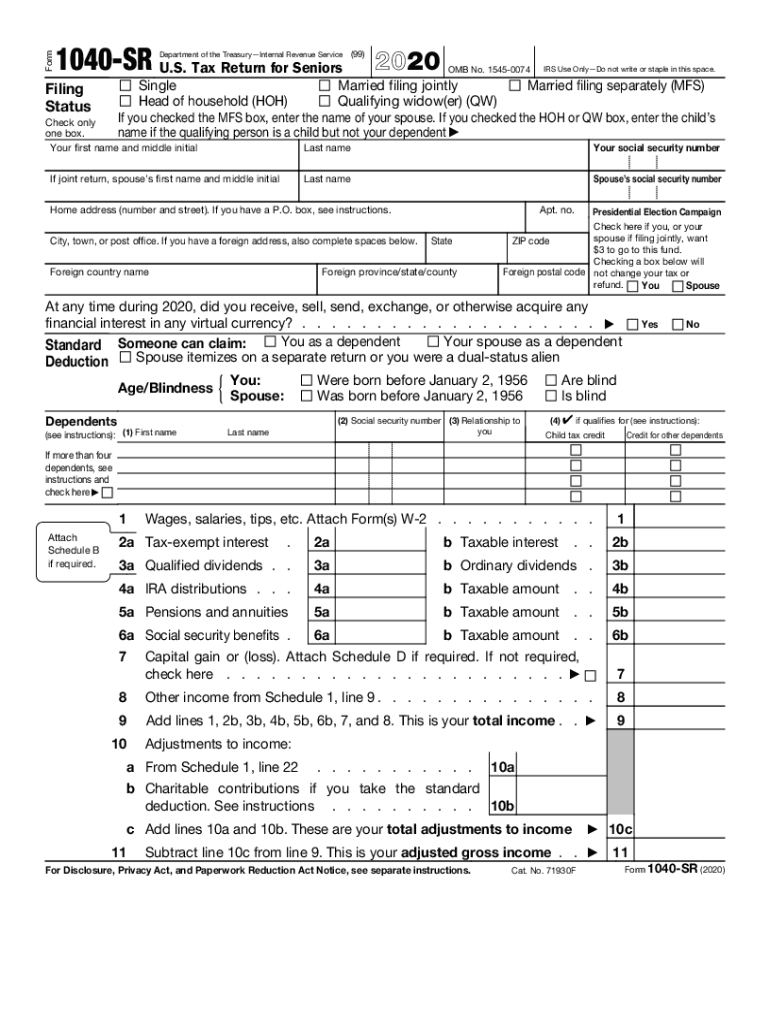
Ling jointly Married filing separately (MFS) Head of household (HOH) Qualifying widow(er) (QW) If you checked the MFS box, enter the name of your spouse. If you checked the HOH or QW box, enter the child s name if the qualifying person is a child but not your dependent Filing Status Check only one box. Your first name and middle initial If joint return, spouse s first name and middle initial Last name Your social security number Last name Spouse s social security number Home ad.
Loading

Open form follow the instructions

Easily sign the form with your finger

Send filled & signed form or save
How to fill out the IRS 1040-SR online
This guide provides clear instructions for completing the IRS 1040-SR, a tax return specifically designed for seniors. Whether you are filing for the first time or have prior experience, this step-by-step process will assist you in accurately completing the form online.
Follow the steps to successfully fill out the form.
- Click the ‘Get Form’ button to access the IRS 1040-SR form and open it in your online editor.
- Select your filing status by checking the appropriate box. You can choose from options such as single, married filing jointly, married filing separately, head of household, or qualifying widow(er). Make sure to enter the necessary information if you are married filing separately or head of household.
- Enter your personal information, including your first name, middle initial, last name, and social security number. If filing jointly, include your spouse's information in the designated fields.
- Fill in your home address, including street number, city, state, and ZIP code. If you have a foreign address, provide the relevant details as well.
- Decide whether to contribute to the Presidential Election Campaign by checking the appropriate box. This will not affect your tax obligations.
- Indicate if you have any financial interest in virtual currency during the tax year by answering the question provided.
- List your income by filling out the corresponding fields for wages, salaries, tips, and any other taxable income sources. Attach necessary forms such as W-2s or 1099s.
- Calculate your total income by adding up the amounts from each applicable line.
- Complete adjustments to income if applicable, and calculate your adjusted gross income by subtracting total adjustments from total income.
- Determine your standard deduction based on your filing status, age, and any blindness qualifications, and enter it in the appropriate field.
- Subtract the total deductions from adjusted gross income to receive your taxable income.
- Calculate your total tax based on your taxable income and any other adjustments. Complete any additional calculations required based on credits or taxes owed.
- Fill out any payments or refundable credits you may qualify for.
- Determine if you are due a refund or if there is an amount owed. Complete the necessary fields regarding your refund preferences including choice of direct deposit.
- Sign and date the form, and if applicable, include your spouse's signature if filing jointly.
- Review the completed form for accuracy and completeness. Save, download, print, or share your form as needed.
Complete your IRS 1040-SR form online today to ensure a smooth filing process.
Experience a faster way to fill out and sign forms on the web. Access the most extensive library of templates available.
Related content
IRS Use Only—Do not write or staple in this space. (99). Filing. Status. Check only one...
Forms 1040, 1040-SR, and 1040-NR for Tax Year 2018 and Tax Year. 2019 ... Go to...
Sep 15, 2012 — TIGTA recommended that the IRS work with the. Identification ... I...
Get answers to your most pressing questions about US Legal Forms API.
Who can use IRS Form 1040 SR?
Form 1040-SR is available as an optional alternative to using Form 1040 for taxpayers who are age 65 or older. Form 1040-SR uses the same schedules and instructions as Form 1040 does.
What is the difference between Form 1040 and Form 1040 SR?
Form 1040-SR allows an individual to report income from wages, salaries, tips, and other income sources. The new form requires a senior to be 65 or older by the end of either 2019 or by the end of the tax filing year. Other senior-friendly features include larger font and spaces to fill in information.
What is a 1040 SR tax return?
The new Form 1040-SR is a simplified tax form for seniors who have uncomplicated finances and who otherwise would have to file Form 1040. Form 1040-SR allows an individual to report income from wages, salaries, tips, and other income sources. ... The new form also has no income tests and expanded income categories.
Is standard deduction higher for seniors?
Standard Deduction for Seniors - If you do not itemize your deductions, you can get a higher standard deduction amount if you and/or your spouse are 65 years old or older. You can get an even higher standard deduction amount if either you or your spouse is blind. (See Form 1040 and Form 1040A instructions.)
What is the difference between IRS Form 1040 and 1040 SR?
* The only differences on page 1 of the two forms is that Form 1040-SR has bigger print, bigger spaces for the information and numbers that senior taxpayers must enter, and a more easily-decoded standard deduction table with bigger print. ... Otherwise, it's identical to page 2 of the regular Form 1040.
What is the standard deduction for 2019 taxes?
For single taxpayers and married individuals filing separately, the standard deduction rises to $12,200 for 2019, up $200, and for heads of households, the standard deduction will be $18,350 for tax year 2019, up $350.
CAN 1040 SR be filed electronically?
Form 1040-SR can be filed electronically, just as Form 1040 can.
What is the standard deduction for senior citizens in 2019?
The standard deduction amounts for the 2019 tax year are $12,200 for individuals, $18,350 for heads of household, and $24,400 for married couples filing jointly and surviving spouses. For 2019, the additional standard deduction amount for seniors or the blind is $1,300.
Is there an extra deduction for over 65 in 2020?
This tax credit is available to individuals who are, at the end of the taxation year, aged 65 or older. The federal age amount for 2020 is $7,637 (2019 is $7,494).
What is the extra deduction for over 65 in 2019?
Income Tax Act s. The age amount tax credit is a non-refundable tax credit, claimed on line 30100 of the personal income tax return. This tax credit is available to individuals who are, at the end of the taxation year, aged 65 or older. The federal age amount for 2020 is $7,637 (2019 is $7,494).
Use professional pre-built templates to fill in and sign documents online faster. Get access to thousands of forms.
If you believe that this page should be taken down, please follow our DMCA take down process here.
This form is available in several versions. Select the version you need from the drop-down list below.