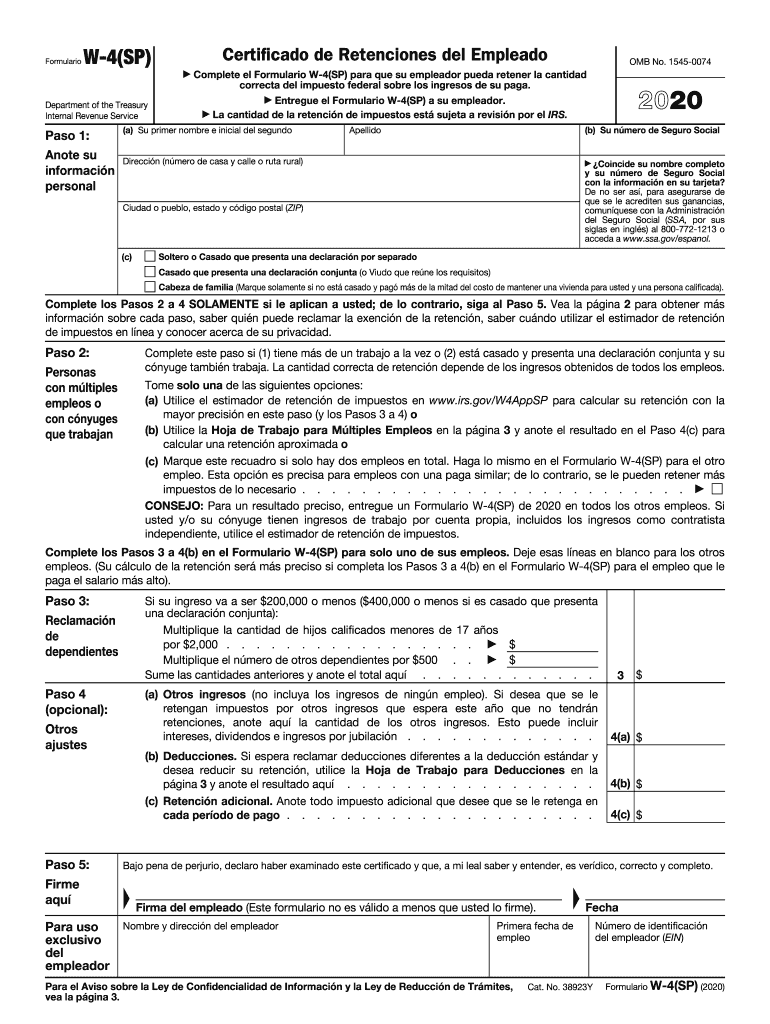
S Pasos 3 a 4(b) en el Formulario W-4(SP) para el empleo que le paga el salario m s alto). Paso 3: Si su ingreso va a ser $200,000 o menos ($400,000 o menos si es casado que presenta una declaraci n conjunta): Multiplique la cantidad de hijos calificados menores de 17 a os por $2,000 . . . . . . . . . . . . . . . . . $ Multiplique el n mero de otros dependientes por $500 . . $ Sume las cantidades anteriores y anote el total aqu . . . . . . . . . . . . Reclamaci n de dependiente.
Loading

Open form follow the instructions

Easily sign the form with your finger

Send filled & signed form or save
How to fill out the IRS W-4(SP) online
Filling out the IRS W-4(SP) form online is essential for ensuring that your employer withholds the correct amount of federal income tax. This guide will lead you through each section of the form clearly and comprehensively, supporting you through the process.
Follow the steps to complete the form accurately.
- Click ‘Get Form’ button to obtain the form and open it in your editor.
- Provide your personal information in Step 1. This includes your first name, middle initial, last name, Social Security number, and address. Ensure that this information matches what is on your Social Security card. If there are discrepancies, refer to the Social Security Administration.
- If you have multiple jobs or a working spouse, complete Step 2 by choosing one of the options to determine the correct withholding amount. You can use the tax withholding estimator or follow the worksheet provided in the form.
- In Step 4, make any other adjustments as needed. You can specify additional income not subject to withholding or request additional deductions. If applicable, enter any extra withholding you want to have taken out of each paycheck.
- Sign and date the form in Step 5. Ensure that your signature is included, as the form is invalid without it.
Start filling out your IRS W-4(SP) form online today.
Experience a faster way to fill out and sign forms on the web. Access the most extensive library of templates available.
Related content
Information about Form W-4, Employee's Withholding Allowance Certificate, including recent...
Sep 12, 2019 - IT-2104-E (Fill-in) (2019), Instructions on form, Certificate of Exemption...
Publication 4163 Modernized e-File (MeF) Information for Authorized IRS e-File Providers...
Get answers to your most pressing questions about US Legal Forms API.
How do I change my w4?
Complete a new Form W-4, Employee's Withholding Allowance Certificate, and submit it to your employer. Complete a new Form W-4P, Withholding Certificate for Pension or Annuity Payments, and submit it to your payer. Make an additional or estimated tax payment to the IRS before the end of the year.
How many allowances should I claim if I am single with one child?
A single person who lives alone and has only one job should place a 1 in part A and B on the worksheet giving them a total of 2 allowances. A married couple with no children, and both having jobs should claim one allowance each.
How many allowances can I claim on w4?
W4 Allowances The Personal Allowances Worksheet will help you arrive at the right number. You claim one allowance for yourself if you're being claimed as a dependent on anyone else's tax return. You then add more allowances as you go down a list of conditions.
Is it better to claim 1 or 0?
Claiming 1 allowance means that a little less tax will be withheld from your paycheck than if you claimed 0 allowances. Here's when I would recommend you claim one allowance. If you're filing status is single this is the safe choice. ... Though it will be smaller than if you claim zero allowances.
How many allowances should I claim on w4?
W4 Allowances The Personal Allowances Worksheet will help you arrive at the right number. You claim one allowance for yourself if you're being claimed as a dependent on anyone else's tax return. You then add more allowances as you go down a list of conditions.
Will I owe taxes if I claim 1?
Single filing status generally puts you in a higher tax bracket than married. The more allowances you claim, the lower your taxable wages and the higher your net pay. If you claim too many allowances, you will likely owe taxes. If you claim too few allowances, you will likely get a refund.
How many allowances should I claim if I'm single?
If you're a single filer with one job and no dependents, you should claim either one or two allowances. One allowance will most likely leave you getting a refund. Claiming two allowances will get you closer to paying your exact tax liability (i.e. how much you owe in taxes).
What happens if I claim 1 on my w4?
Generally, the more allowances you claim, the less tax will be withheld from each paycheck. The fewer allowances claimed, the larger withholding amount, which may result in a refund. ... You'll most likely get a refund back at tax time. Claim zero allowances if someone else claims you as a dependent on their tax return.
Should I claim 0 or 1 on my taxes?
You're entitled to one allowance for yourself of a dependent, but just because you are doesn't mean you absolutely have to. You can still claim zero. If you claim zero, it means the most amount of taxes will be withheld from your paycheck.
Do I claim 0 or 1 on my w4?
If you put "0" then more will be withheld from your pay for taxes than if you put "1"--so that is correct. The more "allowances" you claim on your W-4 the more you get in your take-home pay. Just do not have so little withheld that you owe at tax time.
Use professional pre-built templates to fill in and sign documents online faster. Get access to thousands of forms.
If you believe that this page should be taken down, please follow our DMCA take down process here.