Loading
Get Ca Acr 521 2014
How it works
-

Open form follow the instructions
-

Easily sign the form with your finger
-

Send filled & signed form or save
How to fill out the CA ACR 521 online
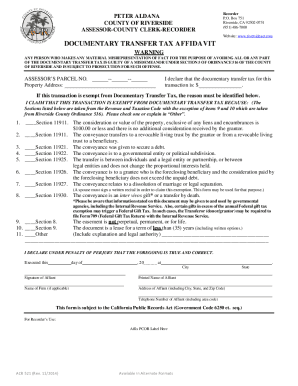
Filling out the CA ACR 521 form online is an essential step for individuals engaged in property transactions in Riverside County. This guide will provide clear and concise instructions to help you complete the form accurately and efficiently.
Follow the steps to fill out the CA ACR 521 online successfully.
- Press the ‘Get Form’ button to obtain the CA ACR 521 and open it in your online editor.
- Begin by entering the Assessors Parcel Number and Property Address in the specified fields at the top of the form.
- In the section regarding the documentary transfer tax for this transaction, input the appropriate dollar amount. If the transaction is exempt from taxes, ensure you check the appropriate box and provide a reason.
- Review the exemption reasons provided, and check the box that corresponds to your specific situation. If none apply, indicate 'Other' and include an explanation.
- Complete the declaration under penalty of perjury by inserting the date, city, and signing your name as the Affiant. Ensure your printed name, address, and phone number are also included.
- After verifying that all information is correct and complete, save your changes. You may choose to download, print, or share the completed form as needed.
Start completing your CA ACR 521 form online today!
Get form
Experience a faster way to fill out and sign forms on the web. Access the most extensive library of templates available.
If you put "0" then more will be withheld from your pay for taxes than if you put "1"--so that is correct. The more "allowances" you claim on your W-4 the more you get in your take-home pay. Just do not have so little withheld that you owe at tax time.
Get This Form Now!
Use professional pre-built templates to fill in and sign documents online faster. Get access to thousands of forms.