Loading
Get Fl Dr-700019 2012
How it works
-

Open form follow the instructions
-

Easily sign the form with your finger
-

Send filled & signed form or save
How to fill out the FL DR-700019 online
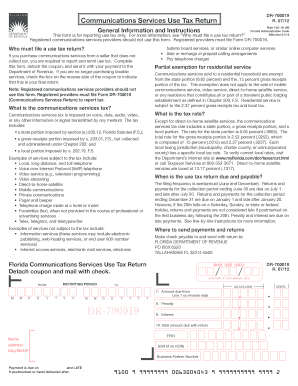
The FL DR-700019 form, known as the Communications Services Use Tax Return, is essential for reporting use tax on communications services purchased from sellers that do not collect tax. This guide will provide clear, step-by-step instructions for filling out the form online.
Follow the steps to complete your FL DR-700019 online.
- Click the ‘Get Form’ button to begin the process of accessing the FL DR-700019 form. This will open a digital editor where you can input your information.
- Enter your business partner number, if applicable, on the designated line. This is a unique identifier assigned by the Florida Department of Revenue.
- Provide all requested demographic information on the front of the coupon, including your name, address, city, state, and ZIP code.
- Line 1 requires you to enter the total purchases of communications services for the reporting period. Ensure this sum reflects all relevant purchases.
- If any of your purchases include direct-to-home satellite services, calculate the tax due for those services separately on Line 2. Multiply the total purchases of these services by the tax rate of 13.17 percent and enter the result.
- For Lines 3 and 4, take your total communications services purchases (excluding direct-to-home satellite services) and calculate the applicable state and gross receipts taxes. For Line 3, use the combined rate of 6.8 percent on Line 3 for state and gross receipts taxes. For Line 4, use the gross receipts rate of 2.37 percent.
- Line 5 allows for the calculation of local taxes based on the jurisdiction where services were used. Multiply your total purchases by the local tax rate and record the amounts for each jurisdiction on Lines 5a and 5b.
- Add the local taxes on Line 6 and then sum the taxes listed on Lines 2, 3, 4, and 6 to find the total tax due on Line 7.
- On Line 8, apply the late penalty, if applicable, based on the total amount due from Line 7. Line 9 is for any interest on late payments—calculate according to the specified rates.
- Summarize all amounts due on Line 10, which totals Lines 7, 8, and 9. Make sure you have a check ready for this amount, payable to the Florida Department of Revenue.
- Lastly, ensure your return is signed in the indicated areas. A lack of signature may delay processing. Also, remember to check the box if this is your final return.
- Once you have completed all the steps, save any changes, then download or print the form if necessary, and proceed to submit it as per the instructions provided.
Complete your FL DR-700019 form online today to ensure compliance with tax regulations.
Get form
Experience a faster way to fill out and sign forms on the web. Access the most extensive library of templates available.
Related links form
In Florida, several services are considered non-taxable under the FL DR-700019 regulations. These generally include services like healthcare, education, and certain types of personal services. Knowing the distinction between taxable and non-taxable services aids in making informed decisions. For clarity, rely on the comprehensive resources available at uslegalforms.
Get This Form Now!
Use professional pre-built templates to fill in and sign documents online faster. Get access to thousands of forms.