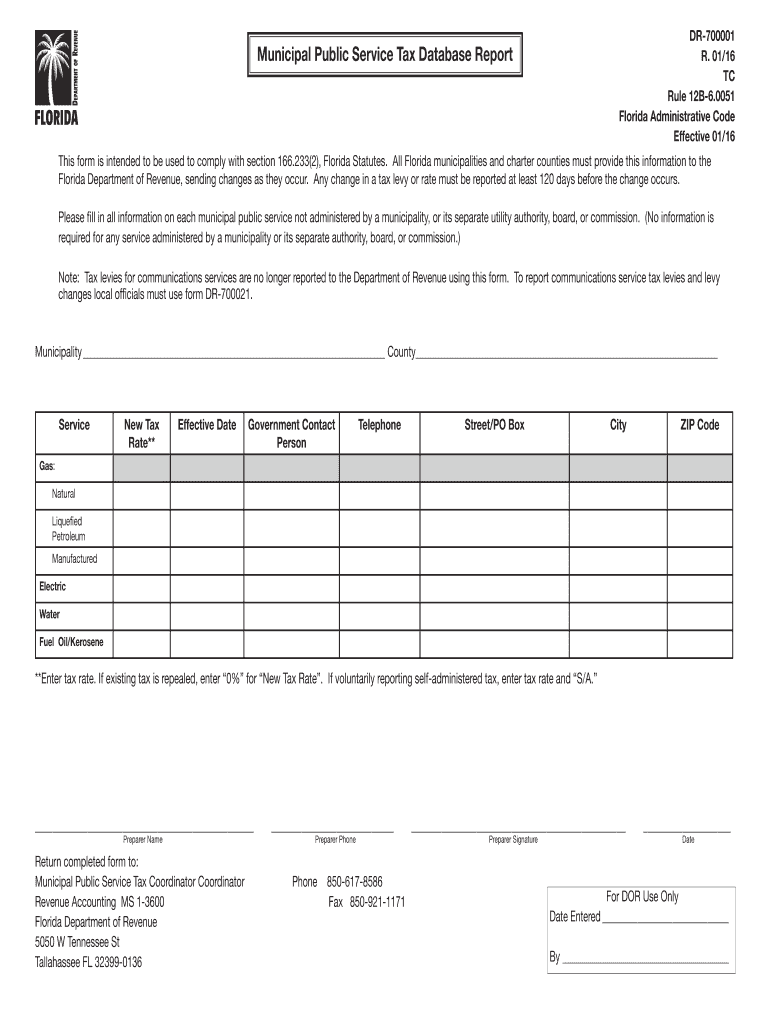
Orida Statutes. All Florida municipalities and charter counties must provide this information to the Florida Department of Revenue, sending changes as they occur. Any change in a tax levy or rate must be reported at least 120 days before the change occurs. Please fill in all information on each municipal public service not administered by a municipality, or its separate utility authority, board, or commission. (No information is required for any service administered by a municipality or its sepa.
Loading

Open form follow the instructions

Easily sign the form with your finger

Send filled & signed form or save
How to fill out the FL DR-700001 online
The FL DR-700001 is a crucial document for municipalities and charter counties in Florida, designed to report public service tax rates. This guide provides a clear and user-friendly approach to completing the form online, ensuring compliance with Florida regulations.
Follow the steps to successfully complete the FL DR-700001 form online.
- Click 'Get Form' button to obtain the form and open it in the editor.
- Begin by filling in the Municipality and County fields with the relevant information pertaining to your locality.
- For each service, select the appropriate option (Gas, Electric, Water, etc.) and enter the New Tax Rate in the specified field. Remember to indicate '0%' if an existing tax is repealed.
- Provide the Effective Date for the new tax rate, ensuring it aligns with your municipality's regulations.
- Fill in the Government Contact Person's details, including their name, telephone number, and address (Street/PO Box, City, ZIP Code).
- Complete the Preparer Name and Preparer Phone fields to identify the individual responsible for the submission.
- After filling out all required fields, ensure the Preparer Signature and Date are included.
- Review all information for accuracy before submitting the form. Once satisfied, you can save changes, download, print, or share the form as needed.
Complete your documents online today to ensure timely compliance.
Experience a faster way to fill out and sign forms on the web. Access the most extensive library of templates available.
Related content
by V Suresh · 2025 · Cited by 1 — The prophylactic use of SGLT2is reduces mortality...
Fla. Admin. Code Ann. R. 12B-6.0051 - Public Service Tax Reporting Form ... (2) DR-700001...
This manual contains physical and electrical specifications for the GPIB-PC2A, describes...
Get answers to your most pressing questions about US Legal Forms API.
How does Florida fund government with no income tax?
Florida funds its government without an income tax primarily through sales tax, property tax, and business taxes. This unique structure allows the state to maintain essential services while attracting new residents and businesses. By diversifying its funding sources, Florida ensures a robust economic environment. For more insights on this topic and its relevance to FL DR-700001, consider exploring US Legal Forms for detailed information.
How do I speak to someone at the Department of Revenue in Florida?
To speak to someone at the Florida Department of Revenue, you can call their main number at 1-850-488-6800. Representatives are available to assist you with questions about taxes, services, or various other inquiries. Additionally, you may visit their website for more direct resources and guidance. Always keep the keyword FL DR-700001 in mind for further support related to your questions.
How does Florida fund public services?
Florida funds public services primarily through sales tax, property tax, and various fees. The state also relies on specific funding from federal government assistance and grants. This diverse revenue system ensures that essential services like education, public safety, and infrastructure remain well-supported. Understanding this funding structure can help residents appreciate how services are maintained in relation to FL DR-700001.
What is the phone number for the Florida Department of Revenue out of state collections unit?
You can reach the Florida Department of Revenue's out of state collections unit at 1-800-352-3671. This contact provides assistance for individuals seeking help with tax collection issues from outside Florida. Connecting with them can clarify your questions regarding tax processes in Florida. For reliable information, remember the keyword FL DR-700001 when discussing your inquiries.
What is the municipal service taxing unit in Florida?
The municipal service taxing unit in Florida refers to a special area established by local governments to fund specific services. This structure allows municipalities to impose taxes to provide essential services like street maintenance and sanitation directly to residents in those areas. By creating such units, Florida enables more targeted funding, ensuring that residents receive the precise services they need. To learn more about municipal service taxing units and their impact, consider checking resources using the keyword FL DR-700001.
How to get a Florida annual resale certificate for sales tax?
To acquire a Florida annual resale certificate for sales tax, you need to apply through the Florida Department of Revenue. This certificate allows you to buy goods for resale without paying sales tax. Completing the application accurately is essential for avoiding issues in the future, and resources like FL DR-700001 can guide you through obtaining the necessary documentation.
How to obtain a Florida sales tax number?
To obtain a Florida sales tax number, you must complete the online registration through the Florida Department of Revenue's website. Make sure to gather all necessary business information before starting your application. Utilizing forms such as FL DR-700001 can assist in streamlining this process for you.
Is Florida sales tax number the same as EIN?
No, a Florida sales tax number differs from your Employer Identification Number (EIN). The sales tax number is specific to collecting sales tax, while the EIN is used for federal tax purposes. Both numbers are crucial for operating your business legally, and you can easily manage them with support from platforms that address needs related to FL DR-700001.
How do I find my Florida RT number?
You can find your Florida reemployment tax (RT) number by referring to your previous tax filings or payment confirmations sent by the Florida Department of Revenue. If you cannot locate it, you can contact the department directly for assistance. Keeping your records organized will help manage your RT number effectively, particularly when using resources like the FL DR-700001.
How do I obtain a Florida sales tax number?
You can obtain a Florida sales tax number by registering your business through the Florida Department of Revenue's website. This registration allows you to collect sales tax from your customers legally. Be prepared with your business information and details, as they will expedite the process. Utilizing forms like FL DR-700001 can streamline your application.
Use professional pre-built templates to fill in and sign documents online faster. Get access to thousands of forms.
If you believe that this page should be taken down, please follow our DMCA take down process here.