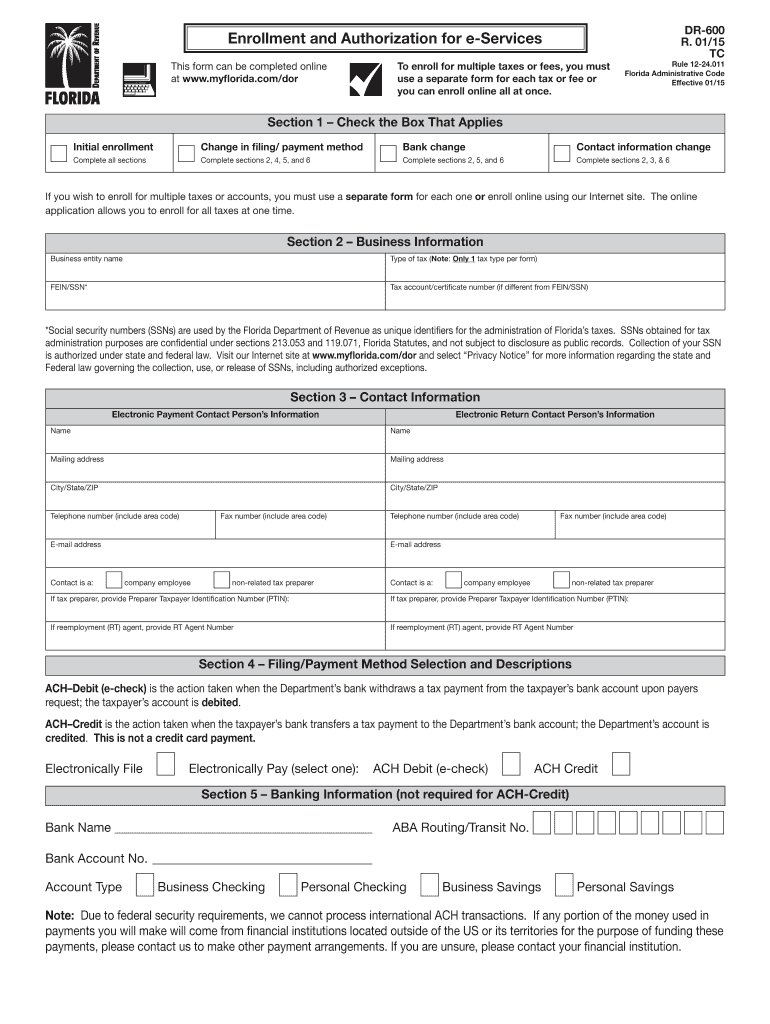
D online at www.myflorida.com/dor DR-600 R. 01/15 TC Rule 12-24.011 Florida Administrative Code Effective 01/15 Section 1 Check the Box That Applies Initial enrollment Complete all sections Change in filing/ payment method Complete sections 2, 4, 5, and 6 Bank change Contact information change Complete sections 2, 5, and 6 Complete sections 2, 3, & 6 If you wish to enroll for multiple taxes or accounts, you must use a separate form for each one or enroll online usi.

Open form follow the instructions

Easily sign the form with your finger

Send filled & signed form or save
How to fill out the FL DR-600 online
The FL DR-600 form is a crucial document for enrolling in Florida’s electronic services for tax filing and payments. This guide will provide you with a step-by-step process to help you complete the form smoothly and effectively, ensuring compliance with state requirements.
Follow the steps to complete the FL DR-600 form online.
- Click ‘Get Form’ button to obtain the form and open it in the editor.
- In Section 1, check the appropriate box that corresponds to your purpose: Initial enrollment, Change in filing/payment method, Bank change, or Contact information change. Depending on your selection, complete the necessary sections as outlined.
- For Section 2, provide your business information. This includes the business entity name, type of tax (note that only one tax type is allowed per form), FEIN or SSN, and tax account or certificate number if applicable.
- In Section 3, enter the contact information for both electronic payment and return contact persons. Include names, mailing addresses, phone numbers, and email addresses. Specify whether the contact is a company employee or a non-related tax preparer.
- In Section 4, select your preferred filing/payment method. Choose between ACH-Debit (e-check) or ACH-Credit, and provide details if necessary.
- If using ACH-Debit in Section 5, provide your banking information, including the bank name, ABA routing number, account number, and account type.
- Review Section 6 for the enrollee authorization and agreement. Ensure that you understand and certify that all information is accurate. Sign where indicated and include your title, printed name, and contact number.
- Once all sections are completed, you can save changes, download, print, or share the completed FL DR-600 form as needed.
Complete your FL DR-600 form online today for a streamlined tax enrollment process!
Experience a faster way to fill out and sign forms on the web. Access the most extensive library of templates available.
Related content
Dec 20, 2022 — Florida Hurricane Frederic DR-600-FL Florida Incident Period: Sep 13...
Complete Form DR-600, Enrollment and Authorization for eServices Program (incorporated by...
1 Sensor do controle remoto. 2 Botão Shuttle. 3 Tecla SEL (selecionar). 4 Tecla...
Get answers to your most pressing questions about US Legal Forms API.
How do I speak to someone at the Department of Revenue in Florida?
To speak with someone at the Florida Department of Revenue, you can call their customer service number, which is readily available on their website. It's essential to have any relevant documents, such as the FL DR-600 form, handy when you make the call. This preparation allows you to discuss your tax issues more effectively. If you prefer written communication, you can also reach out via email or through their online contact form.
What is a power of attorney for taxes in Florida?
A power of attorney for taxes in Florida allows you to appoint someone to handle your tax matters, specifically related to the FL DR-600 form. This document empowers your representative to act on your behalf when dealing with the Florida Department of Revenue. By completing the FL DR-600 form, you ensure that your chosen representative can receive and manage tax information efficiently. Using this form simplifies your tax responsibilities and keeps your financial matters organized.
How do I get a tax ID number in Florida?
To get a tax ID number in Florida, visit the Florida Department of Revenue's website. The process generally involves submitting your business information, which they use to issue your unique tax ID number. This ID is necessary for various business operations, including tax filing and compliance with state regulations.
How do I get a reemployment tax ID in Florida?
You can get a reemployment tax ID in Florida by registering your business with the Florida Department of Revenue. This registration can usually be completed online, and you will receive your ID shortly after submitting your information. This ID is vital for filing your FL DR-600 forms and adhering to tax obligations.
How do I get my Florida unemployment tax form?
You can access your Florida unemployment tax form online at the Florida Department of Revenue's website. The site provides downloadable forms, including the relevant FL DR-600. By completing this form accurately, you can ensure timely and correct filing of your unemployment taxes, avoiding potential penalties.
How to obtain a Florida sales tax number?
You can obtain a Florida sales tax number by applying through the Florida Department of Revenue’s online portal. The application requires details about your business structure and activities. After processing your application, you will receive your sales tax number, allowing you to legally collect sales tax on taxable sales in the state.
How do I get a Florida reemployment tax ID number?
To get a Florida reemployment tax ID number, visit the Florida Department of Revenue's website. You can complete the registration process online, usually requiring basic business information. Once you submit your details, the system will generate your reemployment tax ID. Having this ID ready is critical for compliance with the FL DR-600 requirements.
How to file an amended sales tax return in Florida?
Filing an amended sales tax return in Florida requires you to fill out the FL DR-600 form again, marking the return as amended. Highlight the corrections that need to be made and follow the filing instructions carefully. Timeliness is key, as delays may incur penalties. If you opt for our services, we provide helpful guidance throughout the process to ensure your return is handled properly.
How do I amend a tax return that I already filed?
To amend a tax return you've already filed, you will need to submit a new form, such as the FL DR-600 for sales tax or the appropriate form for your income tax situations. Clearly outline the changes being made to avoid any misunderstandings. If using our platform, you’ll find resources and tools that simplify this process, making it easier for you to correct any errors.
How do I file my Florida income tax?
To file your Florida income tax, you won't be using the FL DR-600, as Florida does not have a personal income tax. If you are a business owner, however, you may need to file corporate income taxes through various forms available. Ensure that you understand your tax obligations, as this could vary based on your business type. You can leverage our platform for additional guidance on your specific situation.
Use professional pre-built templates to fill in and sign documents online faster. Get access to thousands of forms.
If you believe that this page should be taken down, please follow our DMCA take down process here.
This form is available in several versions. Select the version you need from the drop-down list below.