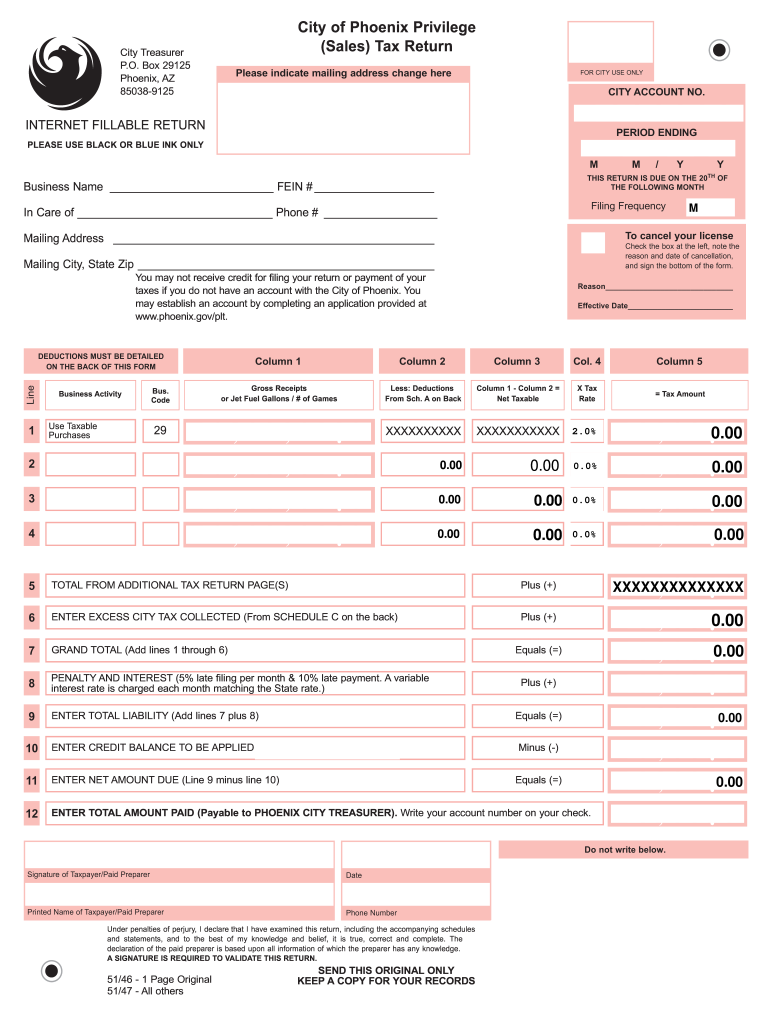
ETURN PERIOD ENDING PLEASE USE BLACK OR BLUE INK ONLY M Business Name FEIN # You may not receive credit for filing your return or payment of your taxes if you do not have an account with the City of Phoenix. You may establish an account by completing an application provided at www.phoenix.gov/plt. Line 1 M Reason Effective Date Column 1 Column 2 Column 3 Col. 4 Column 5 Gross Rece.
Loading

Open form follow the instructions

Easily sign the form with your finger

Send filled & signed form or save
How to fill out the AZ Privilege Sales Tax Return - Phoenix online
Completing the AZ Privilege Sales Tax Return is an essential process for businesses operating in Phoenix. This guide provides clear, step-by-step instructions for filling out the return online, ensuring you accurately report your tax information.
Follow the steps to successfully complete your tax return online
- Click the ‘Get Form’ button to obtain the form and open it in your preferred editor.
- Begin by filling in your business name and Federal Employer Identification Number (FEIN) at the top of the form. Ensure these details are accurate and clearly noted.
- For the main portion of the form, report your gross receipts or applicable gallons/number of games in the specified columns. Be precise to avoid discrepancies.
- Calculate your net taxable amount by subtracting the deductions from your gross receipts.
- Review additional tax returns if applicable and ensure totals from the additional pages are calculated and summarized correctly.
- Complete your total liability, credit balance, and net amount due calculations clearly.
- Once all fields are completed and reviewed, you may save your changes, download the form, print it, or share it as needed.
Complete your AZ Privilege Sales Tax Return online and ensure accurate submission today.
Experience a faster way to fill out and sign forms on the web. Access the most extensive library of templates available.
Related content
The Arizona transaction privilege tax (TPT) is actually a tax on a vendor for the...
Arizona Transaction Privilege Tax (TPT) is a tax imposed on vendors for the privilege of...
Apr 25, 2007 — Phoenix, AZ. 28. 721. Austin, TX. 299. 185 ... positions taken on tax...
Get answers to your most pressing questions about US Legal Forms API.
What is the TPT liability in Arizona?
TPT liability in Arizona refers to the total amount of transaction privilege tax a business owes to the state and any local jurisdictions. This liability is calculated based on your business's gross income from sales and services. Managing this liability is crucial for maintaining compliance with tax regulations. For assistance in calculating and filing your AZ Privilege Sales Tax Return - Phoenix, explore tools available on US Legal Forms.
Are professional services subject to sales tax in Arizona?
In Arizona, most professional services are generally not subject to sales tax. However, certain services may incur taxes based on specific circumstances. Therefore, it is vital to review your business activities carefully. To simplify matters and ensure accurate reporting in your AZ Privilege Sales Tax Return - Phoenix, consider consulting professionals or using reliable platforms like US Legal Forms.
What is the TPT tax in Phoenix?
The TPT tax in Phoenix combines the state transaction privilege tax and the local taxes levied by the city. This tax is crucial for businesses operating within the city limits, impacting their overall tax obligations. Knowing the current rates is important for compliance. To ensure accuracy in your AZ Privilege Sales Tax Return - Phoenix, stay informed about any recent changes.
What is Phoenix sales tax?
Phoenix sales tax consists of the state and local transaction privilege taxes applied to sales of goods and services. The total sales tax rate may vary based on the type of transaction. Understanding this tax is important for businesses and consumers alike. When filing your AZ Privilege Sales Tax Return - Phoenix, ensure you account for these rates accurately.
How do I find my Arizona transaction privilege tax number?
To find your Arizona TPT number, you should check the documentation from your initial tax registration or visit the Arizona Department of Revenue’s website. You may also call their office for assistance. This number is vital when filing your AZ Privilege Sales Tax Return - Phoenix, so ensure you keep it handy.
How to file a TPT return in Arizona?
Filing a TPT return in Arizona involves completing a form that details your gross income from sales. You can file online through the Arizona Department of Revenue's website or by paper. It’s crucial to adhere to the filing deadlines to avoid penalties. By using services like US Legal Forms, you can streamline the process of preparing your AZ Privilege Sales Tax Return - Phoenix.
Is TPT the same as ein?
No, TPT, or Transaction Privilege Tax, is not the same as an EIN, or Employer Identification Number. TPT is a tax imposed on businesses for the privilege of conducting business in Arizona. An EIN, on the other hand, is a unique identifier issued by the IRS for tax purposes. Understanding these distinctions is essential when managing your AZ Privilege Sales Tax Return - Phoenix.
Is an EIN the same as a vendor's license?
An EIN and a vendor's license serve different purposes and are not the same. An EIN is used for tax identification purposes, while a vendor's license is required to sell goods or services. If you're planning to operate a business in Arizona, obtaining both is essential for compliance and for filing your AZ Privilege Sales Tax Return - Phoenix accurately.
Is EIN the same as nonprofit tax ID?
No, an EIN is not synonymous with a nonprofit tax ID. While both numbers serve as identifiers, an EIN is used for payroll and federal tax purposes across all business types, including nonprofits. Nonprofits may also require a specific tax-exempt identifier, which allows them to operate without paying certain taxes. Understanding these distinctions will help you navigate your organization's financial responsibilities more effectively.
Is my sales tax ID the same as my EIN?
No, your sales tax ID is not the same as your Employer Identification Number (EIN). Your sales tax ID, often referred to as TPT number, is used for collecting sales tax, while your EIN is primarily for federal tax purposes. Understanding this distinction is important for accurately managing your business finances and filing your AZ Privilege Sales Tax Return - Phoenix correctly.
Use professional pre-built templates to fill in and sign documents online faster. Get access to thousands of forms.
If you believe that this page should be taken down, please follow our DMCA take down process here.