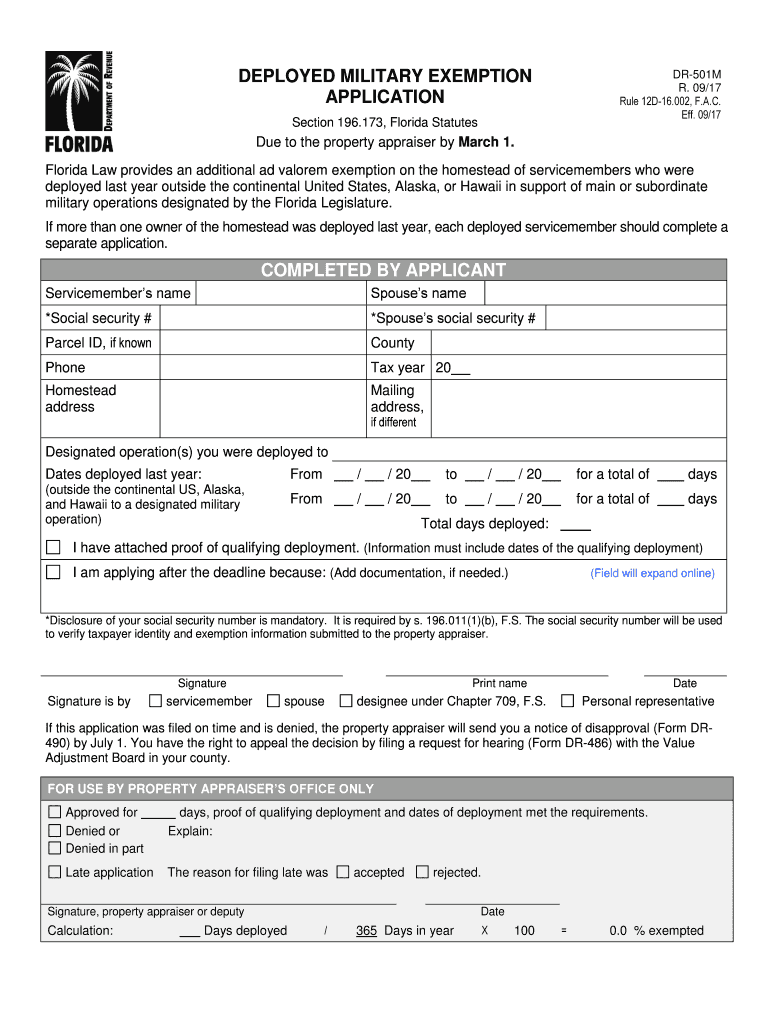
DEPLOYED MILITARY EXEMPTION APPLICATION DR-501M R. 09/17 Rule 12D-16. 002 F.A. C. Eff. 09/17 Section 196. 173 Florida Statutes Due to the property appraiser by March 1. Florida Law provides an additional ad valorem exemption on the homestead of servicemembers who were deployed last year outside the continental United States Alaska or Hawaii in support of main or subordinate military operations designated by the Florida Legislature. If more than one owner of the homestead was deployed last year e.
Loading

Open form follow the instructions

Easily sign the form with your finger

Send filled & signed form or save
How to fill out the FL DR-501M online
Filling out the FL DR-501M form is essential for servicemembers seeking additional property tax exemptions due to deployment. This guide provides clear, step-by-step instructions to help users complete the form efficiently.
Follow the steps to complete your application online.
- Click the ‘Get Form’ button to obtain the form and open it in the editor.
- Begin by entering the servicemember’s name in the designated field. Ensure accuracy, as this information is crucial for identification.
- Fill in the spouse’s name, if applicable, in the provided space. This step is important for verifying relationships.
- Input the social security number of the servicemember. Remember that this information is mandatory for the application process.
- Enter the spouse’s social security number in the respective field, if applicable.
- If known, provide the parcel ID to help identify the property associated with the exemption.
- Select the county where the property is located from the dropdown menu.
- Provide a contact phone number to allow the property appraiser to reach you if needed.
- Indicate the tax year for which you are applying for the exemption.
- Input the homestead address where the exemption is being claimed.
- If your mailing address is different from the homestead address, enter it in the specified area.
- List the designated military operations you were deployed to in the provided section.
- For each deployment, record the dates deployed last year by entering the start and end dates.
- Calculate the total number of days deployed for each operation and input this information in the designated space.
- Attach proof of your qualifying deployment, ensuring that it includes the relevant dates.
- If you are applying after the deadline, explain the reason in the provided field and attach any necessary documentation.
- Once all fields are completed, review the information for accuracy before proceeding to the signature section.
- Sign the application in the designated field, indicating the servicemember's name, spouse's name, or the name of the designated representative.
- Confirm the date of signature in the provided box.
- After completing the application, make sure to save changes, download the form, print it for your records, or share it as needed.
Complete your FL DR-501M application online today and secure your exemption.
Experience a faster way to fill out and sign forms on the web. Access the most extensive library of templates available.
Related content
DR-501M. R. 09/17. Rule 12D-16.002, F.A.C.. Eff. 09/17. DEPLOYED MILITARY EXEMPTION...
Florida Law provides an additional ad valorem exemption on the homestead of servicemembers...
1-1. Complete TCS Equipment. 1-2. Transmitter Type -52245-A Front Perspective View Showing...
Get answers to your most pressing questions about US Legal Forms API.
How do I get a $50,000 homestead exemption in Florida?
To obtain a $50,000 homestead exemption in Florida, you must first ensure you meet the eligibility criteria of being a permanent resident and owner of the property. Complete the FL DR-501M form to submit your application. Staying informed about local deadlines and providing necessary documentation will help ensure you successfully receive this exemption.
What property tax exemptions do I qualify for in Florida?
Your eligibility for property tax exemptions in Florida may depend on your age, disability status, or veteran status. Common exemptions include the homestead exemption and additional benefits for seniors or disabled individuals. Utilizing the FL DR-501M form will clarify which exemptions apply to you and guide you through the application process.
Who is entitled to exempt property in Florida?
Exempt property in Florida typically includes homes owned by qualifying individuals, such as seniors, veterans, or disabled persons. Various exemptions are designed to assist these groups in lowering their tax responsibilities. By submitting the FL DR-501M, you can apply for the exemptions you may be entitled to receive.
Who qualifies for property tax exemption in Florida?
In Florida, property tax exemptions are available to various groups, including permanent residents, veterans, and individuals with disabilities. Each exemption has specific qualification criteria. To determine your eligibility, review the guidelines and use the FL DR-501M form to apply for your applicable exemptions.
Is the current Florida homestead tax exemption up to $50,000?
Yes, the Florida homestead tax exemption can indeed reach up to $50,000 for eligible property owners. This exemption reduces the taxable value of your property, providing significant savings on your tax bill. To benefit from this exemption, make sure to fill out the FL DR-501M form and keep up with annual renewal requirements.
What documents do I need to apply for homestead exemption in Florida?
To apply for the homestead exemption in Florida, you typically need proof of ownership, such as the deed, and a valid ID to confirm residency. You may also need documents supporting your claim, depending on your situation. The FL DR-501M form will provide specific guidance on the necessary documentation and help streamline the application process.
At what age do seniors stop paying property taxes in FL?
Seniors in Florida do not stop paying property taxes automatically at any age. They have the opportunity to claim various property tax exemptions, such as the senior exemption, after reaching age 65. Submitting the FL DR-501M can help seniors receive these benefits, significantly reducing their tax payments.
How do I know if I qualify for homestead exemption in Florida?
To qualify for the homestead exemption in Florida, you must meet several criteria, including being a permanent resident of the state and owning the property you wish to claim. The FL DR-501M form will be your guide in the application process. Review the requirements carefully, as exemptions may vary depending on your situation.
At what age do you stop paying property taxes in Florida?
In Florida, there is no age at which you automatically stop paying property taxes. However, seniors may qualify for additional exemptions that can significantly reduce their tax burden. If you turn 65, consider applying for the senior exemption using the FL DR-501M form to potentially lessen your payments. Check local regulations for specifics.
How does the $5,000 property tax exemption work in Florida?
The $5,000 property tax exemption in Florida applies mainly to those who qualify for specific criteria such as being a veteran or permanently disabled. To take advantage of this exemption, the FL DR-501M form must be submitted. It's essential to check the deadlines for applications, as they vary by county, and ensure you meet all eligibility requirements.
Use professional pre-built templates to fill in and sign documents online faster. Get access to thousands of forms.
If you believe that this page should be taken down, please follow our DMCA take down process here.