Loading
Form preview
  • US Legal Forms
  • Form Library
  • Tax Forms
  • Florida Tax Forms
  • Fl Dr-17c 2007

Get Fl Dr-17c 2007

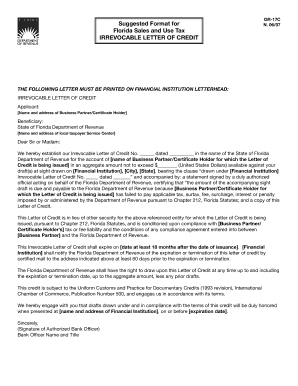
T: Name and address of Business Partner/Certificate Holder Beneficiary: State of Florida Department of Revenue Name and address of local taxpayer Service Center Dear Sir or Madam: We hereby establish our Irrevocable Letter of Credit No. dated in the name of the State of Florida Department of Revenue for the account of name of Business Partner/Certificate Holder for which the Letter of Credit is being issued in an aggregate amount not to exceed $ (United States D.

How it works

  1. Open form

    Open form follow the instructions

  2. Easily sign form

    Easily sign the form with your finger

  3. Share form

    Send filled & signed form or save

How to fill out the FL DR-17C online

The FL DR-17C form is essential for establishing an irrevocable letter of credit for tax compliance with the State of Florida Department of Revenue. This guide will provide you with clear and straightforward steps to complete this form online.

Follow the steps to accurately complete the FL DR-17C form.

  1. Click ‘Get Form’ button to obtain the FL DR-17C form and open it in an editable format.
  2. On the form, enter the applicant’s details in the designated section, including the name and address of the business partner or certificate holder.
  3. Fill in the beneficiary information with the details of the Florida Department of Revenue, including the specific address of your local taxpayer service center.
  4. In the main body of the letter, enter the unique letter of credit number and the date of issuance under the appropriate fields.
  5. Specify the aggregate amount of the letter of credit in United States Dollars, ensuring it does not exceed the maximum limit set by regulations.
  6. Designate your financial institution's name and address, including the city and state where it is located.
  7. Include a statement regarding the conditions for drawing the letter of credit, specifying the tax liabilities of the business partner or certificate holder.
  8. Indicate the expiration date of the letter of credit, ensuring it is at least 18 months after the date of issuance.
  9. Finally, a duly authorized bank officer must sign the letter. Include their name and title in the appropriate fields.
  10. Review all the filled information for accuracy, then save changes, and choose to download, print, or share the completed form as needed.

Complete your FL DR-17C form online to ensure compliance and facilitate your tax matters efficiently.

Get form

Experience a faster way to fill out and sign forms on the web. Access the most extensive library of templates available.

Related content

AC 150/5210-17C, Programs for Training of Aircraft...
Jun 12, 2015 — This AC provides information on ARFF training courses and materials, and...
Learn more
Guidelines for Determining Flood Flow Frequency...
The unit of publication, the chapter, is limited to a narrow field of subject matter...
Learn more
SERVICE INSTRUCTIONS
TO AVOID POSSIBLE FROST-. BITE OR BLINDNESS, AVOID CONTACT WITH REFRIGERANT AND WEAR...
Learn more

Related links form

AK CR-769 FBKS 2013 AK CR-771 NOME 2012 AK CR-772 2016 AK CR-786 ANCH 2014

Questions & Answers

Get answers to your most pressing questions about US Legal Forms API.

Contact support

Calculating the collection allowance in Florida sales tax involves understanding the permitted amount you can retain from the tax collected on sales. You can find this information on the FL DR-17C form, which provides guidance on deductions. Following the instructions correctly ensures that you maximize your allowable retention. Review your calculations carefully to maintain accuracy.

Filing your Florida state tax return typically involves completing the appropriate forms provided by the Florida Department of Revenue. While Florida does not have a state income tax, you should focus on sales tax filings such as the FL DR-17C when applicable. Always confirm the types of income and deductions relevant to your situation. Ensure that you submit your return by the required deadlines.

To file Florida sales tax, you need to complete the FL DR-15 or FL DR-17C form, depending on your needs. Make sure to report all taxable sales accurately and calculate your tax liability. Florida allows both paper filings and electronic submissions for convenience. You can choose the method that works best for you.

Filing Florida sales tax late can result in a penalty ranging from 10% to 20% of the unpaid tax amount. If you need to amend a previously filed return, remember to use the FL DR-17C form for clarity. Timely filing helps avoid these penalties and keeps your tax obligations in good standing. Consider setting reminders to help you meet your deadlines.

You can file an amended return electronically by using the FL DR-17C form through the Florida Department of Revenue’s online portal. This method is efficient and provides confirmation once you submit your amendment. Just be sure to choose the electronic filing option on the site and follow the prompts. This method helps ensure that your records are updated promptly.

To amend a tax return in Florida, you will need to submit the FL DR-17C form, indicating the changes you wish to make. Ensure that you have the original return on hand to reference any necessary corrections. By accurately completing the FL DR-17C, you can smoothly transition your amendment. Always keep a copy for your records.

Filing an amended sales tax return in Florida requires you to submit a corrected return using the FL DR-17C form. Make sure to indicate that you are amending a previous return. For convenience, you can utilize the online filing options available through the Florida Department of Revenue. This streamlines the process and helps you track your submission.

To apply for a sales tax refund in Florida, you should use the FL DR-17C form. This form allows you to detail the sales tax amount you are claiming. Be sure to fill out all sections accurately to avoid processing delays. You can download the FL DR-17C from the Florida Department of Revenue's website.

A tax certificate sale in Florida occurs when a government sells a certificate to recover unpaid property taxes. This certificate allows the buyer to collect the owed amount plus interest from the property owner. The process is governed by Florida law, and participating in a tax certificate sale can be a strategic investment. For detailed information and assistance, check uslegalforms.

To get a reemployment tax ID in Florida, you need to register with the Florida Department of Revenue. Start by visiting their website and completing the FL DR-17C form. After your application is processed, you will receive your tax ID. Using uslegalforms can also help simplify the paperwork required for this process.

Get This Form Now!

Use professional pre-built templates to fill in and sign documents online faster. Get access to thousands of forms.
If you believe that this page should be taken down, please follow our DMCA take down processhere.

Industry-leading security and compliance

US Legal Forms protects your data by complying with industry-specific security standards.
  • In businnes since 1997
    25+ years providing professional legal documents.
  • Accredited business
    Guarantees that a business meets BBB accreditation standards in the US and Canada.
  • Secured by Braintree
    Validated Level 1 PCI DSS compliant payment gateway that accepts most major credit and debit card brands from across the globe.
Get FL DR-17C
  • Adoption
  • Bankruptcy
  • Contractors
  • Divorce
  • Home Sales
  • Employment
  • Identity Theft
  • Incorporation
  • Landlord Tenant
  • Living Trust
  • Name Change
  • Personal Planning
  • Small Business
  • Wills & Estates
  • Packages A-Z
  • Affidavits
  • Bankruptcy
  • Bill of Sale
  • Corporate - LLC
  • Divorce
  • Employment
  • Identity Theft
  • Internet Technology
  • Landlord Tenant
  • Living Wills
  • Name Change
  • Power of Attorney
  • Real Estate
  • Small Estates
  • Wills
  • All Forms
  • Forms A-Z
  • Form Library
  • Legal Hub
  • About Us
  • Help Portal
  • Legal Resources
  • Blog
  • Affiliates
  • Contact Us
  • Delete My Account
  • Site Map
  • Industries
  • Forms in Spanish
  • Localized Forms
  • State-specific Forms
  • Forms Kit
  • Real Estate Handbook
  • All Guides
  • Notarize
  • Incorporation services
  • For Consumers
  • For Small Business
  • For Attorneys
  • USLegal
  • FormsPass
  • pdfFiller
  • signNow
  • altaFlow
  • DocHub
  • Instapage
Form Packages
  • Adoption
  • Bankruptcy
  • Contractors
  • Divorce
  • Home Sales
  • Employment
  • Identity Theft
  • Incorporation
  • Landlord Tenant
  • Living Trust
  • Name Change
  • Personal Planning
  • Small Business
  • Wills & Estates
  • Packages A-Z
Form Categories
  • Affidavits
  • Bankruptcy
  • Bill of Sale
  • Corporate - LLC
  • Divorce
  • Employment
  • Identity Theft
  • Internet Technology
  • Landlord Tenant
  • Living Wills
  • Name Change
  • Power of Attorney
  • Real Estate
  • Small Estates
  • Wills
  • All Forms
  • Forms A-Z
  • Form Library
Customer Service
  • Legal Hub
  • About Us
  • Help Portal
  • Legal Resources
  • Blog
  • Affiliates
  • Contact Us
  • Delete My Account
  • Site Map
  • Industries
  • Forms in Spanish
  • Localized Forms
  • State-specific Forms
  • Forms Kit
Legal Guides
  • Real Estate Handbook
  • All Guides
Prepared for you
  • Notarize
  • Incorporation services
Our Customers
  • For Consumers
  • For Small Business
  • For Attorneys
Our Sites
  • USLegal
  • FormsPass
  • pdfFiller
  • signNow
  • altaFlow
  • DocHub
  • Instapage
Social Media
Call us now toll free:
+1 833 426 79 33
As seen in:
© Copyright 1999-2026 airSlate Legal Forms, Inc. 3720 Flowood Dr, Flowood, Mississippi 39232
  • Your Privacy Choices
  • Terms of Service
  • Privacy Notice
  • Content Takedown Policy
  • Bug Bounty Program
FL DR-17C
This form is available in several versions.
Select the version you need from the drop-down list below.
2015 FL DR-17C
Select form
  • 2015 FL DR-17C
  • 2007 FL DR-17C
Select form