Loading
Form preview
  • US Legal Forms
  • Form Library
  • Tax Forms
  • Florida Tax Forms
  • Fl Dr-176 2009

Get Fl Dr-176 2009-2026

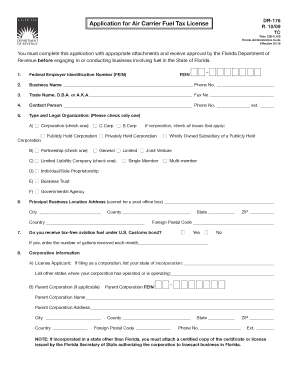
Ive approval by the Florida Department of Revenue before engaging in or conducting business involving fuel in the State of Florida. 1. Federal Employer Identification Number (FEIN) FEIN 2. Business Name Phone No. 3. Trade Name, D.B.A. or A.K.A. Fax No. 4. Contact Person.

How it works

  1. Open form

    Open form follow the instructions

  2. Easily sign form

    Easily sign the form with your finger

  3. Share form

    Send filled & signed form or save

How to fill out the FL DR-176 online

The FL DR-176 form is an essential application for obtaining an air carrier fuel tax license in Florida. This guide provides clear, step-by-step instructions to assist you in completing the form accurately and efficiently.

Follow the steps to fill out the FL DR-176 online successfully.

  1. Click ‘Get Form’ button to access the FL DR-176 application and open it for editing.
  2. Enter your Federal Employer Identification Number (FEIN) in the designated field. This number is crucial for your business identification.
  3. Provide your business name and phone number in the respective fields. Ensure that both entries are complete and accurate.
  4. Include your trade name, doing business as (DBA) name, and fax number, if applicable. This helps clarify your business identity.
  5. Assign a contact person for your application. Fill in their name, phone number, and ext. for any inquiries related to your submission.
  6. Select your organization's type and legal structure by checking only one option from the list provided (e.g., Corporation, Partnership, Individual/Sole Proprietorship). Make sure to clarify your selection where applicable.
  7. Complete your principal business location address accurately, avoiding post office box addresses. Include city, county, state, country, and ZIP code.
  8. Indicate if you receive tax-free aviation fuel under U.S. Customs bond and specify the amount received monthly if applicable.
  9. For corporations, provide additional information such as the state of incorporation and other operating states. Include parent corporation details if applicable, as well as its FEIN.
  10. List personnel or partners involved with your entity, including their full name, SSN (if individual), FEIN (if applicable), and their address. Repeat for each person in a corporate structure.
  11. Review the affidavit section and ensure you or the authorized individual verifies the application by signing and providing the necessary notary information.
  12. Save your changes and prepare to file. You can download, print, or share your completed application as needed, ensuring you send it to the appropriate address with the required fee.

Complete your FL DR-176 application online today and take the first step towards obtaining your air carrier fuel tax license.

Get form

Experience a faster way to fill out and sign forms on the web. Access the most extensive library of templates available.
Get form

Related content

Florida Hurricane Dora
Dec 20, 2022 — Florida Hurricane Dora. DR-176-FL. Florida. Incident Period: Sep 10...
Learn more
Florida Frontiers Radio Program #176
by DB Brotemarkle · 2014 — Florida Frontiers Radio Program #176 · Author(s). Dr. Ben...
Learn more
Motores CA
Jul 7, 2017 — DR..71 – DR..225. DRN80 – 225. Tensão de alimentação. VB. 5 VCC. 9...
Learn more

Related links form

AK CR-311 2012 AK CR-312 2005 AK CR-316 2015 AK CR-320 2013

Questions & Answers

Get answers to your most pressing questions about US Legal Forms API.

Contact support

A business partner number serves as a unique identifier for business partners in Florida, often used in various legal and tax-related documents. It helps the state keep track of business affiliations and responsibilities. If you want to learn more about this aspect of business registration, exploring the US Legal Forms platform may provide valuable insights.

You can acquire a Florida Blue tax form from the Florida Department of Revenue’s website, where they provide downloadable versions. Ensure to check for the specific year you need. If you require assistance with this process, the US Legal Forms platform can guide you on how to fill out these forms correctly.

Getting your Florida annual resale certificate for sales tax involves completing an application available online. Make sure to have your business information ready and verify any requirements outlined by the state. The US Legal Forms platform is a valuable resource that can help you along your application process.

To locate your Florida business partner number, you can check your business registration documents. Alternatively, visiting the Florida Division of Corporations website will offer you easy access to this information. Additionally, using platforms like US Legal Forms can guide you through the process efficiently.

Finding your Florida RT number is straightforward if you access your tax documents, as it is usually listed there. If you need further guidance, the Florida Department of Revenue can provide assistance. You may also benefit from the resources available on the US Legal Forms platform to help you locate this information.

No, a resale certificate is not the same as a tax ID. A tax ID is an identifier for your business used in various federal and state tax-related obligations. The resale certificate, however, specifically enables tax-exempt purchases for resale purposes. Consulting the US Legal Forms platform can help clarify these distinctions.

You can find your business partner number in your business registration files or through the Florida Division of Corporations website. Additionally, accessing the US Legal Forms platform may provide you with tools to streamline your search for this number. Do not hesitate to reach out for help if you encounter difficulties.

You can locate your business certificate number by checking your official business registration documents. Typically, the number appears on documents issued by the Florida Department of State. If you need assistance, consider visiting the US Legal Forms platform, where you can find resources to navigate your business registration.

Filing an insurance claim in Florida typically involves notifying your insurance company about the incident. Be prepared to provide documents and details claimed in your FL DR-176 and any other relevant forms. Follow your insurer's specific instructions for filing the claim, and keep a record of all communications. Using platforms like USLegalForms can provide additional resources to help streamline the claim process.

To file for summary administration in Florida without a lawyer, you should begin by collecting all necessary documentation. Use the appropriate forms, including the FL DR-176 where applicable, available online from the Florida court system. Follow the provided instructions carefully to ensure all details are accurate before filing. Online services, such as USLegalForms, can simplify this process for you.

Get This Form Now!

Use professional pre-built templates to fill in and sign documents online faster. Get access to thousands of forms.
Get form
If you believe that this page should be taken down, please follow our DMCA take down processhere.
Get FL DR-176
Get form
  • Adoption
  • Bankruptcy
  • Contractors
  • Divorce
  • Home Sales
  • Employment
  • Identity Theft
  • Incorporation
  • Landlord Tenant
  • Living Trust
  • Name Change
  • Personal Planning
  • Small Business
  • Wills & Estates
  • Packages A-Z
  • Affidavits
  • Bankruptcy
  • Bill of Sale
  • Corporate - LLC
  • Divorce
  • Employment
  • Identity Theft
  • Internet Technology
  • Landlord Tenant
  • Living Wills
  • Name Change
  • Power of Attorney
  • Real Estate
  • Small Estates
  • Wills
  • All Forms
  • Forms A-Z
  • Form Library
  • Legal Hub
  • About Us
  • Help Portal
  • Legal Resources
  • Blog
  • Affiliates
  • Contact Us
  • Delete My Account
  • Site Map
  • Industries
  • Forms in Spanish
  • Localized Forms
  • State-specific Forms
  • Forms Kit
  • Real Estate Handbook
  • All Guides
  • Notarize
  • Incorporation services
  • For Consumers
  • For Small Business
  • For Attorneys
  • USLegal
  • FormsPass
  • pdfFiller
  • signNow
  • altaFlow
  • DocHub
  • Instapage
Form Packages
  • Adoption
  • Bankruptcy
  • Contractors
  • Divorce
  • Home Sales
  • Employment
  • Identity Theft
  • Incorporation
  • Landlord Tenant
  • Living Trust
  • Name Change
  • Personal Planning
  • Small Business
  • Wills & Estates
  • Packages A-Z
Form Categories
  • Affidavits
  • Bankruptcy
  • Bill of Sale
  • Corporate - LLC
  • Divorce
  • Employment
  • Identity Theft
  • Internet Technology
  • Landlord Tenant
  • Living Wills
  • Name Change
  • Power of Attorney
  • Real Estate
  • Small Estates
  • Wills
  • All Forms
  • Forms A-Z
  • Form Library
Customer Service
  • Legal Hub
  • About Us
  • Help Portal
  • Legal Resources
  • Blog
  • Affiliates
  • Contact Us
  • Delete My Account
  • Site Map
  • Industries
  • Forms in Spanish
  • Localized Forms
  • State-specific Forms
  • Forms Kit
Legal Guides
  • Real Estate Handbook
  • All Guides
Prepared for you
  • Notarize
  • Incorporation services
Our Customers
  • For Consumers
  • For Small Business
  • For Attorneys
Our Sites
  • USLegal
  • FormsPass
  • pdfFiller
  • signNow
  • altaFlow
  • DocHub
  • Instapage
Social Media
Call us now toll free:
+1 833 426 79 33
As seen in:
© Copyright 1999-2026 airSlate Legal Forms, Inc. 3720 Flowood Dr, Flowood, Mississippi 39232
  • Your Privacy Choices
  • Terms of Service
  • Privacy Notice
  • Content Takedown Policy
  • Bug Bounty Program