Loading
Form preview
  • US Legal Forms
  • Form Library
  • Tax Forms
  • Arizona Tax Forms
  • Az Form 140 2018

Get Az Form 140 2018

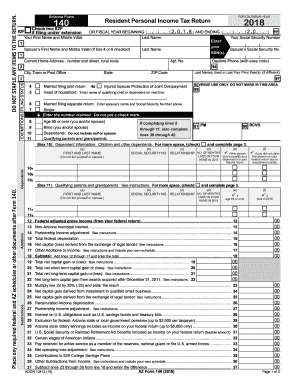
Ort-term capital gain or (loss): See instructions..................................................... 20 Total net long-term capital gain or (loss): See instructions....................................................... 21 Net long-term capital gain from assets acquired after December 31, 2011. See instructions.. 22 Multiply line 22 by 25% (.25) and enter the result........................................................................................................ Net capital gain deri.

How it works

  1. Open form

    Open form follow the instructions

  2. Easily sign form

    Easily sign the form with your finger

  3. Share form

    Send filled & signed form or save

How to fill out the AZ Form 140 online

Filling out the Arizona Form 140 online is a straightforward process that enables you to submit your personal income tax return accurately and efficiently. This guide offers clear and detailed instructions to help users navigate each section of the form confidently.

Follow the steps to complete the AZ Form 140 online effectively.

  1. Press the ‘Get Form’ button to obtain the form and open it in your online editor.
  2. Begin by entering your personal information. Fill in your name, address, and Social Security number correctly to ensure proper identification.
  3. Indicate your filing status. Choose between options such as Married Filing Joint, Head of Household, or Single by checking the appropriate box.
  4. List any dependents you are claiming. Provide their names, Social Security numbers, and the relationship to you. Ensure you account for all qualifying dependents for maximum exemptions.
  5. Input your adjusted gross income as reported on your federal return. Add any state-adjusted amounts as necessary.
  6. Complete the sections for subtractions and additions to income, carefully detailing any relevant adjustments such as exemptions for age or blindness.
  7. Calculate your Arizona taxable income by subtracting appropriate deductions from your adjusted gross income.
  8. Determine your tax liability using the provided tax tables, and enter the total in the designated field.
  9. If applicable, calculate any potential credits. This includes family income tax credits and other refundable credits, which can reduce your overall tax owed.
  10. Finalize your form by reviewing all entered data. Make any necessary corrections, then proceed to save, download, or print your completed form for submission.

Start filling out the AZ Form 140 online to ensure your tax return is submitted accurately and on time.

Get form

Experience a faster way to fill out and sign forms on the web. Access the most extensive library of templates available.

Related content

Form 140 - Resident Personal Income Tax Form...
You must use Form 140 if any of the following apply: Your Arizona taxable income is...
Learn more
Arizona Booklet 140PTC
Use Arizona Form 140PTC to file an original claim for the property tax credit. If you are...
Learn more
Z97M-PLUS
Z97M-PLUS features Gigabit LAN design which complies with 802.3az Energy Efficient...
Learn more

Related links form

FL DR-15JEZ 2009 FL DR-15MO 2016 FL DR-15MO 2013 FL DR-15MO 2010

Questions & Answers

Get answers to your most pressing questions about US Legal Forms API.

Contact support

Arizona Form 285 is typically sent to the Arizona Department of Revenue, but you should always confirm the mailing address based on the instructions provided for that specific form. This ensures your form gets processed quickly and accurately. If in doubt, check the Arizona Department of Revenue's website or consult a tax professional for guidance. Ensuring proper submission of AZ Form 285 supports your overall tax compliance.

To send your tax forms by mail, first ensure you have completed all necessary forms accurately. Place your Arizona Form 140 and any other required documents in an envelope and seal it. It's also good practice to include any check if you owe taxes. Lastly, use a reliable mailing option like certified or registered mail to confirm that your documents reach the appropriate tax authority.

If you're referring to the Pennsylvania PA-40 form, you should mail it to the Pennsylvania Department of Revenue, specifically to the address provided on the form. However, if you’re focusing on Arizona state taxes, remember to concentrate on the AZ Form 140. To make the mailing process easier, ensure you have the correct address and consider using certified mail for tracking purposes.

You can mail your Arizona Form 140 to different addresses based on whether you are enclosing a payment. If you owe taxes, send your form to the Arizona Department of Revenue, P.O. Box 29079, Phoenix, AZ 85038-9079. If you are expecting a refund or filing without a payment, you should mail it to the Arizona Department of Revenue, P.O. Box 52138, Phoenix, AZ 85072-2138. Be sure to check your mailing address against the latest guidelines to ensure proper delivery.

The Arizona Form 140 is the state individual income tax return used by residents of Arizona. It helps you report your income, calculate taxes owed, and claim any credits. Completing this form is essential to ensure you comply with state tax laws and receive any applicable refunds. Using AZ Form 140 can simplify your filing process, making it easier to manage your state tax obligations.

To obtain a property tax exemption in Arizona, you need to file the appropriate application with your county assessor's office. Requirements may include proof of income, age, or disability status. Exploring resources offered by US Legal Forms can provide you with the necessary documentation and assistance throughout the application process.

Eligibility for a tax credit usually depends on your income level, filing status, and specific deductions or contributions made during the tax year. For credits specific to Arizona, such as those noted on AZ Form 140, requirements can vary, so it's best to review the Arizona Department of Revenue site or consult tax resources for more information.

To qualify for an AZ tax credit, you generally need to meet specific income thresholds and file the appropriate forms, including AZ Form 140. Eligible expenses might include contributions to schools or donations to qualifying charities. Each tax year may have different qualifications, so always check current guidelines.

In Arizona, seniors do not automatically stop paying property taxes based on age alone. However, those who are 65 or older may qualify for certain property tax exemptions or deferrals. To learn more about these options, consider reviewing options like the Arizona property tax credit process, which might provide some relief.

You can access AZ tax forms, including AZ Form 140, through several sources. The Arizona Department of Revenue website offers downloadable forms directly. Additionally, you can find forms at many local libraries, post offices, and online platforms like US Legal Forms, which provides easy access to necessary documents.

Get This Form Now!

Use professional pre-built templates to fill in and sign documents online faster. Get access to thousands of forms.
If you believe that this page should be taken down, please follow our DMCA take down processhere.

Industry-leading security and compliance

US Legal Forms protects your data by complying with industry-specific security standards.
  • In businnes since 1997
    25+ years providing professional legal documents.
  • Accredited business
    Guarantees that a business meets BBB accreditation standards in the US and Canada.
  • Secured by Braintree
    Validated Level 1 PCI DSS compliant payment gateway that accepts most major credit and debit card brands from across the globe.
Get AZ Form 140
  • Adoption
  • Bankruptcy
  • Contractors
  • Divorce
  • Home Sales
  • Employment
  • Identity Theft
  • Incorporation
  • Landlord Tenant
  • Living Trust
  • Name Change
  • Personal Planning
  • Small Business
  • Wills & Estates
  • Packages A-Z
  • Affidavits
  • Bankruptcy
  • Bill of Sale
  • Corporate - LLC
  • Divorce
  • Employment
  • Identity Theft
  • Internet Technology
  • Landlord Tenant
  • Living Wills
  • Name Change
  • Power of Attorney
  • Real Estate
  • Small Estates
  • Wills
  • All Forms
  • Forms A-Z
  • Form Library
  • Legal Hub
  • About Us
  • Help Portal
  • Legal Resources
  • Blog
  • Affiliates
  • Contact Us
  • Delete My Account
  • Site Map
  • Industries
  • Forms in Spanish
  • Localized Forms
  • State-specific Forms
  • Forms Kit
  • Real Estate Handbook
  • All Guides
  • Notarize
  • Incorporation services
  • For Consumers
  • For Small Business
  • For Attorneys
  • USLegal
  • FormsPass
  • pdfFiller
  • signNow
  • altaFlow
  • DocHub
  • Instapage
Form Packages
  • Adoption
  • Bankruptcy
  • Contractors
  • Divorce
  • Home Sales
  • Employment
  • Identity Theft
  • Incorporation
  • Landlord Tenant
  • Living Trust
  • Name Change
  • Personal Planning
  • Small Business
  • Wills & Estates
  • Packages A-Z
Form Categories
  • Affidavits
  • Bankruptcy
  • Bill of Sale
  • Corporate - LLC
  • Divorce
  • Employment
  • Identity Theft
  • Internet Technology
  • Landlord Tenant
  • Living Wills
  • Name Change
  • Power of Attorney
  • Real Estate
  • Small Estates
  • Wills
  • All Forms
  • Forms A-Z
  • Form Library
Customer Service
  • Legal Hub
  • About Us
  • Help Portal
  • Legal Resources
  • Blog
  • Affiliates
  • Contact Us
  • Delete My Account
  • Site Map
  • Industries
  • Forms in Spanish
  • Localized Forms
  • State-specific Forms
  • Forms Kit
Legal Guides
  • Real Estate Handbook
  • All Guides
Prepared for you
  • Notarize
  • Incorporation services
Our Customers
  • For Consumers
  • For Small Business
  • For Attorneys
Our Sites
  • USLegal
  • FormsPass
  • pdfFiller
  • signNow
  • altaFlow
  • DocHub
  • Instapage
Social Media
Call us now toll free:
+1 833 426 79 33
As seen in:
© Copyright 1999-2026 airSlate Legal Forms, Inc. 3720 Flowood Dr, Flowood, Mississippi 39232
  • Your Privacy Choices
  • Terms of Service
  • Privacy Notice
  • Content Takedown Policy
  • Bug Bounty Program
AZ Form 140
This form is available in several versions.
Select the version you need from the drop-down list below.
2023 AZ Form 140
Select form
  • 2023 AZ Form 140
  • 2022 AZ Form 140
  • 2021 AZ Form 140
  • 2020 AZ Form 140
  • 2019 AZ Form 140
  • 2018 AZ Form 140
  • 2017 AZ Form 140
  • 2016 AZ Form 140
  • Arizona Form 140 Fillable 2020
Select form