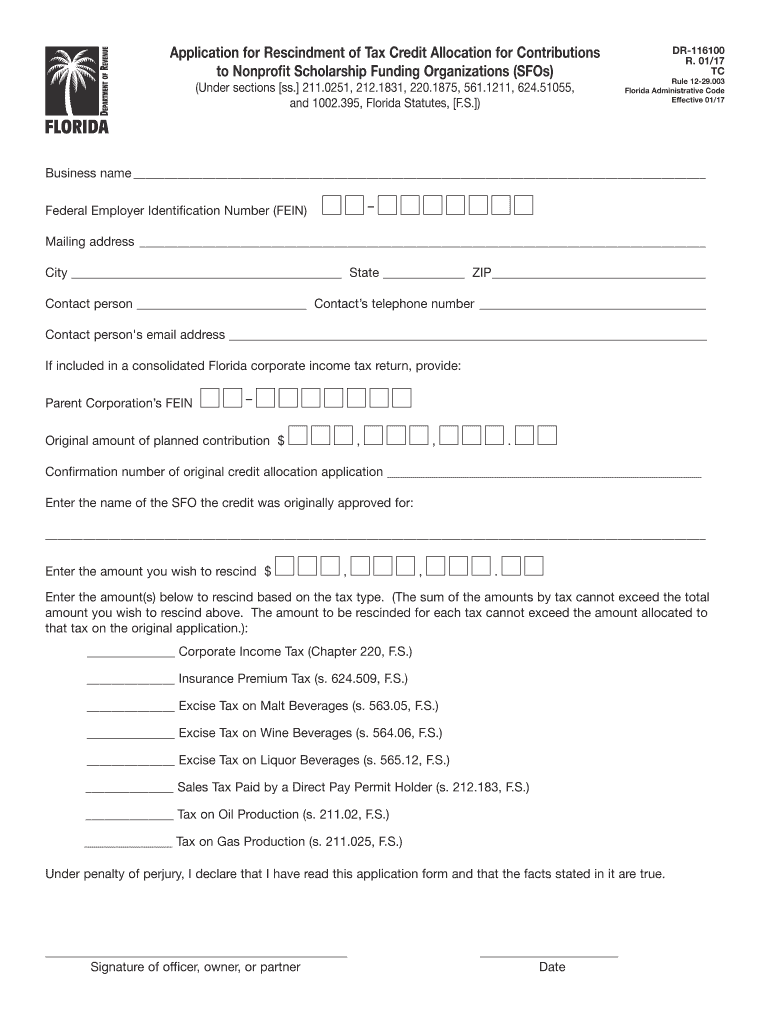
Application for Rescindment of Tax Credit Allocation for Contributions to Nonprofit Scholarship Funding Organizations (SFOs) (Under sections ss. 211.0251, 212.1831, 220.1875, 561.1211, 624.51055,.
Loading

Open form follow the instructions

Easily sign the form with your finger

Send filled & signed form or save
How to fill out the FL DR-116100 online
The FL DR-116100 form is used to apply for the rescindment of tax credit allocations for contributions made to nonprofit scholarship funding organizations. This guide provides clear and detailed instructions on how to complete the form online, ensuring that users can navigate the process easily, regardless of their legal experience.
Follow the steps to complete the FL DR-116100 form online.
- Click the ‘Get Form’ button to access the FL DR-116100 form and open it in your preferred editing tool.
- Begin by entering your business name in the designated field provided on the form.
- Input your Federal Employer Identification Number (FEIN) carefully to ensure accuracy.
- Fill in your mailing address, including the city, state, and ZIP code to facilitate correspondence.
- Provide the contact person's name, telephone number, and email address for any follow-up inquiries.
- If applicable, enter the Parent Corporation’s FEIN if you are part of a consolidated Florida corporate income tax return.
- State the original amount of the planned contribution in the allocated field.
- Enter the confirmation number of your original credit allocation application for reference.
- Indicate the name of the scholarship funding organization (SFO) that the credit was originally approved for.
- Specify the amount you wish to rescind, ensuring it aligns with the original allocation.
- Detail the amounts you wish to rescind based on each tax type listed, ensuring the total does not exceed your stated rescindment amount.
- Sign the form, indicating your position as an officer, owner, or partner, and include the date of signature.
- After completing the form, save your changes, and ensure to download or print it for your records. You can also share the form as needed.
Complete your FL DR-116100 form online today to efficiently manage your tax credit allocations.
Experience a faster way to fill out and sign forms on the web. Access the most extensive library of templates available.
Related content
House report on DEPARTMENT OF THE INTERIOR, ENVIRONMENT, AND RELATED AGENCIES...
Office 432 Newell Drive E109 CSE Gainesville FL 32611 homeMailing P.O. Box 116100...
INTRODUCTION . . . . . . . . . . . . . . . . . . . 4-1. ANALOG INPUT CONNECTIONS . . . ....
Get answers to your most pressing questions about US Legal Forms API.
How do I speak to someone at the Department of Revenue in Florida?
If you are looking to speak to someone at the Department of Revenue in Florida, you can call their main line at 1-800-352-3671. This line connects you to representatives who are trained to assist you with various tax-related inquiries, including those linked to FL DR-116100. Engaging directly with them can provide you clarity and support.
What is the phone number for the Florida Department of Revenue Collections?
You can contact the Florida Department of Revenue Collections by calling 1-800-352-3671. This number connects you to representatives who are well-equipped to handle your inquiries and concerns. For queries related to the FL DR-116100, having direct access to the collections department is advantageous.
What is the personal income tax form for Florida?
Florida is one of the few states that does not impose a personal income tax, so there is no specific form required for that purpose. However, residents should be aware of various tax forms for other obligations. If you need further guidance on related matters, the FL DR-116100 can provide valuable resources.
What is a power of attorney for sales tax in Florida?
A power of attorney for sales tax in Florida allows an individual to grant authority to another person to act on their behalf in tax matters. This is particularly useful for managing sales tax obligations effectively. You can streamline your dealings with the Florida Department of Revenue, especially concerning FL DR-116100, by utilizing this legal tool.
Does Florida collect sales tax on out of state purchases?
Yes, Florida typically requires sales tax on certain out of state purchases if the seller has nexus in Florida. This requirement is part of the state's effort to maintain fairness and compliance within its tax system. Understanding your obligations regarding the FL DR-116100 can help you stay in line with these regulations.
What is the phone number for the Florida Department of Revenue out of state collections unit?
To reach the Florida Department of Revenue out of state collections unit, you can dial their dedicated phone line at 1-800-352-3671. This ensures you connect directly with knowledgeable professionals who can provide assistance specific to your needs regarding the FL DR-116100. Having this number on hand can simplify your inquiries and facilitate quicker resolutions.
Who needs a business tax receipt in Florida?
Any business operating in Florida is typically required to obtain a business tax receipt, also known as an occupational license. This receipt ensures that your enterprise complies with local regulations and permits. Learning about requirements and processes outlined in forms like FL DR-116100 is essential for staying compliant. You can utilize uslegalforms to streamline the application process for your business tax receipt.
What is a Florida Department of Revenue Notice of Final Assessment?
A Florida Department of Revenue Notice of Final Assessment is an official document that outlines the findings of an audit or assessment of a taxpayer’s obligations. This notice informs you of any taxes due and provides options for contesting or addressing the assessment. Understanding your rights under FL DR-116100 can help you respond effectively. If you need assistance, uslegalforms offers resources to help you navigate this process.
Do I need to file Florida DR 405?
The Florida DR 405 form is specifically for those claiming exemptions for sales tax. If your business qualifies for such exemptions, you will indeed need to file this form. It's vital to understand your responsibilities under the FL DR-116100 guidelines to ensure that all required forms, including the DR 405, are submitted accurately. You can find support on uslegalforms to navigate this requirement.
What is the corporate tax form for Florida?
The corporate tax form for Florida is known as the Florida Corporate Income Tax Return, or Form F-1120. This form is essential for corporations operating in the state to report their income and calculate their tax liability. To ensure compliance, businesses should also understand forms related to tax obligations, such as FL DR-116100. Utilizing uslegalforms can assist you in correctly filing this form.
Use professional pre-built templates to fill in and sign documents online faster. Get access to thousands of forms.
If you believe that this page should be taken down, please follow our DMCA take down process here.
This form is available in several versions. Select the version you need from the drop-down list below.