Loading
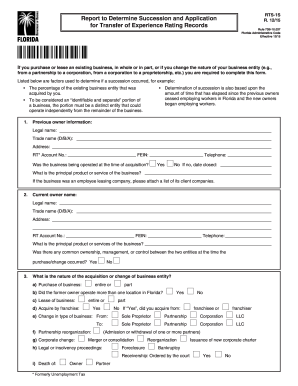
Get Fl Dor Rts-1s 2015
How it works
-

Open form follow the instructions
-

Easily sign the form with your finger
-

Send filled & signed form or save
How to fill out the FL DoR RTS-1S online
The FL DoR RTS-1S form is essential for individuals and entities undergoing the transfer of experience rating records when acquiring an existing business or changing the type of business entity. This guide provides clear step-by-step instructions on how to accurately complete the form online.
Follow the steps to successfully complete the FL DoR RTS-1S form.
- Press the ‘Get Form’ button to access the FL DoR RTS-1S form and open it in your editing interface.
- Begin by filling in the previous owner information. This includes the legal name, trade name (doing business as), address, RT account number, FEIN, and telephone number. Indicate whether the business was operational at the time of acquisition and describe the principal product or service offered.
- Next, provide the current owner’s information in the same manner. Fill in the legal name, trade name, address, RT account number, FEIN, telephone number, and the principal product or service. Specify if there was any common ownership or management between the previous and current entities at the time of the acquisition.
- Detail the nature of the acquisition or change in business entity. Indicate whether it was a purchase, lease, franchise acquisition, or change in business type. Be clear on whether the former owner managed multiple locations in Florida and provide necessary particulars.
- Record the date of acquisition and confirm whether the entire business was acquired. If yes, complete section 5(a). If no, use section 5(b) or 5(c) as appropriate. Clearly indicate whether you are claiming total succession or partial succession, and provide the required information for either option.
- For total succession, acknowledge responsibility for any outstanding debts related to wages for the previous employees. Include your signature, printed name, position/title, and date in the corresponding fields.
- If opting for partial succession, ensure to attach or electronically submit the List of Employees to be Transferred if applicable. Like total succession, provide your signature, printed name, title, and date.
- If you are rejecting the transfer of employment records, complete section 5(c) with your signature, printed name, title, and date.
- Once all sections and fields are accurately completed, review the form for errors and completeness. Users can then save changes, download, print, or share the completed form as needed.
Complete your FL DoR RTS-1S form online for a seamless transition in your business records.
Get form
Experience a faster way to fill out and sign forms on the web. Access the most extensive library of templates available.
Related links form
A Florida Department of Revenue Notice of Final Assessment is an official statement informing you of the final determination regarding your tax obligations. This notice will detail the amounts owed, if any, and the reasons behind the assessment. Understanding the FL DoR RTS-1S can help you respond correctly to such notices.
Get This Form Now!
Use professional pre-built templates to fill in and sign documents online faster. Get access to thousands of forms.