Loading
Form preview
  • US Legal Forms
  • Other Templates
  • Tax Forms
  • Florida Tax Forms
  • Fl Dor Rt-6a 2013

Get Fl Dor Rt-6a 2013

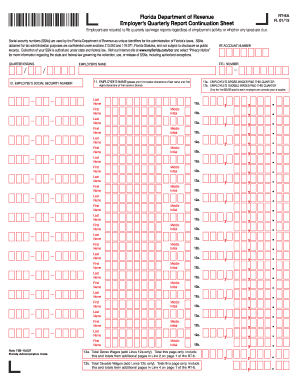
Florida Department of Revenue Employer s Quarterly Report Continuation Sheet RT-6A R. 01/13 Employers are required to file quarterly tax/wage reports regardless of employment activity or whether any taxes are due. Social security numbers SSNs are used by the Florida Department of Revenue as unique identifiers for the administration of Florida s taxes. SSNs obtained for tax administration purposes are confidential under sections 213. 053 and 119. 071 Florida Statutes and not subject to disclosure.

How it works

  1. Open form

    Open form follow the instructions

  2. Easily sign form

    Easily sign the form with your finger

  3. Share form

    Send filled & signed form or save

How to fill out the FL DoR RT-6A online

The FL DoR RT-6A is an essential form for employers in Florida, required for filing quarterly tax and wage reports. This guide will provide you with detailed steps to complete this form online with ease.

Follow the steps to successfully complete the FL DoR RT-6A online.

  1. Click ‘Get Form’ button to access the document and open it in your preferred editing tool.
  2. Begin by filling in the quarter ending date and the Florida Employer Identification (F.E.I.) Number at the top of the form. Ensure these details are correct before proceeding.
  3. In the section labeled 'Employer’s Name,' input the full legal name of your business as registered with the Florida Department of Revenue.
  4. For each employee, enter their Social Security Number (SSN) in the designated fields. Remember that SSNs are confidential and protected under state law.
  5. Enter each employee's name in the required format. Print the first twelve characters of the last name followed by the first eight characters of the first name. This is crucial for accurate record-keeping.
  6. Complete the 'Employee’s Gross Wages Paid This Quarter' fields (12a) by inputting the total wages each employee earned during the reporting period.
  7. In the 'Employee’s Taxable Wages Paid This Quarter' fields (12b), report only the portion of wages that is subject to taxation, which is capped at the first $8,000 paid to each employee per year.
  8. Once you have filled in all necessary fields for each employee, proceed to calculate the totals. Add the gross wages from all employees in Line 13a, which is the total for this page only.
  9. Next, total the taxable wages in Line 13b, also for this page only. These totals will be included in the RT-6 form's main reporting lines.
  10. After reviewing all entries for accuracy, you can save your changes, download, or print the form for your records or submission.

Start filling out your FL DoR RT-6A online today to ensure timely tax compliance.

Get form

Experience a faster way to fill out and sign forms on the web. Access the most extensive library of templates available.

Related content

Memorandum of Understanding Between The ...
FDOR's GTA is responsible for ensuring that employers correctly report all of their...
Learn more
Florida Payroll Tax Setup
File an Employer's Quarterly Report (Form RT-6) by the end of each month following the end...
Learn more
Conjunto de Caixas Acústicas e Receiver para Home...
Todas as tomadas de áudio digital são compatíveis com as frequências de amostragem de...
Learn more

Related links form

WI DoR WI-Z 2017 WI DoR WI-Z 2016 WI DoR WI-Z 2014 WI DoR WI-Z 2013

Questions & Answers

Get answers to your most pressing questions about US Legal Forms API.

Contact support

The Florida Department of Revenue (FL DoR) sales tax collection allowance is a provision that permits businesses to retain a percentage of collected sales tax. This allowance is designed to offset the operational costs incurred by businesses while managing sales tax compliance. Knowledge of this allowance enables you to maximize your retention and maintain effective tax management. For further insights, look into resources related to the FL DoR RT-6A.

In Florida, businesses can deduct the collection allowance from their total sales tax liability. This deduction allows businesses to retain a small portion of the sales tax collected, easing the financial burden associated with collecting and reporting taxes. Understanding how deductions work can significantly impact your business's financial management. For complete guidance, refer to the guidelines set forth in the FL DoR RT-6A.

The RT-6 report in Florida is a form that businesses use to report their sales tax collections to the Florida Department of Revenue. This form includes details about total sales, taxable sales, and the amount of sales tax collected. Filing the RT-6 accurately is essential for compliance and aids businesses in maintaining their good standing with the state. Platforms like uslegalforms simplify the process of preparing and submitting the RT-6 report.

An RT number, or Revenue Tax number, is a unique identifier assigned to businesses registered with the Florida Department of Revenue. This number facilitates the management and tracking of sales tax collections and reporting. It's crucial for any business involved in retail sales, as it ensures compliance with state tax laws. If you're new to applying for an RT number, tools like the FL DoR RT-6A can provide guidance on the process.

The threshold for sales tax in Florida is the minimum amount of taxable sales a business must reach before it is required to register for sales tax collection. Currently, businesses with gross sales over a specific limit must register with the Florida Department of Revenue (FL DoR) and comply with sales tax regulations. Staying informed about the threshold ensures your business meets its sales tax obligations effectively.

Florida sales tax collection allowance enables businesses to retain a portion of the sales tax they collect to offset the costs of tax handling. The FL DoR specifies this percentage for various businesses, making it easier for them to manage their tax obligations. It promotes efficient tax collection while supporting local businesses. By understanding the allowance, you can better navigate your compliance needs.

The collection allowance for Dr 15 in Florida refers to a percentage of sales tax that businesses can retain to cover their administrative costs of collecting sales tax. Specifically, the Florida Department of Revenue (FL DoR) allows businesses to keep a small portion of the taxes collected. This allowance helps ease the burden of compliance and encourages accurate tax collection. For more details, consider consulting the FL DoR RT-6A.

To claim your Florida sales tax refund, you need to file a refund claim with the Florida Department of Revenue. You will typically need to provide documentation, such as receipts and proof of tax payment. If your claim is successful, you will receive the refund after the FL DoR processes your request. Using tools available on platforms like uslegalforms can make this process easier and more efficient.

To acquire a reemployment tax ID in Florida, start by registering with the Florida Department of Revenue (DoR). This process often requires providing your business details and employee information. Once registered, you will receive your reemployment tax ID promptly, allowing your business to comply with state tax laws related to the FL DoR RT-6A. Having this ID helps you manage your reemployment tax responsibilities effectively.

To obtain a Florida tax ID number, you need to apply through the Florida Department of Revenue (DoR). You can complete the application online, which is convenient and efficient. Once you submit the required information, including your business details, you will receive your tax ID number directly from the FL DoR. This number is essential for managing your taxes and business transactions.

Get This Form Now!

Use professional pre-built templates to fill in and sign documents online faster. Get access to thousands of forms.
If you believe that this page should be taken down, please follow our DMCA take down processhere.
Get FL DoR RT-6A
  • Adoption
  • Bankruptcy
  • Contractors
  • Divorce
  • Home Sales
  • Employment
  • Identity Theft
  • Incorporation
  • Landlord Tenant
  • Living Trust
  • Name Change
  • Personal Planning
  • Small Business
  • Wills & Estates
  • Packages A-Z
  • Affidavits
  • Bankruptcy
  • Bill of Sale
  • Corporate - LLC
  • Divorce
  • Employment
  • Identity Theft
  • Internet Technology
  • Landlord Tenant
  • Living Wills
  • Name Change
  • Power of Attorney
  • Real Estate
  • Small Estates
  • Wills
  • All Forms
  • Forms A-Z
  • Other Templates
  • Legal Hub
  • About Us
  • Help Portal
  • Legal Resources
  • Blog
  • Affiliates
  • Contact Us
  • Delete My Account
  • Site Map
  • Industries
  • Forms in Spanish
  • Localized Forms
  • State-specific Forms
  • Forms Kit
  • Real Estate Handbook
  • All Guides
  • Notarize
  • Incorporation services
  • For Consumers
  • For Small Business
  • For Attorneys
  • USLegal
  • FormsPass
  • pdfFiller
  • signNow
  • altaFlow
  • DocHub
  • Instapage
Form Packages
  • Adoption
  • Bankruptcy
  • Contractors
  • Divorce
  • Home Sales
  • Employment
  • Identity Theft
  • Incorporation
  • Landlord Tenant
  • Living Trust
  • Name Change
  • Personal Planning
  • Small Business
  • Wills & Estates
  • Packages A-Z
Form Categories
  • Affidavits
  • Bankruptcy
  • Bill of Sale
  • Corporate - LLC
  • Divorce
  • Employment
  • Identity Theft
  • Internet Technology
  • Landlord Tenant
  • Living Wills
  • Name Change
  • Power of Attorney
  • Real Estate
  • Small Estates
  • Wills
  • All Forms
  • Forms A-Z
  • Other Templates
Customer Service
  • Legal Hub
  • About Us
  • Help Portal
  • Legal Resources
  • Blog
  • Affiliates
  • Contact Us
  • Delete My Account
  • Site Map
  • Industries
  • Forms in Spanish
  • Localized Forms
  • State-specific Forms
  • Forms Kit
Legal Guides
  • Real Estate Handbook
  • All Guides
Prepared for you
  • Notarize
  • Incorporation services
Our Customers
  • For Consumers
  • For Small Business
  • For Attorneys
Our Sites
  • USLegal
  • FormsPass
  • pdfFiller
  • signNow
  • altaFlow
  • DocHub
  • Instapage
Social Media
Call us now toll free:
+1 833 426 79 33
As seen in:
© Copyright 1999-2026 airSlate Legal Forms, Inc. 17 Station Street, Suite 303, Brookline, MA 02445
  • Your Privacy Choices
  • Terms of Service
  • Privacy Notice
  • Content Takedown Policy
  • Bug Bounty Program
FL DoR RT-6A
This form is available in several versions.
Select the version you need from the drop-down list below.
2015 FL DoR RT-6A
Select form
  • 2015 FL DoR RT-6A
  • 2013 FL DoR RT-6A
Select form