1. Documentary Stamp Tax Due DR-225 2. Surtax Due 3. Penalty 4. Interest 5. Amount Due With Return Due: Late After: Do Not Write in the Space Below , , , , , , , , , , Check here if payment was made electronically. 9100 0 99999999 0019025033 9 400009999 9999 2 Instructions for Filing Documentary Stamp Tax Return Line 1. Documentary Stamp Tax Due. Enter the total amount of documentary stamp tax collected. DR-225 R. 01/16 Sign and Date the Return. The person authorized to file t.

Open form follow the instructions

Easily sign the form with your finger

Send filled & signed form or save
How to fill out the FL DoR DR-225 online
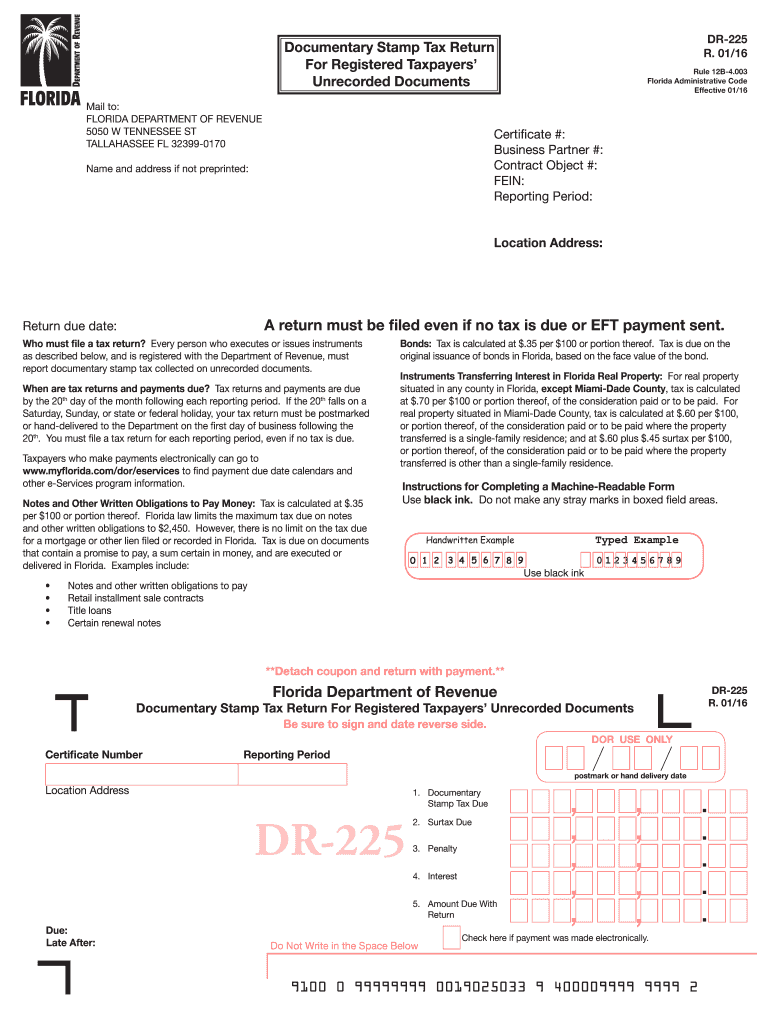
Filling out the FL DoR DR-225 online can seem daunting, but with the right guidance, you can complete this documentary stamp tax return with confidence. This guide will walk you through each section of the form, ensuring you understand everything you need to do to submit your tax return accurately.
Follow the steps to successfully complete the FL DoR DR-225 online.
- Click ‘Get Form’ button to obtain the form and open it in the editor.
- Begin by entering your Certificate Number, Business Partner Number, Contract Object Number, and FEIN in the designated fields. You may need to refer to your official documents for this information.
- Specify the Reporting Period for which you are filing the return. This is typically the month and year relevant to the tax you're reporting.
- If your name and address are not preprinted on the form, fill them in, ensuring to use black ink for clarity. Include your Location Address in the provided area.
- Line 1 requires you to enter the total amount of documentary stamp tax collected. Ensure this amount reflects accurate calculations based on the transactions you've executed.
- On Line 2, document the total amount of surtax collected, if applicable.
- Calculate any Penalty for late payment on Line 3. This is 10 percent for each month the payment is late but should not exceed 50 percent of the tax due. Include any minimum penalty applicable.
- For Line 4, calculate the Interest due from the due date of the tax until the payment date. Use the latest interest rate provided by the Florida Department of Revenue.
- Add the amounts from Lines 1 to 4 and enter the total on Line 5. This is the amount you are required to send with your return, so be sure it’s accurate.
- At the end of the form, ensure that the return is signed and dated by the authorized person. Include their current job title and phone number for any follow-up.
- Finally, you can save the changes made to your form, download a copy for your records, print the form, or share it as needed to comply with filing requirements.
Complete your FL DoR DR-225 online today to ensure timely submission of your documentary stamp tax return.
Experience a faster way to fill out and sign forms on the web. Access the most extensive library of templates available.
Related content
A process agent is a representative upon whom court papers may be served in any proceeding...
Jan 1, 2025 — Electronic Funds Transfer (EFT): Florida law requires certain taxpayers to...
dor. • Consulte a página de Download da Yamaha na seguinte URL para obter ... 225 Magic...
Get answers to your most pressing questions about US Legal Forms API.
Who pays the Florida documentary stamp tax?
Generally, the seller in a Florida real estate transaction pays the documentary stamp tax. However, this can vary based on contractual agreements between the parties involved. For clarity and accurate record-keeping, utilizing the FL DoR DR-225 can provide proper documentation of who is responsible.
How do I avoid documentary stamp tax in Florida?
While avoiding documentary stamp tax in Florida can be challenging, certain exemptions may apply. For instance, transfers between spouses or certain types of non-profit organizations might qualify for exemption. It is essential to check the latest regulations and consider using the FL DoR DR-225 to document any exemptions correctly.
Who pays for the documentary stamp tax?
In most real estate transactions in Florida, the seller typically pays the documentary stamp tax. However, parties can negotiate this responsibility in the sale agreement. To ensure clarity and compliance, using the FL DoR DR-225 can help formalize the understanding between both parties.
What is the Florida Department of Revenue Collection Allowance?
The Florida Department of Revenue Collection Allowance refers to a small percentage of tax collected that is retained by the county tax collector. This allowance helps cover administrative costs associated with tax collection. If you are preparing your tax payments, be sure to consult the FL DoR DR-225 for the latest guidelines and procedures.
How much are doc stamps on a quit claim deed in Florida?
The documentary stamp tax on a quit claim deed in Florida typically amounts to 70 cents per $100 of the property's total consideration. To calculate the exact amount, multiply the consideration by the tax rate. Keep in mind that you may also need to fill out forms such as the FL DoR DR-225 for proper documentation when handling real estate transactions.
How do you calculate tax collection?
To calculate tax collection, multiply your taxable sales by the applicable sales tax rate in Florida. This will provide you with the total tax amount that must be collected from customers. For efficient management, using tools and resources from uslegalforms alongside the FL DoR DR-225 can simplify your tax collection efforts.
How do you calculate total sales from tax collected?
To calculate total sales from tax collected, divide the total amount of sales tax by the sales tax rate. This calculation gives you the gross sales amount before tax was applied. Utilizing forms like the FL DoR DR-225 can help streamline this process and ensure you correctly report your earnings.
Who is required to collect Florida sales tax?
In Florida, any business selling tangible personal property or certain services is required to collect sales tax. This includes both retailers and online sellers with a physical presence in the state. As you manage your tax collection responsibilities, the FL DoR DR-225 can provide necessary forms and guidance to comply with state regulations.
How to avoid documentary stamp tax in Florida?
To avoid documentary stamp tax in Florida, you may consider structuring your transaction to qualify for certain exemptions, such as transfers between relatives or deeds that correct prior defects. Additionally, understanding the specifics of the FL DoR DR-225 could help you navigate regulatory requirements effectively. Always consult with a tax advisor to explore your options.
Who usually pays Florida documentary stamp tax on deeds?
Typically, the seller or grantor pays the Florida documentary stamp tax on deeds, but this can be negotiated between the parties involved in a transaction. It is vital to confirm this during the title process. Using platforms like uslegalforms can provide clarity about your obligations and simplify the completion of necessary forms, including those related to the FL DoR DR-225.
Use professional pre-built templates to fill in and sign documents online faster. Get access to thousands of forms.
If you believe that this page should be taken down, please follow our DMCA take down process here.