Loading
Form preview
  • US Legal Forms
  • Other Templates
  • Tax Forms
  • Florida Tax Forms
  • Fl Dor Dr-1 2018

Get Fl Dor Dr-1 2018

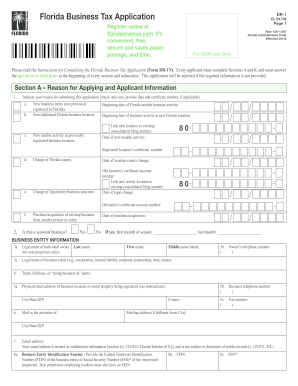
About the other person or entity: a. Legal name of person or entity: b. FEIN: c. Reemployment tax account number: d. Address, City, State, ZIP: e. Sales tax certificate number: f. Portion of business acquired: All Part h. Was the business operating at the time of purchase/ acquisition? j. Did the business have employees at the time of purchase/acquisition? g. Date of purchase or acquisition: Unknown Yes i. If no, on what date did the business close? No Yes k. If yes,.

How it works

  1. Open form

    Open form follow the instructions

  2. Easily sign form

    Easily sign the form with your finger

  3. Share form

    Send filled & signed form or save

How to fill out the FL DoR DR-1 online

Completing the Florida Department of Revenue's DR-1 form can be a straightforward process when you have clear guidance. This form is essential for registering your business for tax purposes in Florida. Below, you will find step-by-step instructions to help you fill out the form with ease.

Follow the steps to complete the FL DoR DR-1 online.

  1. Click the ‘Get Form’ button to obtain the FL DoR DR-1 form and open it in your preferred online editor.
  2. Begin with Section A, where you will indicate your reason for applying. Select only one option from the provided list and fill in any applicable details, such as dates and certificate numbers.
  3. In Section A, you will also provide your business entity information. Enter the legal name of the business, the owner's name for sole proprietorships, and contact details such as phone numbers and email address.
  4. Continue filling out Section B, 'Activities Subject to Sales & Use Tax.' Be sure to check the boxes corresponding to your business activities.
  5. Move on to Section C and answer whether your business sells prepaid phone services, along with any details required if applicable.
  6. In Section D, indicate whether your business engages in activities subject to solid waste fees and provide any necessary details.
  7. Proceed to Section E, where you will address the reemployment tax questions regarding your employment status and the types of employment.
  8. As you complete the later sections, ensure you have provided any required additional information or selected appropriate options based on your business operations.
  9. After filling in all sections accurately, review your entries to confirm all required fields are completed.
  10. Finally, save your changes, and then you can proceed to download, print, or share the completed FL DoR DR-1 form.

Complete your FL DoR DR-1 form online today to ensure your business is registered efficiently.

Get form

Experience a faster way to fill out and sign forms on the web. Access the most extensive library of templates available.

Related content

Florida Department Of Revenue
Apr 7, 2011 — If you need help downloading the address/jurisdiction database, please...
Learn more
Business Owner's Guide for Sales and Use Tax
You can register online at floridarevenue.com/taxes/registration or submit a paper Florida...
Learn more
PSR-S550 Manual do Proprietário
• Quantize: 1/4, 1/6, 1/8, 1/12, 1/16, 1/24, 1/32. • Limpeza da parte. Salvando. •...
Learn more

Related links form

UT TC-51 2002 UT TC-559 2016 UT TC-559 2011 UT TC-55A 2017

Questions & Answers

Get answers to your most pressing questions about US Legal Forms API.

Contact support

To obtain a tax ID number for your small business in Florida, complete the required forms on the Florida Department of Revenue (FL DoR) website. This number is crucial for tax purposes and must be acquired before conducting business. If you need assistance, platforms like uslegalforms offer services to help streamline the application process.

A Florida Department of Revenue Notice of Final Assessment is a document issued to taxpayers indicating the final amounts owed regarding taxes. This notice outlines your tax obligations and any penalties incurred. Understanding it is crucial for compliance, and if complexities arise, uslegalforms can help you understand and address the notice effectively.

Finding your Florida RT number is straightforward. You can look it up on documents previously issued by the Florida Department of Revenue (FL DoR) or check your business registration information online. If you face difficulties, consider using uslegalforms for personalized support in retrieving your RT number.

To set up an employer unemployment account in Florida, visit the Florida Department of Revenue (FL DoR) website and follow the registration steps. You will need to provide your business details and tax identification number. Utilizing uslegalforms can make this process smoother and ensure you meet all requirements without confusion.

To retrieve your business partner number in Florida, visit the Florida Department of Revenue (FL DoR) website. You may need to provide your business details, including the legal name and tax identification number. If you encounter challenges, platforms like uslegalforms can provide guidance and help you navigate the process.

A business partner number serves as a unique identifier for your business in Florida, assigned by the Florida Department of Revenue (FL DoR). This number is crucial for tax reporting and managing your business's tax obligations. Understanding your business partner number is key to ensuring compliance and efficient tax handling.

To obtain a business partner number in Florida, you need to register your business with the Florida Department of Revenue (FL DoR). This number is essential for tax purposes and reporting. You can apply online through the FL DoR website or seek assistance from platforms like uslegalforms to simplify the process.

No, your sales tax ID number is not the same as your EIN. The sales tax ID is specifically issued for sales tax purposes at the state level, while the EIN serves as a federal identification for businesses. Knowing this distinction helps prevent confusion when managing your obligations under the FL DoR DR-1.

To apply for a reemployment tax ID in Florida, you can complete the application process online through the Florida Department of Revenue's website. Ensure that you have all necessary information ready, including your business details. For ease, consider resources like uslegalforms, which can guide you step-by-step through the FL DoR DR-1 application.

A seller's permit number is not the same as an EIN. The seller's permit, issued by the state, allows businesses to collect sales tax, while the EIN identifies your business to the federal government. Knowing the difference is important when filing taxes and complying with the FL DoR DR-1 requirements.

Get This Form Now!

Use professional pre-built templates to fill in and sign documents online faster. Get access to thousands of forms.
If you believe that this page should be taken down, please follow our DMCA take down processhere.
Get FL DoR DR-1
  • Adoption
  • Bankruptcy
  • Contractors
  • Divorce
  • Home Sales
  • Employment
  • Identity Theft
  • Incorporation
  • Landlord Tenant
  • Living Trust
  • Name Change
  • Personal Planning
  • Small Business
  • Wills & Estates
  • Packages A-Z
  • Affidavits
  • Bankruptcy
  • Bill of Sale
  • Corporate - LLC
  • Divorce
  • Employment
  • Identity Theft
  • Internet Technology
  • Landlord Tenant
  • Living Wills
  • Name Change
  • Power of Attorney
  • Real Estate
  • Small Estates
  • Wills
  • All Forms
  • Forms A-Z
  • Other Templates
  • Legal Hub
  • About Us
  • Help Portal
  • Legal Resources
  • Blog
  • Affiliates
  • Contact Us
  • Delete My Account
  • Site Map
  • Industries
  • Forms in Spanish
  • Localized Forms
  • State-specific Forms
  • Forms Kit
  • Real Estate Handbook
  • All Guides
  • Notarize
  • Incorporation services
  • For Consumers
  • For Small Business
  • For Attorneys
  • USLegal
  • FormsPass
  • pdfFiller
  • signNow
  • altaFlow
  • DocHub
  • Instapage
Form Packages
  • Adoption
  • Bankruptcy
  • Contractors
  • Divorce
  • Home Sales
  • Employment
  • Identity Theft
  • Incorporation
  • Landlord Tenant
  • Living Trust
  • Name Change
  • Personal Planning
  • Small Business
  • Wills & Estates
  • Packages A-Z
Form Categories
  • Affidavits
  • Bankruptcy
  • Bill of Sale
  • Corporate - LLC
  • Divorce
  • Employment
  • Identity Theft
  • Internet Technology
  • Landlord Tenant
  • Living Wills
  • Name Change
  • Power of Attorney
  • Real Estate
  • Small Estates
  • Wills
  • All Forms
  • Forms A-Z
  • Other Templates
Customer Service
  • Legal Hub
  • About Us
  • Help Portal
  • Legal Resources
  • Blog
  • Affiliates
  • Contact Us
  • Delete My Account
  • Site Map
  • Industries
  • Forms in Spanish
  • Localized Forms
  • State-specific Forms
  • Forms Kit
Legal Guides
  • Real Estate Handbook
  • All Guides
Prepared for you
  • Notarize
  • Incorporation services
Our Customers
  • For Consumers
  • For Small Business
  • For Attorneys
Our Sites
  • USLegal
  • FormsPass
  • pdfFiller
  • signNow
  • altaFlow
  • DocHub
  • Instapage
Social Media
Call us now toll free:
+1 833 426 79 33
As seen in:
© Copyright 1999-2026 airSlate Legal Forms, Inc. 17 Station Street, Ste. 203, Brookline, MA 02445
  • Your Privacy Choices
  • Terms of Service
  • Privacy Notice
  • Content Takedown Policy
  • Bug Bounty Program
FL DoR DR-1
This form is available in several versions.
Select the version you need from the drop-down list below.
2021 FL DoR DR-1
Select form
  • 2021 FL DoR DR-1
  • 2020 FL DoR DR-1
  • 2018 FL DoR DR-1
  • 2015 FL DoR DR-1
  • 2011 FL DoR DR-1
Select form