Get Treasury Fs 1522 2015
How it works
-

Open form follow the instructions
-

Easily sign the form with your finger
-

Send filled & signed form or save
How to fill out the Treasury FS 1522 online
Filling out the Treasury FS 1522 form online can be a straightforward process when you follow the right steps. This guide aims to provide comprehensive instructions to help you accurately complete the form for requesting payment of United States savings and retirement securities.
Follow the steps to successfully complete the Treasury FS 1522 form.
- Press the 'Get Form' button to access the form and open it in your preferred editor.
- Begin by entering the customer name and number at the top of the form. Ensure all information is clear and legible.
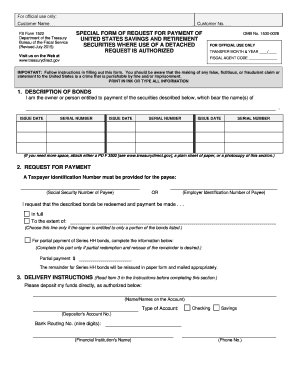
- In the 'Description of Bonds' section, list the owner or person entitled to payment as shown on the bonds. Provide the issue dates and serial numbers of the bonds for which you are requesting payment. If more space is needed, attach a separate sheet.
- Move to the 'Request for Payment' section. Indicate whether you are requesting a full payment or a partial payment. If partial payment is selected, specify the amount. Include the payee's Taxpayer Identification Number, either the Social Security Number or Employer Identification Number.
- In the 'Delivery Instructions' section, provide the names on the account, the type of account (checking or savings), the account number, the bank routing number, and the financial institution's name and phone number. Verify this information for accuracy.
- The form requires signatures from the person or persons requesting payment. Sign in ink, print your name, and include your home address, daytime telephone number, and email address (if applicable). If the name on the bonds has changed, indicate the previous name.
- Once completed, ensure that signatures are witnessed by an authorized certifying officer, who will provide certification of identification. The officer must complete their section by confirming identity and signing accordingly.
- Review the form for completeness, ensuring all required fields are filled accurately. Save your changes and download or print the document as necessary.
- Finally, send the completed form to the Treasury Retail Securities Site at the specified address if required.
Take the next steps and complete your Treasury FS 1522 form online for efficient management of your securities.
Get form
Related links form
To redeem savings bonds in your TreasuryDirect account, simply log in to your account and navigate to the ‘Redeem’ option for your bonds. Follow the outlined prompts to complete the redemption process, and the funds will be transferred to your linked bank account. Understanding this procedure can ensure you access your funds with ease. Additional information on this can be found in Treasury FS 1522 for further clarity.