Loading
Form preview
  • US Legal Forms
  • Form Library
  • Tax Forms
  • Executive Department Treasury IRS Forms
  • Irs W-4 2011

Get Irs W-4 2011

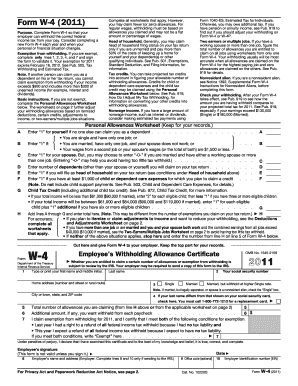
. . . . . . . . . . . . . A You are single and have only one job; or Enter 1 if: B You are married, have only one job, and your spouse does not work; or . . . Your wages from a second job or your spouse s wages (or the total of both) are $1,500 or less. Enter 1 for your spouse. But, you may choose to enter -0- if you are married and have either a working spouse or more than one job. (Entering -0- may help you avoid having too little tax withheld.) . . . .

How it works

  1. Open form

    Open form follow the instructions

  2. Easily sign form

    Easily sign the form with your finger

  3. Share form

    Send filled & signed form or save

How to fill out the IRS W-4 online

Completing the IRS W-4 form is essential for ensuring the correct amount of federal income tax is withheld from your pay. By following these steps, you will be able to accurately complete the form online, taking into consideration your unique financial situation.

Follow the steps to fill out the IRS W-4 online effectively.

  1. Click ‘Get Form’ button to obtain the form and open it for completion.
  2. Provide your personal information including your first name, middle initial, last name, home address, social security number, and filing status by selecting either 'Single' or 'Married'. If legally separated, select 'Single'.
  3. Check the box if your last name differs from that shown on your social security card and follow the instructions to obtain a replacement card if needed.
  4. Enter the total number of allowances you are claiming based on the Personal Allowances Worksheet you complete. Input this figure on line 5.
  5. If you wish to withhold an additional amount from each paycheck, specify this on line 6. This figure is optional.
  6. If you are exempt from withholding, state this clearly on line 7 by writing 'Exempt' and ensure you meet the stated conditions for exemption.
  7. Sign and date the form to validate it, as it is not considered valid without your signature.
  8. Finally, submit the completed form to your employer, retaining the top portion for your personal records.

Complete your IRS W-4 online today to ensure accurate tax withholding for your financial peace of mind.

Get form

Experience a faster way to fill out and sign forms on the web. Access the most extensive library of templates available.

Related content

fw4.pdf
Complete Form W-4 so that your employer can withhold the correct federal income tax from...
Learn more
fw4.pdf
Complete Form W-4 so that your employer can withhold the correct federal income tax from...
Learn more
2017 Publication 505
Mar 1, 2017 — Form W-4 to the IRS. There is a penalty for sup- plying false information...
Learn more

Related links form

FL FDACS-10100 2015 GA Business Registration Application - Dekalb County GA SEC C13 2010 IL Commercial Compliance Form 2009

Questions & Answers

Get answers to your most pressing questions about US Legal Forms API.

Contact support

To submit the IRS form W-4V, you first need to fill out the form correctly, specifying the type of income for which you want taxes withheld. After completing the form, send it directly to the payer or organization that provides your income. They will then process your request to withhold federal income tax. For additional clarity and support, UsLegalForms can assist you in understanding the submission process.

Claiming 0 on your IRS W-4 does not guarantee that you will not owe taxes at the end of the year. Factors such as multiple income sources, changes in tax laws, or unreported income can affect your tax liability. It's possible that not enough tax was withheld throughout the year. If you are unsure about your withholding, UsLegalForms offers tools to help calculate and adjust your withholdings.

To file your IRS W-4, start by downloading the form from the IRS website. Complete the form with accurate personal information, including your filing status and the number of allowances you wish to claim. Once you finish filling it out, submit it to your employer, who will adjust your withholdings accordingly. If you need help, UsLegalForms provides resources and guidance for filling out the IRS W-4 correctly.

To fill out a W-4 with the IRS, start by visiting the official IRS website to download the form. After reading the instructions, provide your personal details, and claim allowances based on your financial context. Review your answers for accuracy, then submit the completed W-4 to your employer. For support and templates during this process, check out platforms like USLegalForms to streamline your completion.

Filling out the IRS W-4 form involves several key steps that help determine your tax withholding. Start by entering your personal information, including your name and address. Next, follow the instructions to claim allowances based on your filing situation. Finally, review your calculations and provide your signature and date. For detailed guidance, resources available on USLegalForms can assist you in completing each step correctly.

Yes, you can fill out the W-4V form online, which is the request for voluntary withholding. This form allows you to request that federal income tax be withheld from certain types of income, such as unemployment benefits. Using digital platforms like USLegalForms can simplify the process by providing templates and guidance on completing the W-4V accurately. Always check with your specific payer to confirm their acceptance of the online form.

Filling out your IRS W-4 correctly is crucial for accurate tax withholding. Start by providing your personal information and then decide the number of allowances to claim based on your situation. Make sure to review the instructions carefully and consult tools, such as those provided by US Legal Forms, to assist you in completing your W-4 accurately and confidently.

Choosing between claiming 0 or 1 on your IRS W-4 can impact your tax situation. If you claim 0, more taxes will be withheld from your paycheck, which might result in a refund during tax season. Conversely, if you claim 1, you'll see a larger paycheck, but you might owe at tax time. Consider your overall financial picture to make the best choice.

Determining the best amount to claim on your IRS W-4 depends on your financial situation. If you want a larger paycheck throughout the year, you might claim more allowances. However, this could lead to owing taxes when you file. It's beneficial to use the IRS withholding calculator available on their website or consult a tax professional for personalized advice.

Yes, you can and should request a copy of your W-2 from your employer if you need it. They must supply you with a replacement if you misplace your original copy. If you encounter issues, you can directly contact the IRS for further guidance. Ensuring you have your W-2 is crucial for timely and accurate tax reporting.

Get This Form Now!

Use professional pre-built templates to fill in and sign documents online faster. Get access to thousands of forms.
If you believe that this page should be taken down, please follow our DMCA take down processhere.

Industry-leading security and compliance

US Legal Forms protects your data by complying with industry-specific security standards.
  • In businnes since 1997
    25+ years providing professional legal documents.
  • Accredited business
    Guarantees that a business meets BBB accreditation standards in the US and Canada.
  • Secured by Braintree
    Validated Level 1 PCI DSS compliant payment gateway that accepts most major credit and debit card brands from across the globe.
Get IRS W-4
  • Adoption
  • Bankruptcy
  • Contractors
  • Divorce
  • Home Sales
  • Employment
  • Identity Theft
  • Incorporation
  • Landlord Tenant
  • Living Trust
  • Name Change
  • Personal Planning
  • Small Business
  • Wills & Estates
  • Packages A-Z
  • Affidavits
  • Bankruptcy
  • Bill of Sale
  • Corporate - LLC
  • Divorce
  • Employment
  • Identity Theft
  • Internet Technology
  • Landlord Tenant
  • Living Wills
  • Name Change
  • Power of Attorney
  • Real Estate
  • Small Estates
  • Wills
  • All Forms
  • Forms A-Z
  • Form Library
  • Legal Hub
  • About Us
  • Help Portal
  • Legal Resources
  • Blog
  • Affiliates
  • Contact Us
  • Delete My Account
  • Site Map
  • Industries
  • Forms in Spanish
  • Localized Forms
  • State-specific Forms
  • Forms Kit
  • Real Estate Handbook
  • All Guides
  • Notarize
  • Incorporation services
  • For Consumers
  • For Small Business
  • For Attorneys
  • USLegal
  • FormsPass
  • pdfFiller
  • signNow
  • altaFlow
  • DocHub
  • Instapage
Form Packages
  • Adoption
  • Bankruptcy
  • Contractors
  • Divorce
  • Home Sales
  • Employment
  • Identity Theft
  • Incorporation
  • Landlord Tenant
  • Living Trust
  • Name Change
  • Personal Planning
  • Small Business
  • Wills & Estates
  • Packages A-Z
Form Categories
  • Affidavits
  • Bankruptcy
  • Bill of Sale
  • Corporate - LLC
  • Divorce
  • Employment
  • Identity Theft
  • Internet Technology
  • Landlord Tenant
  • Living Wills
  • Name Change
  • Power of Attorney
  • Real Estate
  • Small Estates
  • Wills
  • All Forms
  • Forms A-Z
  • Form Library
Customer Service
  • Legal Hub
  • About Us
  • Help Portal
  • Legal Resources
  • Blog
  • Affiliates
  • Contact Us
  • Delete My Account
  • Site Map
  • Industries
  • Forms in Spanish
  • Localized Forms
  • State-specific Forms
  • Forms Kit
Legal Guides
  • Real Estate Handbook
  • All Guides
Prepared for you
  • Notarize
  • Incorporation services
Our Customers
  • For Consumers
  • For Small Business
  • For Attorneys
Our Sites
  • USLegal
  • FormsPass
  • pdfFiller
  • signNow
  • altaFlow
  • DocHub
  • Instapage
Social Media
Call us now toll free:
+1 833 426 79 33
As seen in:
© Copyright 1999-2026 airSlate Legal Forms, Inc. 3720 Flowood Dr, Flowood, Mississippi 39232
  • Your Privacy Choices
  • Terms of Service
  • Privacy Notice
  • Content Takedown Policy
  • Bug Bounty Program
IRS W-4
This form is available in several versions.
Select the version you need from the drop-down list below.
2019 IRS W-4
Select form
  • 2019 IRS W-4
  • 2018 IRS W-4
  • 2017 IRS W-4
  • 2016 IRS W-4
  • 2015 IRS W-4
  • 2014 IRS W-4
  • 2013 IRS W-4
  • 2012 IRS W-4
  • 2011 IRS W-4
  • 2010 IRS W-4
  • 1999 IRS W-4
  • 1990 IRS W-4
Select form