Loading
Form preview
  • US Legal Forms
  • Other Templates
  • Tax Forms
  • Executive Department Treasury IRS Forms
  • Irs W-3pr 2014

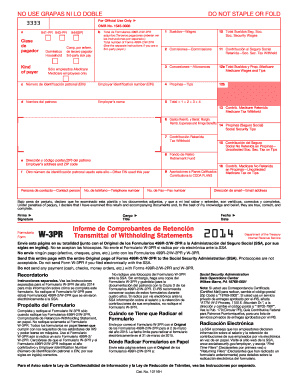
Get Irs W-3pr 2014

Printed version of this IRS form is scannable, but the online version of it, printed from this website, is not. A penalty may be imposed for filing forms that can t be scanned. See the penalties section in the current General Instructions for Forms W-2 and W-3 for more information. To order official IRS forms, call 1-800-TAX-FORM (1-800-829-3676) or Order Information Returns and Employer Returns Online, and we ll mail you the scannable forms and other products. You may file Forms W-2 and W-3.

This website is not affiliated with IRS

How it works

  1. Open form

    Open form follow the instructions

  2. Easily sign form

    Easily sign the form with your finger

  3. Share form

    Send filled & signed form or save

How to fill out the IRS W-3PR online

The IRS W-3PR is a critical document used in conjunction with Forms 499R-2/W-2PR for reporting withholding statements for employees in Puerto Rico. This guide provides a step-by-step approach on how to accurately complete the W-3PR online, ensuring compliance and accuracy in reporting.

Follow the steps to complete the IRS W-3PR online:

  1. Click ‘Get Form’ button to download the form and open it in your preferred editor.
  2. Begin by filling in your employer identification number (EIN) in the designated field. This number is essential for identifying your business with the IRS.
  3. Enter your employer's name as it appears in your records. Accuracy is important to avoid any potential issues.
  4. Complete the employer's address, including the ZIP code. Ensure that the address is current and matches IRS records.
  5. Report total wages, including wages, commissions, allowances, and tips in the appropriate fields. This total is critical for correct tax reporting.
  6. Fill out the withheld amounts for Social Security and Medicare taxes. Each withheld amount must be accurately reported to avoid penalties.
  7. Under penalties of perjury, declare that the information is correct by signing in the designated area. Include your title and the date of signing.
  8. After completing the form, review all entries for accuracy and completeness. Mistakes can lead to delays or penalties.
  9. Finally, save changes, download the completed form, and prepare it for submission to the Social Security Administration (SSA). You may also print or share the form as needed.

Start filling out your IRS W-3PR form online today to ensure timely and accurate reporting.

Get form

Experience a faster way to fill out and sign forms on the web. Access the most extensive library of templates available.

Related content

Prior Year Products - Internal Revenue Service
Form W-3, Transmittal of Wage and Tax Statements (Info Copy Only), 2014 ... para el...
Learn more
Access Form W-2 | Office of the Controller
Follow these instructions to access your Form W-2. ... you need a duplicate copy of Form...
Learn more
Publication 4163 (Rev. 12 2017) P4163...
5 IRS e-File for Large Taxpayers Filing Their Own Corporate Income Tax Return. 5.1 Purpose...
Learn more

Related links form

NY VPN - Virtual Private Network Access Request Form NYC Finance NFP Exemption Renewal Form 2011 NYS Liquor Authority Form SEP1011 2012 OH Form 521 2014

Questions & Answers

Get answers to your most pressing questions about US Legal Forms API.

Contact support

The 5-digit PIN for the IRS functions as a personal identifier for tax purposes. It helps verify your identity when accessing tax-related services online or filing your returns. If you’ve misplaced your PIN, check your previous tax documents or contact the IRS directly. For a seamless experience when working with forms, including the IRS W-3PR, keeping your PIN secure is advisable.

To retrieve your PIN number from the IRS, you can begin by using the IRS online tool or by consulting the tax return from the prior year. If neither option works, you should consider calling the IRS directly for assistance. Having your PIN is essential for submitting forms correctly, such as the IRS W-3PR, and ensuring your tax matters are resolved smoothly.

To find your PIN number, start by reviewing your previous year's tax returns, as your PIN will typically be listed there. Alternatively, you can use the IRS's online retrieval tool designed for lost PINs. If you're having difficulties, contacting the IRS directly will allow you to verify your identity and obtain your PIN. Remember, these details are key for managing your tax forms, including the IRS W-3PR.

The primary difference between a 5-digit PIN and a 6-digit PIN issued by the IRS lies in their purposes. The 5-digit PIN is often used for individual tax returns, while the 6-digit PIN may come into play for accessing taxpayer accounts online. Both serve to protect your identity and ensure secure access to sensitive financial information. If you manage IRS documents like the W-3PR, understanding this distinction is important.

Locating your 5-digit IRS PIN is straightforward. You can find it on your prior year’s tax return, specifically on Form 1040. If you cannot locate it, you may need to use the IRS online tool to generate a new one. Remember, safeguarding your PIN is crucial in verifying your identity, especially when accessing documents like the IRS W-3PR.

To obtain a reward from the IRS, you must file a claim based on specific criteria outlined by the IRS. Generally, rewards come in the form of tax credits or refunds. It’s essential to stay informed about eligible programs and follow the necessary steps. For forms related to unclaimed rewards, you can refer to the IRS W-3PR for additional guidance.

8BEN for nonUS individuals is a tax form that certifies your status as a foreign person receiving income from US sources. Filling this out allows you to claim tax treaty benefits and reduces the withholding tax rates. Completing the 8BEN correctly is essential for smooth processing of payments and forms like the IRS 3PR. Use platforms like uslegalforms to access easytofollow instructions.

Filling in a W-8BEN form requires capturing your personal information, including your legal name and country of citizenship. You will also need to declare any applicable tax treaty benefits. Accurate completion is crucial for maintaining favorable tax treatment on income related to the IRS W-3PR. Utilizing resources from uslegalforms can simplify this task.

You may need to fill out a W-8BEN if you are a foreign individual receiving income from US sources. This form helps you establish your foreign status for tax purposes and claim any applicable exemptions. Not completing it may result in higher withholding taxes on your earnings. To avoid issues with your IRS W-3PR, ensure this form is filled out accurately.

To fill out the W-8BEN form, start by entering your name and address in the appropriate fields. You then must provide details about your foreign status and claim any applicable tax treaty benefits. Make sure to double-check your information, as errors can complicate your filings, including the IRS W-3PR submission. Uslegalforms can offer templates to assist you.

Get This Form Now!

Use professional pre-built templates to fill in and sign documents online faster. Get access to thousands of forms.
If you believe that this page should be taken down, please follow our DMCA take down processhere.
Get IRS W-3PR
  • Adoption
  • Bankruptcy
  • Contractors
  • Divorce
  • Home Sales
  • Employment
  • Identity Theft
  • Incorporation
  • Landlord Tenant
  • Living Trust
  • Name Change
  • Personal Planning
  • Small Business
  • Wills & Estates
  • Packages A-Z
  • Affidavits
  • Bankruptcy
  • Bill of Sale
  • Corporate - LLC
  • Divorce
  • Employment
  • Identity Theft
  • Internet Technology
  • Landlord Tenant
  • Living Wills
  • Name Change
  • Power of Attorney
  • Real Estate
  • Small Estates
  • Wills
  • All Forms
  • Forms A-Z
  • Other Templates
  • Legal Hub
  • About Us
  • Help Portal
  • Legal Resources
  • Blog
  • Affiliates
  • Contact Us
  • Delete My Account
  • Site Map
  • Industries
  • Forms in Spanish
  • Localized Forms
  • State-specific Forms
  • Forms Kit
  • Real Estate Handbook
  • All Guides
  • Notarize
  • Incorporation services
  • For Consumers
  • For Small Business
  • For Attorneys
  • USLegal
  • FormsPass
  • pdfFiller
  • signNow
  • altaFlow
  • DocHub
  • Instapage
Form Packages
  • Adoption
  • Bankruptcy
  • Contractors
  • Divorce
  • Home Sales
  • Employment
  • Identity Theft
  • Incorporation
  • Landlord Tenant
  • Living Trust
  • Name Change
  • Personal Planning
  • Small Business
  • Wills & Estates
  • Packages A-Z
Form Categories
  • Affidavits
  • Bankruptcy
  • Bill of Sale
  • Corporate - LLC
  • Divorce
  • Employment
  • Identity Theft
  • Internet Technology
  • Landlord Tenant
  • Living Wills
  • Name Change
  • Power of Attorney
  • Real Estate
  • Small Estates
  • Wills
  • All Forms
  • Forms A-Z
  • Other Templates
Customer Service
  • Legal Hub
  • About Us
  • Help Portal
  • Legal Resources
  • Blog
  • Affiliates
  • Contact Us
  • Delete My Account
  • Site Map
  • Industries
  • Forms in Spanish
  • Localized Forms
  • State-specific Forms
  • Forms Kit
Legal Guides
  • Real Estate Handbook
  • All Guides
Prepared for you
  • Notarize
  • Incorporation services
Our Customers
  • For Consumers
  • For Small Business
  • For Attorneys
Our Sites
  • USLegal
  • FormsPass
  • pdfFiller
  • signNow
  • altaFlow
  • DocHub
  • Instapage
Social Media
Call us now toll free:
+1 833 426 79 33
As seen in:
© Copyright 1999-2026 airSlate Legal Forms, Inc. 17 Station Street, Suite 303, Brookline, MA 02445
  • Your Privacy Choices
  • Terms of Service
  • Privacy Notice
  • Content Takedown Policy
  • Bug Bounty Program
IRS W-3PR
This form is available in several versions.
Select the version you need from the drop-down list below.
2020 IRS W-3PR
Select form
  • 2020 IRS W-3PR
  • 2019 IRS W-3PR
  • 2018 IRS W-3PR
  • 2017 IRS W-3PR
  • 2016 IRS W-3PR
  • 2015 IRS W-3PR
  • 2014 IRS W-3PR
  • 2013 IRS W-3PR
  • 2012 IRS W-3PR
Select form