Loading
Get Irs W-3pr 2017
This website is not affiliated with IRS
How it works
-

Open form follow the instructions
-

Easily sign the form with your finger
-

Send filled & signed form or save
How to fill out the IRS W-3PR online
Filling out the IRS W-3PR form is essential for employers in Puerto Rico who need to report withholding information for their employees. This guide provides detailed, step-by-step instructions to ensure you accurately complete the form online.
Follow the steps to effectively complete the IRS W-3PR form.
- Click ‘Get Form’ button to obtain the form and open it in the editor.
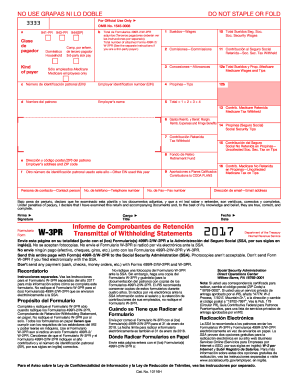
- Identify the kind of payer you are by selecting the appropriate box that corresponds to your business type, such as domestic or household.
- Enter the total number of attached Forms 499R-2/W-2PR in the designated field.
- Fill in the total wages, commissions, allowances, and tips in their respective fields (1 through 4). Ensure all calculations are correct.
- Complete the employer's details including employer identification number (EIN), name, and contact information.
- Indicate any contributions withheld, such as Social Security and Medicare taxes, by entering the amounts in the correct fields (11, 13, and 14).
- Review the declaration statement at the end of the form and provide your signature, title, and date.
- After completing the form, you can save your changes, download, print, or share the W-3PR form as needed.
Complete your IRS W-3PR form online today to ensure compliance and accuracy.
Get form
Experience a faster way to fill out and sign forms on the web. Access the most extensive library of templates available.
To get a reward from the IRS, you would typically need to report specific types of information regarding tax fraud. This often requires submitting detailed documentation as evidence. Using services like uslegalforms can help ensure you follow the right procedures to maximize your chances of receiving a reward through the IRS.
Get This Form Now!
Use professional pre-built templates to fill in and sign documents online faster. Get access to thousands of forms.