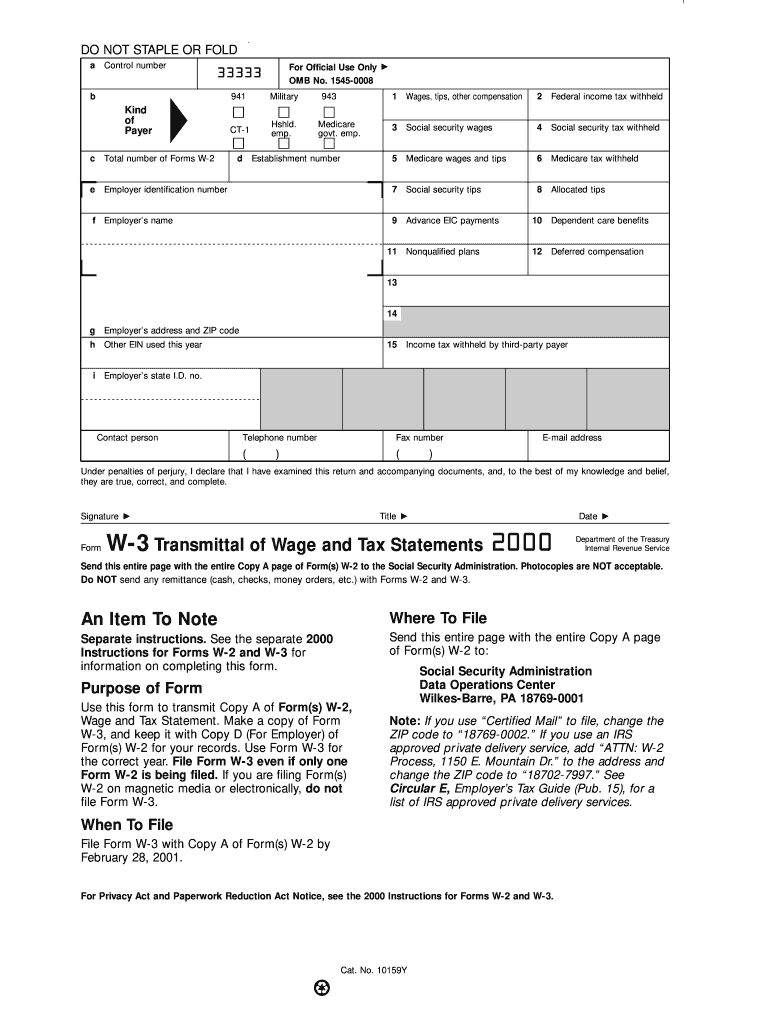
Hshld. emp. d 943 Medicare govt. emp. Establishment number f Employer s name 1 Wages, tips, other compensation 2 Federal income tax withheld 3 Social security wages 4 Social security tax withheld 5 Medicare wages and tips 6 Medicare tax withheld 7 Social security tips 8 Allocated tips 9 Advance EIC payments 10 Dependent care benefits Nonqualified plans 12 Deferred compensation 11 13 14 g Employer s address and ZIP code h Other EIN used this year i Empl.

Open form follow the instructions

Easily sign the form with your finger

Send filled & signed form or save
How to fill out the IRS W-3 online
The IRS W-3 form is essential for transmitting wage and tax statements to the Social Security Administration. This guide will assist users in accurately completing the W-3 online with clear and supportive instructions.
Follow the steps to fill out the IRS W-3 online efficiently.
- Click ‘Get Form’ button to access the IRS W-3 form in the digital platform.
- Begin filling out the control number section, typically located at the top left of the form. Enter the appropriate control number assigned for tracking purposes.
- In the Kind of Payer box, select the type of payer; options include Military, Household employer, and Government employer.
- Enter the total number of Forms W-2 being submitted in the corresponding field below the payer type.
- Provide your employer identification number (EIN) in the designated section. Ensure this number is unique to your business entity.
- Complete the employer’s name and address sections, including ZIP code, ensuring all details are correct and current.
- Fill in the fields for wages, tips, and other compensation received throughout the year, along with federal income tax withheld.
- Include social security wages and tax withheld, and signify any Medicare wages, tips, and corresponding tax.
- If applicable, report any allocated or advance earned income credit (EIC) payments.
- Complete any relevant information regarding dependent care benefits or nonqualified plans.
- Confirm tax withheld by third-party payers, if applicable, and include the employer’s state identification number.
- When all fields are completed, review the form to ensure accuracy before saving your changes. You can then download, print, or share the completed form as needed.
Complete your IRS W-3 online today to ensure timely and accurate submission.
Experience a faster way to fill out and sign forms on the web. Access the most extensive library of templates available.
Related content
Jun 24, 2025 — Information about Form W-3, Transmittal of Wage and Tax Statements (Info...
Jan 26, 2024 — Do not use these forms to report wages subject to U.S. income tax...
May 2, 2017 — Be sure that the payer's name and EIN on Forms W-2 and. W-3 are the same...
Get answers to your most pressing questions about US Legal Forms API.
How to fill out a third party authorization form?
To fill out a third party authorization form, start by identifying the IRS form needed, such as Form 2848. Clearly state the authority you grant and provide relevant details about yourself and the authorized individual. Ensure both parties sign the document where indicated to validate the authorization. If you need templates or guidance, uslegalforms can help facilitate this process.
What is the easiest way to fill out a tax return?
The easiest way to fill out a tax return often involves utilizing tax preparation software or professional assistance. These tools guide you through each step, prompting for necessary information related to your tax situation. Additionally, platforms like uslegalforms provide templates and guides for various tax forms, making the process straightforward and less intimidating.
What is k in box 14?
In box 14 of the IRS W-3 form, 'k' refers to the amount of uncollected Social Security or Medicare tax on tips. This box may also include other important information that the employer chooses to provide to the IRS. Employers need to report any amounts here accurately, as it can affect tax obligations. Using uslegalforms can simplify tracking and reporting these figures.
How to complete W-3?
To complete the IRS W-3 form, gather all W-2 forms for your employees first. Input the total boxes accurately, including total wages and federal income tax withheld for the year. It's essential to check your entries for consistency with your payroll records. If you're unsure, uslegalforms offers tools that guide you through the completion process seamlessly.
What is the W-3 format?
The IRS W-3 form is a summary of the W-2 forms that an employer submits to the IRS. It provides information on total earnings and taxes withheld for all employees in a tax year. Completing the W-3 ensures the IRS has accurate data for each employee's tax filings. For efficient management of this form, consider using platforms like uslegalforms to maintain compliance.
How to complete W3?
To complete the IRS W-3, begin with accurate W-2 totals for all employees. Follow the form's structure, ensuring you provide your employer identification details, total wages, and withholding amounts. For a smooth process, consider consulting with US Legal Forms, as they offer tools and resources to guide you through each step.
What is the W3 format?
The W-3 format refers to the layout and required fields of the IRS W-3 form, which summarizes wage and tax information for multiple employees. It includes sections for employer data, total wages, and tax withheld. Familiarizing yourself with this format helps ensure you provide complete and accurate information to the IRS.
How to fill out a third-party authorization form?
To fill out a third-party authorization form, clearly provide the necessary details about yourself, the individual, or entity you designate, and any specifics related to IRS business. Ensure that you understand the permissions you’re granting, as this authorizes another party to receive your tax information. Utilizing resources like US Legal Forms can simplify this process and facilitate proper completion.
How to fill W3?
To fill out the IRS W-3, start by gathering your W-2 forms, as they provide the necessary information. Enter your employer identification data, total wages, and tax withheld for each employee accurately. Make sure to double-check entries for mistakes, as accuracy simplifies the tax filing process and ensures compliance.
What's the difference between 'w' and 'W-2'?
The lowercase 'w' typically refers to forms that include a variety of wages and tax-related information, while 'W-2' specifically designates the tax form used by employers to report wages for employees. The distinction is important because the IRS uses these forms for different purposes. Understanding this difference helps clarify the context and procedures you need to follow when filing. Should you have further queries, UsLegalForms can provide insightful answers and support.
Use professional pre-built templates to fill in and sign documents online faster. Get access to thousands of forms.
If you believe that this page should be taken down, please follow our DMCA take down process here.
This form is available in several versions. Select the version you need from the drop-down list below.