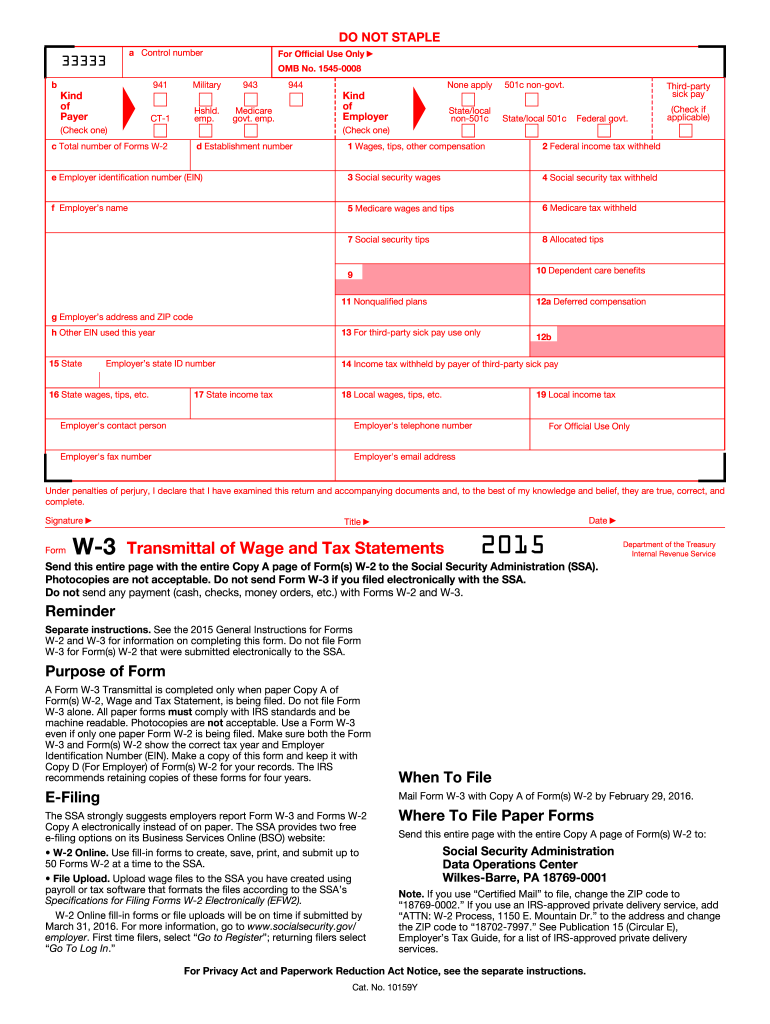
N on completing this form. Do not file Form W-3 for Form(s) W-2 that were submitted electronically to the SSA. Purpose of Form A Form W-3 Transmittal is completed only when paper Copy A of Form(s) W-2, Wage and Tax Statement, is being filed. Do not file Form W-3 alone. All paper forms must comply with IRS standards and be machine readable. Photocopies are not acceptable. Use a Form W-3 even if only one paper Form W-2 is being filed. Make sure both the Form W-3 and Form(s) W-2 show the correct t.
Loading

Open form follow the instructions

Easily sign the form with your finger

Send filled & signed form or save
How to fill out the IRS W-3 online
The IRS W-3 form, also known as the Transmittal of Wage and Tax Statements, is essential for reporting wages and tax information to the Social Security Administration (SSA). This guide aims to help users navigate the online process of completing the form accurately and efficiently.
Follow the steps to fill out the IRS W-3 form online.
- Click ‘Get Form’ button to access the IRS W-3 form for completion in an online editor.
- Begin by filling in the control number at the top left of the form, if applicable.
- Indicate the type of employer by checking the appropriate box under 'Kind of Employer.'
- Provide your establishment number, if applicable, and fill in the employer's identification number (EIN).
- Input your employer's name and the address, including the ZIP code, in the designated fields.
- Complete the section detailing total wages, tips, and other compensation. Accurately list the federal income tax withheld.
- Enter social security wages and the corresponding social security tax withheld.
- Provide information on Medicare wages, tips, and the Medicare tax withheld if applicable.
- Fill in the boxes related to allocated tips and dependent care benefits, ensuring all amounts are accurate.
- Indicate state and local tax information such as wages, tips, income tax withheld, and state employer identification number.
- Review all filled sections to ensure accuracy as this is crucial for submission.
- Finalize the form by entering your signature, title, and date, confirming under penalties of perjury that the information is correct.
- Once completed, save your changes. You have the option to download, print, or share the form as needed.
Start filling out the IRS W-3 form online to ensure your tax reporting is processed correctly.
Experience a faster way to fill out and sign forms on the web. Access the most extensive library of templates available.
Related content
Jun 24, 2025 — Information about Form W-3, Transmittal of Wage and Tax Statements (Info...
Jan 26, 2024 — Do not use these forms to report wages subject to U.S. income tax...
May 2, 2017 — Be sure that the payer's name and EIN on Forms W-2 and. W-3 are the same...
Get answers to your most pressing questions about US Legal Forms API.
How to complete W-3?
To complete the IRS W-3, start by gathering the relevant totals from all W-2 forms for your employees. Enter key information like the total number of forms, total wages, and taxes withheld in the appropriate boxes. Be sure to review the form carefully for any errors before submission. Using a platform like US Legal Forms can ease this process, offering valuable resources and guidance for correct completion.
What's the difference between 'w' and 'W-2'?
'W' generally refers to various forms associated with employee earnings, whereas 'W-2' specifically denotes the form summarizing an employee’s annual earnings and tax withholding. The IRS W-3, on the other hand, captures the total of all W-2 forms submitted by an employer. Understanding these distinctions is important for proper tax reporting. For comprehensive support, US Legal Forms can assist you in navigating the various IRS forms.
What is included in box 1 of W-3?
Box 1 of the IRS W-3 includes the total wages, tips, and other compensation that are subject to federal income tax. It's important to consolidate all figures from your employees’ W-2 forms for this box. This ensures compliance and accuracy when filing taxes. If you need assistance compiling your data or understanding the details, US Legal Forms can provide the necessary tools and templates.
What is the W-3 format?
The IRS W-3 format consists of specific boxes that capture essential payroll information, including totals of wages, tips, and taxes for all employees. The form includes sections for the employer's details, tax information, and additional notes. Making sure to follow the official guidelines for the layout is crucial for accurate reporting. Utilizing resources from US Legal Forms can help you adhere to the correct W-3 format easily.
What is the difference between W-2 and W-3?
The primary difference between the W-2 and the IRS W-3 lies in their purpose. The W-2 reports individual employee earnings and taxes withheld, while the W-3 summarizes the total amounts from all W-2 forms submitted by an employer. In essence, the W-3 acts as a covering document for the W-2s, showing totals for the entire organization. Using a reliable platform like US Legal Forms can ensure you accurately prepare both forms.
What if I don't understand my Box 14?
Box 14 on the IRS W-3 can sometimes be confusing, as it includes additional information that may not apply to everyone. This box is often used for reporting items such as contributions to retirement plans or other benefits. If you find this box unclear, refer to your employer or a tax professional. Tools offered by US Legal Forms can also provide clarifications and examples to help you understand your W-3 better.
What is the easiest way to fill out a tax return?
The easiest way to fill out a tax return is to use tax preparation software or an online tax filing service. These platforms guide you through each step while ensuring compliance with IRS guidelines, including filling out forms like the IRS W-3 accurately. Additionally, these services often prompt you for necessary information, reducing the chance of errors and providing a smoother filing experience.
What is k in box 14?
The letter 'K' in box 14 of your W-3 form refers to the amount contributed to a retirement plan by the employer. This section helps delineate pension or annuity contributions made on behalf of employees. Understanding this can provide insight into your retirement savings accrued through your employer, which might impact your overall financial planning.
How to fill out a third party authorization form?
When filling out a third party authorization form, first provide the taxpayer’s information, including name and Social Security number. Next, include the details of the authorized third party, such as their name and contact information. Finally, ensure you sign and date the form, affirming that you consent to allow specified individuals access to your tax information, including details related to the IRS W-3, if necessary.
How to complete W3?
To complete the IRS W-3 form, start by gathering all relevant information from your W-2 forms. You will need to enter the total number of forms you are submitting, along with your company’s details. Ensure the figures you report match those on the W-2 forms, as accuracy is crucial. Consider using USLegalForms for easy access to fillable templates, which can simplify the process.
Use professional pre-built templates to fill in and sign documents online faster. Get access to thousands of forms.
If you believe that this page should be taken down, please follow our DMCA take down process here.
This form is available in several versions. Select the version you need from the drop-down list below.