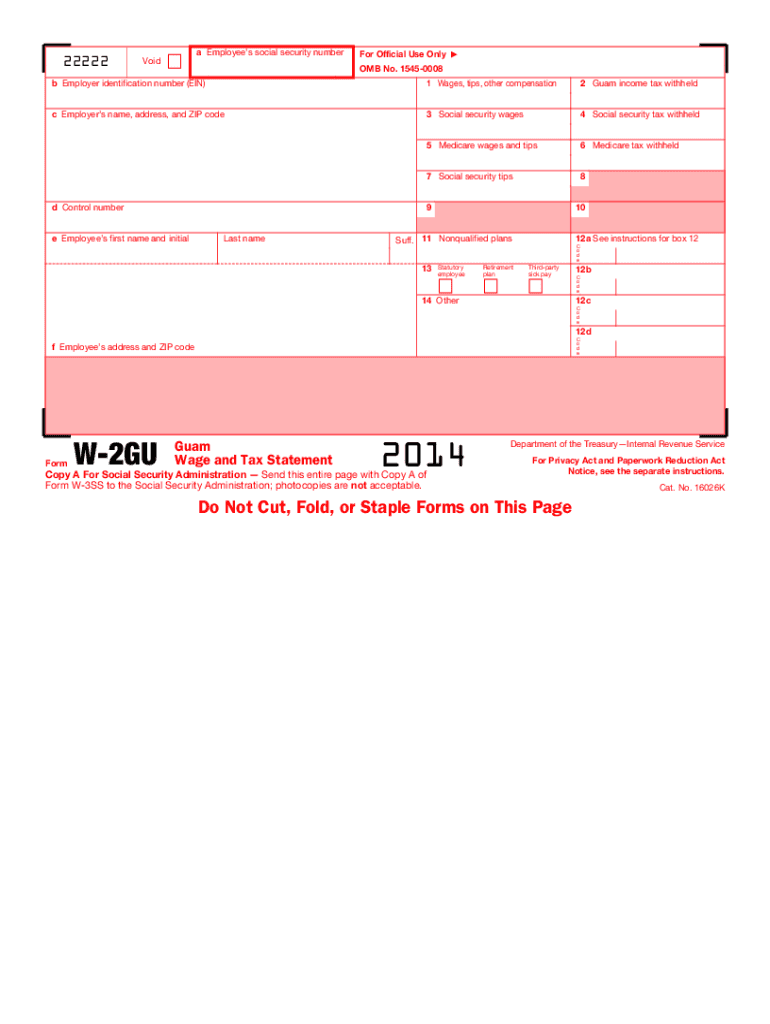
Identification number (EIN) c Employer s name, address, and ZIP code 2 Guam income tax withheld 4 Social security tax withheld 5 Medicare wages and tips 6 Medicare tax withheld 7 Social security tips d Control number 3 Social security wages 8 9 e Employee s first name and initial Last name 10 Suff. 11 Nonqualified plans 13 Statutory employee 14 Other Retirement plan 12a See instructions for box 12 C o d e Third-party sick pay 12b C o d e 12c C o d e 12d C o d e f Employe.
Loading

Open form follow the instructions

Easily sign the form with your finger

Send filled & signed form or save
How to fill out the IRS W-2GU online
This guide provides clear instructions on how to complete the IRS W-2GU form online. Whether you are an employee or an employer, understanding the components of this form will help you accurately report earnings and taxes.
Follow the steps to fill out the IRS W-2GU online.
- Press the ‘Get Form’ button to access the form and open it in your preferred editor.
- Enter the employee's social security number in box 'a'. Make sure this is accurate to avoid any issues with tax reporting.
- In box 'b', input the employer identification number (EIN) which uniquely identifies your business for tax purposes.
- Complete box 'c' with the employer's name, address, and ZIP code, ensuring that the information is accurate.
- Fill in box '1' with the total wages, tips, and other compensation paid to the employee during the tax year.
- Indicate the amount of Guam income tax withheld in box '2'. This is important for accurate tax reporting.
- Enter the social security wages in box '3' and the social security tax withheld in box '4'.
- In box '5', list the Medicare wages and tips, and in box '6', the Medicare tax withheld.
- If applicable, enter any social security tips in box '7'. Use box '11' for any nonqualified plans.
- Complete any applicable codes in box '12', which may include details about retirement plans and benefits.
- Make sure to complete the boxes for the employee’s name, address, and other required information on the form.
- Review the entire form for errors or omissions, ensuring all fields are appropriately filled.
- Once finished, you can save changes, download, print, or share the form as needed.
Complete your forms online to ensure accuracy and compliance.
Experience a faster way to fill out and sign forms on the web. Access the most extensive library of templates available.
Related content
Jan 17, 2025 — Employers file this form to report Guam wages. Do not use this form to...
Jan 26, 2024 — In these instructions, reference to Forms W-2 and W-3 includes Forms...
May 2, 2017 — Forms W-2AS, W-2CM, W-2GU, and W-2VI). You must notify employees who have...
Get answers to your most pressing questions about US Legal Forms API.
What does box 14 category mean on W-2?
Box 14 on the W-2 is designated for reporting additional information that doesn’t fit into other boxes. This may include deductions, specific benefits, or other compensation types. Employers use various codes in this section to provide you with crucial information impacting your tax obligations. It's essential to review this section carefully when preparing your IRS W-2GU.
What does y mean in box 14 of W-2?
The letter 'y' in box 14 of the W-2 indicates specific information regarding your income that affects your tax situation. Similar to other codes in box 14, it can denote various types of compensation or benefits. It's a way for your employer to communicate essential information that may impact your tax return. Ensure you understand these codes when using your IRS W-2GU.
What is a W-2GU?
2GU is a variation of the standard W2 form used specifically for reporting income in Guam. It provides information about your earnings, tips, and taxes withheld throughout the year. If you work in Guam or are a resident, you will likely receive this form to report your income on your tax return. Make sure to keep this document handy when preparing your IRS W2GU.
What is the code Y in box 12 of W-2?
The code Y in box 12 of the W-2 indicates that you have received contributions to your health savings account (HSA) from your employer. This code is beneficial for tax purposes, as it allows you to make tax-deductible contributions to your HSA. It's important to maintain accurate records to ensure proper reporting when you file your taxes using the IRS W-2GU.
What does code y mean in box 14 of W-2?
Code Y in box 14 of the W-2 refers to certain types of deductions that may be applicable to you. Specifically, it indicates contributions to a health savings account (HSA). This code is important as it helps identify tax advantages you may claim during tax filing. Understanding this can help you maximize your benefits when preparing your IRS W-2GU.
Does the name on my W-2 need to match my social security card?
Yes, the name on your W-2 should match your social security card. This alignment helps ensure accurate reporting of your income to the IRS. If there’s a discrepancy, you may face delays with your tax return or potential issues with your Social Security benefits. Ensure your employer uses the correct name to avoid complications.
What are the codes for box 12 on W-2?
Box 12 of your IRS W-2GU can include various codes, such as A for uncollected Social Security or B for uncollected Medicare tax, among others. Each code represents specific types of income or deductions relevant to your tax return. Familiarizing yourself with these codes ensures that your tax filing remains accurate and beneficial.
Can I file W-2 myself?
Yes, you can file your IRS W-2GU yourself, but it’s vital to ensure you understand the tax laws and requirements. Take your time to gather all necessary information before completing the form. If you're uncertain about any steps or details, utilizing tax software or consulting a professional could streamline the process and prevent errors.
What if there is no letter code in box 12?
If you notice that there is no letter code in box 12 of your IRS W-2GU, it may indicate that there are no special tax adjustments or benefits applicable for that tax year. It's essential to review other sections of the form to confirm any taxable amounts. Should you require clarity, consider checking the IRS guidelines or consult a tax professional to ensure proper filing and compliance.
Do I send my W-2 to the IRS?
When you receive your IRS W-2GU, it is important to understand that you do not send your W-2 forms directly to the IRS. Instead, your employer submits the W-2 forms on your behalf. You should keep a copy for your personal records and use it to file your taxes.
Use professional pre-built templates to fill in and sign documents online faster. Get access to thousands of forms.
If you believe that this page should be taken down, please follow our DMCA take down process here.
This form is available in several versions. Select the version you need from the drop-down list below.