Loading
Form preview
  • US Legal Forms
  • Other Templates
  • Tax Forms
  • Executive Department Treasury IRS Forms
  • Irs W-2g 2010

Get Irs W-2g 2010

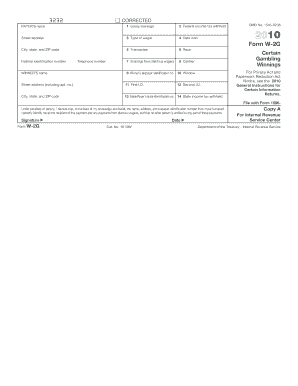
Nal Revenue Service. Copy B Report this income on your federal tax return. If this form shows federal income tax withheld in box 2, attach this copy to your return. Department of the Treasury - Internal Revenue Service CORRECTED (if checked) PAYER S name, address, ZIP code, federal identification number, and telephone number 1 Gross winnings 2 Federal income tax withheld 3 Type of wager 4 Date won 5 Transaction 6 Race 7 Winnings from identical wagers 8 Cashier OMB No. 1545-0238 2.

How it works

  1. Open form

    Open form follow the instructions

  2. Easily sign form

    Easily sign the form with your finger

  3. Share form

    Send filled & signed form or save

How to fill out the IRS W-2G online

The IRS W-2G form is used to report certain gambling winnings and any federal income tax withheld from those winnings. Completing this form online is a straightforward process when you follow the right steps.

Follow the steps to fill out the IRS W-2G form accurately.

  1. Click the ‘Get Form’ button to access the W-2G form and open it in the editor.
  2. Fill in the payer's name, address, ZIP code, and federal identification number in the designated fields at the top of the form.
  3. Enter the gross winnings amount in Box 1 to reflect the total gambling winnings received.
  4. In Box 2, indicate the total federal income tax withheld from the winnings, if applicable.
  5. Specify the type of wager in Box 3, detailing the nature of the gambling event that led to the winnings.
  6. Fill in the date the winnings were won in Box 4.
  7. In Box 5, provide the transaction number associated with the gambling winnings, if available.
  8. Complete Box 6 by indicating the race associated with the transaction, if required.
  9. If applicable, list winnings from identical wagers in Box 7.
  10. Specify the cashier's name or identification in Box 8.
  11. Fill in the winner's name and address, including apartment number, in the relevant fields under the 'Winner's name' section.
  12. Enter the winner's taxpayer identification number in Box 9.
  13. Complete Box 10 with identification related to the window from which the winnings were received.
  14. Provide information for first and second identification in Boxes 11 and 12 as necessary.
  15. Fill in the state or payer's state identification number and state income tax withheld in Boxes 13 and 14.
  16. Sign and date the form to certify that the information provided is accurate, then save changes, and download or print the completed form.

Ensure your information is reported correctly by completing the IRS W-2G online.

Get form

Experience a faster way to fill out and sign forms on the web. Access the most extensive library of templates available.

Related content

About Form W-2 G, Certain Gambling Winnings
Jan 28, 2025 — File this form to report gambling winnings and any federal income tax...
Learn more
26 CFR § 31.3402(q)-1 - Extension of withholding...
Persons making payments of winnings subject to withholding must use Form 1096 to transmit...
Learn more
2017 General Instructions for Forms W-2 and W-3
May 2, 2017 — Do not use these forms to report wages subject to U.S. income tax...
Learn more

Related links form

VA DMAS-96 2009 VA Service Modification 2014 WA DSHS 10-114 2001 WI DPH 5024 2007

Questions & Answers

Get answers to your most pressing questions about US Legal Forms API.

Contact support

The tax rate on IRS W-2G winnings depends on your overall taxable income. Generally, winnings are taxed as ordinary income, which means you will be taxed at your applicable income tax rate. Additionally, the IRS may withhold 24% from your winnings if they surpass certain amounts. It’s advisable to consult with a tax advisor to understand how these taxes impact your financial situation.

If you fail to report IRS W-2G income, you could face penalties from the IRS. They may conduct an audit, leading to additional taxes owed along with interest and fines. It's crucial to report all income accurately to prevent these issues. Using a service like US Legal Forms can help you manage and report your tax obligations effectively.

To request a copy of your IRS W-2G, you can contact the IRS directly. Use the IRS's online tools or call their support for assistance. It's important to provide relevant information to expedite your request. Keeping accurate tax records is essential, and getting your W-2G forms from the IRS ensures you have all the necessary documents.

To file a tax return with a W-2, gather your forms, ensuring you have all necessary documentation. Input the information from your IRS W-2G into a tax preparation platform or your paper return. Carefully follow the steps to report your income and any withholdings. Consider using US Legal Forms to simplify the process and eliminate confusion.

In TurboTax, navigate to the 'Wages and Income' section to find the option for 'Less Common Income'. Here, you can locate the place to enter your IRS W-2G information. Follow the prompts, entering the details as shown on your form. This integration helps ensure the correct calculation of your taxes owed and any potential refunds.

Filing your W-2 yourself requires you to first gather your form and any other financial documents. Use either a paper tax return or an online tax filing service to enter your earnings. Review each step to ensure you include your IRS W-2G detail accurately. This process helps you maintain control over your tax filing and ensures you can address any questions that may arise.

To file a tax return with your W-2, start by gathering your W-2 form and other relevant documents. Enter the income from the IRS W-2G into the tax software or the appropriate paper forms. Review the information carefully for accuracy, focusing on income and withholding sections. Filing electronically often expedites processing times and offers confirmation of receipt.

If you have two W-2 forms, collecting both documents and entering their details is essential for an accurate tax return. Combine the wages, withholdings, and any extra withholding from both IRS W-2Gs. You can file electronically or using paper forms; just ensure that the information matches what the IRS holds. This completeness helps prevent issues down the line.

To attach your W-2 to your tax return, include it as part of your submission when filing. If you file electronically, simply input the W-2 information into the appropriate sections. For paper filings, attach the W-2 behind the first page of your tax return using a staple. Always ensure your details match those on the IRS W-2G to avoid processing delays.

To enter the IRS W-2G on TurboTax, start by navigating to the section for income and select 'Other Income.' Here, you can input the amounts from your W-2G forms. Be sure to have your forms handy to ensure accuracy, as TurboTax provides prompts to guide you through the input. Using tools like US Legal Forms can enhance your understanding of this process, making your tax filing smoother.

Get This Form Now!

Use professional pre-built templates to fill in and sign documents online faster. Get access to thousands of forms.
If you believe that this page should be taken down, please follow our DMCA take down processhere.
Get IRS W-2G
  • Adoption
  • Bankruptcy
  • Contractors
  • Divorce
  • Home Sales
  • Employment
  • Identity Theft
  • Incorporation
  • Landlord Tenant
  • Living Trust
  • Name Change
  • Personal Planning
  • Small Business
  • Wills & Estates
  • Packages A-Z
  • Affidavits
  • Bankruptcy
  • Bill of Sale
  • Corporate - LLC
  • Divorce
  • Employment
  • Identity Theft
  • Internet Technology
  • Landlord Tenant
  • Living Wills
  • Name Change
  • Power of Attorney
  • Real Estate
  • Small Estates
  • Wills
  • All Forms
  • Forms A-Z
  • Other Templates
  • Legal Hub
  • About Us
  • Help Portal
  • Legal Resources
  • Blog
  • Affiliates
  • Contact Us
  • Delete My Account
  • Site Map
  • Industries
  • Forms in Spanish
  • Localized Forms
  • State-specific Forms
  • Forms Kit
  • Real Estate Handbook
  • All Guides
  • Notarize
  • Incorporation services
  • For Consumers
  • For Small Business
  • For Attorneys
  • USLegal
  • FormsPass
  • pdfFiller
  • signNow
  • altaFlow
  • DocHub
  • Instapage
Form Packages
  • Adoption
  • Bankruptcy
  • Contractors
  • Divorce
  • Home Sales
  • Employment
  • Identity Theft
  • Incorporation
  • Landlord Tenant
  • Living Trust
  • Name Change
  • Personal Planning
  • Small Business
  • Wills & Estates
  • Packages A-Z
Form Categories
  • Affidavits
  • Bankruptcy
  • Bill of Sale
  • Corporate - LLC
  • Divorce
  • Employment
  • Identity Theft
  • Internet Technology
  • Landlord Tenant
  • Living Wills
  • Name Change
  • Power of Attorney
  • Real Estate
  • Small Estates
  • Wills
  • All Forms
  • Forms A-Z
  • Other Templates
Customer Service
  • Legal Hub
  • About Us
  • Help Portal
  • Legal Resources
  • Blog
  • Affiliates
  • Contact Us
  • Delete My Account
  • Site Map
  • Industries
  • Forms in Spanish
  • Localized Forms
  • State-specific Forms
  • Forms Kit
Legal Guides
  • Real Estate Handbook
  • All Guides
Prepared for you
  • Notarize
  • Incorporation services
Our Customers
  • For Consumers
  • For Small Business
  • For Attorneys
Our Sites
  • USLegal
  • FormsPass
  • pdfFiller
  • signNow
  • altaFlow
  • DocHub
  • Instapage
Social Media
Call us now toll free:
+1 833 426 79 33
As seen in:
© Copyright 1999-2026 airSlate Legal Forms, Inc. 17 Station Street, Ste. 203, Brookline, MA 02445
  • Your Privacy Choices
  • Terms of Service
  • Privacy Notice
  • Content Takedown Policy
  • Bug Bounty Program
IRS W-2G
This form is available in several versions.
Select the version you need from the drop-down list below.
2020 IRS W-2G
Select form
  • 2020 IRS W-2G
  • 2018 IRS W-2G
  • 2017 IRS W-2G
  • 2016 IRS W-2G
  • 2015 IRS W-2G
  • 2014 IRS W-2G
  • 2013 IRS W-2G
  • 2012 IRS W-2G
  • 2011 2011 Form W 2g
  • 2010 IRS W-2G
Select form