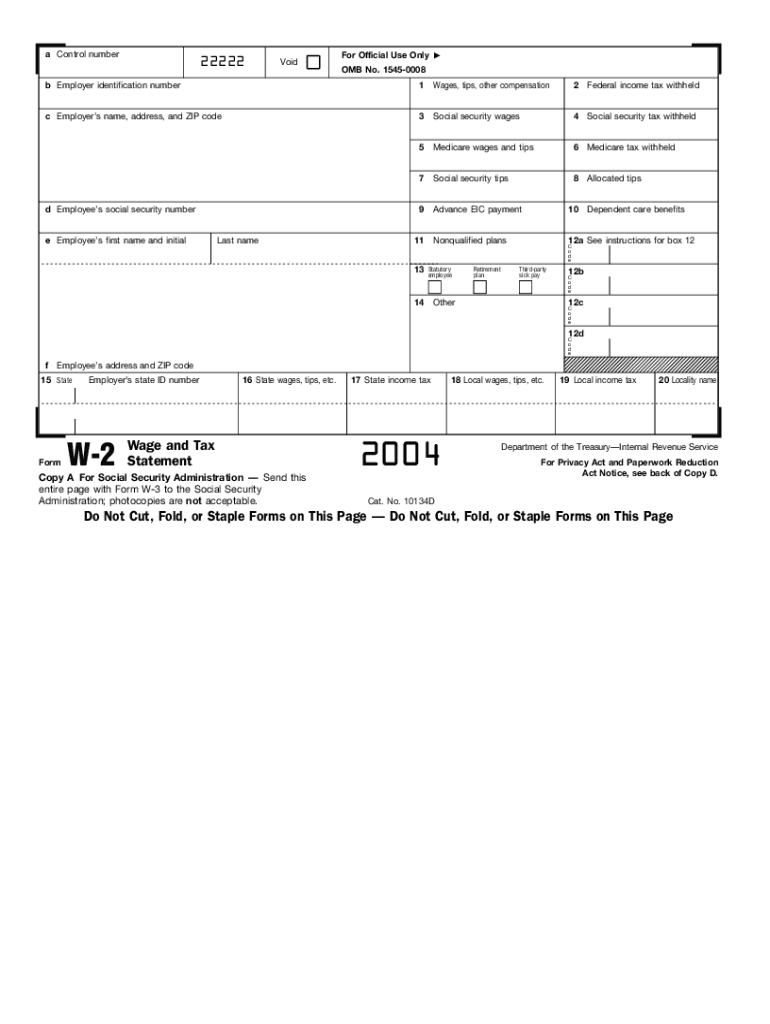
Ate income tax 2004 18 Local wages, tips, etc. 19 Local income tax 20 Locality name Department of the Treasury Internal Revenue Service Notice to Employee Refund. Even if you do not have to file a tax return, you should file to get a refund if box 2 shows Federal income tax withheld or if you can take the earned income credit. Earned income credit (EIC). You must file a tax return if any amount is shown in box 9. You may be able to take the EIC for 2004 if: (a) you do not have a qualify.

Open form follow the instructions

Easily sign the form with your finger

Send filled & signed form or save
How to fill out the IRS W-2 online
The IRS W-2 form is a vital document used by employers to report wages, tips, and other compensation provided to their employees. Completing this form accurately is essential for both tax reporting and filing purposes.
Follow the steps to fill out the IRS W-2 online
- Click ‘Get Form’ button to obtain the form and open it in the editor.
- In box a, provide the control number, if applicable, that may be assigned by your employer for filing purposes.
- In box b, enter the employer identification number (EIN), which can be found on official documents provided by the employer.
- In box c, input the employer’s name, address, and ZIP code to ensure proper identification.
- In box d, fill in the employee's Social Security number as it appears on their Social Security card.
- In box e, write the employee's first name, middle initial, and last name, ensuring accuracy for tax reporting.
- In box f, provide the employee's address and ZIP code for correct mailing purposes.
- In box 1, report the total wages, tips, and other compensation for the employee for the tax year.
- In box 2, indicate the total federal income tax withheld from the employee's paycheck.
- Complete boxes 3 to 10 by entering the relevant details for Social Security wages, Medicare wages, and any applicable tips or compensation details.
- In boxes 12a to 12d, fill in any additional codes that may apply based on provided instructions regarding retirement plans or benefits.
- Boxes 13 through 20 require you to enter information specific to state, local wages, and taxes, as applicable based on the employee's residency and work location.
- Review all entries for accuracy and completeness before saving the form.
- Upon finalizing the entries, save the changes, and then download, print, or share the completed form as needed.
Begin filling out your IRS W-2 form online to ensure accurate and timely tax reporting.
Experience a faster way to fill out and sign forms on the web. Access the most extensive library of templates available.
Related content
Jan 17, 2025 — Important information on employment tax withholding obligations and Form...
IRS Form W-2, or 'Wage and Tax Statement,' reports an employee's income, taxes withheld...
May 2, 2017 — Do not use these forms to report wages subject to U.S. income tax...
Get answers to your most pressing questions about US Legal Forms API.
Is W-2 only for US citizens?
No, the IRS W-2 is not limited to US citizens; it applies to any employee in the US, including non-citizens working under a valid work visa. As long as you earn wages and fulfill tax responsibilities, you will receive a W-2. Understanding your rights and responsibilities as a worker can help you make informed decisions about your employment and tax obligations.
What are W-2 candidates in the USA?
2 candidates refer to individuals who are registered as employees with a company, earning wages that fall under IRS reporting. These candidates are often eligible for company benefits, including health insurance and retirement plans. If you're looking for a more secure employment situation, aiming for a 2 role may be the best option. It shows employers' investment in your longterm success.
What is a W-2 in the USA?
2 in the USA is a tax form provided by employers that reports an employee's annual wages and tax withholdings. This form is vital for employees when filing their income tax returns, as it provides necessary information about their earnings. Be sure to check your W2 for accuracy, as any discrepancies can lead to issues with the IRS during tax season.
What is a W-2 visa in the US?
There isn't a specific 'W-2 visa' in the US; however, individuals working with employment visas may receive a W-2 to report their earnings. While the term may be misleading, it is essential to understand that income and tax reporting is part of maintaining legal employment status. Staying updated on your earnings and documentation can help you navigate the complex immigration landscape.
What is W2 in US visa?
The IRS W-2 form is relevant for individuals on a US visa as it outlines income, which may affect visa status and immigration benefits. Generally, employees holding a work visa should receive a W-2 reflecting their annual earnings in the US. This documentation is necessary for tax compliance and helps inform decisions on residency and work permits. Staying informed can simplify your tax filing process.
What is a W2 role in the USA?
2 role indicates that an individual is employed directly by a company as opposed to being an independent contractor. This role typically provides benefits, such as health insurance and retirement plans, which are less common for contract workers. If you are seeking more stability in your employment, consider roles that issue an IRS W2 form. These positions often offer greater longterm security and support.
What are W2 tax terms in the USA?
The IRS W-2 form refers to the document that employers use to report employee wages, tips, and other compensation. This form also details taxes withheld from an employee’s paycheck. Understanding these terms is crucial for accurate tax filing and can help clarify your financial standing in the eyes of the IRS. Make sure to keep your W-2 documents organized for tax season.
How can I access W-2?
Accessing your IRS W-2 can be a straightforward process. First, check with your employer, as many provide electronic access or send a mailed copy. If you are having trouble, consider visiting the IRS website, which offers information on how to request a duplicate if needed. Moreover, US Legal Forms serves as an excellent resource to help you understand the requirements and guide you through obtaining your W-2 easily.
How do I access W-2?
To access your IRS W-2, start by checking your employer's payroll website, where many provide online access. If your employer offers digital copies, you simply log in and download your W-2 document. If you prefer a physical copy, you can request it directly from your HR department. In some cases, utilizing services like US Legal Forms can streamline the process and clarify any requirements.
What is the easiest way to get a W-2?
The easiest way to get your IRS W-2 is to contact your employer directly. Most employers provide electronic access through their payroll systems or send physical copies by mail. If you have not received your W-2 by the deadline, reaching out sooner can help ensure you have the necessary documents for tax filing. Additionally, you may consider using platforms like US Legal Forms to navigate any issues with obtaining your W-2.
Use professional pre-built templates to fill in and sign documents online faster. Get access to thousands of forms.
If you believe that this page should be taken down, please follow our DMCA take down process here.
This form is available in several versions. Select the version you need from the drop-down list below.