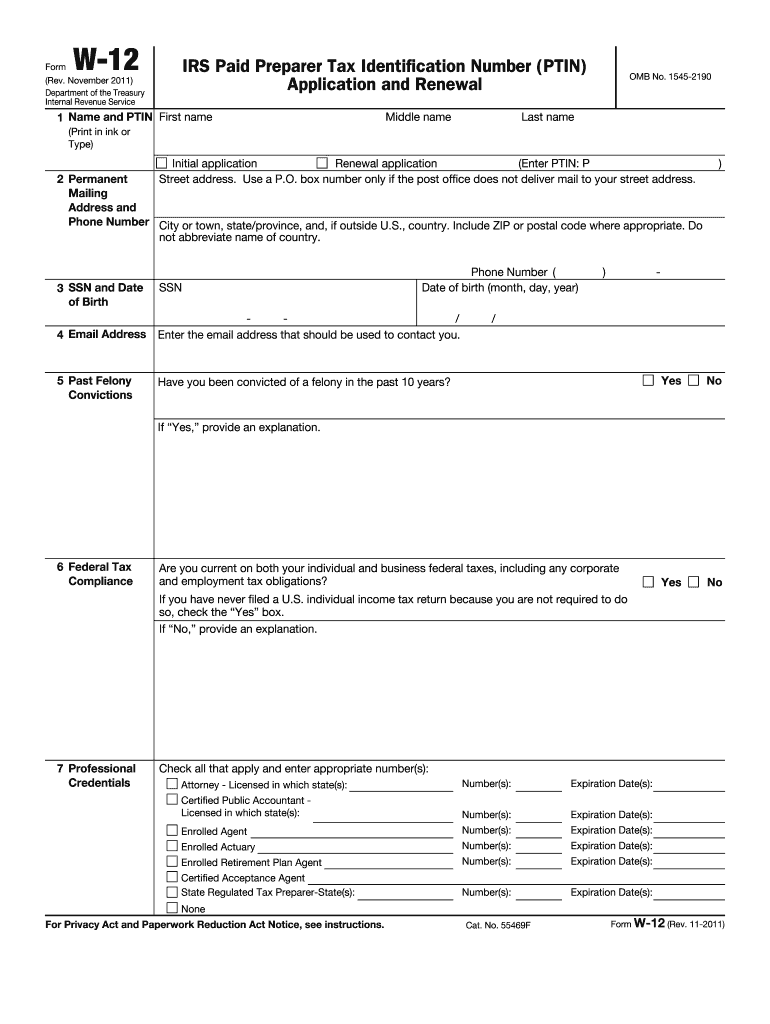
: P Yes No Yes No Yes No Yes No If this is your initial application for a PTIN, continue to line 14. If you are renewing your PTIN, go to line 16. 14 Address of Your Last Individual Income Tax Return Filed 15 Filing Status and Tax Year on Last Individual Income Tax Return Filed Enter the address that you used on the last individual income tax return you filed. If you have never filed a federal income tax return, check here . See line 14 instructions for documents that must be submitte.

Open form follow the instructions

Easily sign the form with your finger

Send filled & signed form or save
How to fill out the IRS W-12 online
The IRS W-12 form is essential for anyone seeking to apply for or renew their Preparer Tax Identification Number (PTIN). This guide will provide clear, step-by-step instructions to help users complete the form accurately and efficiently online.
Follow the steps to fill out the IRS W-12 online
- Click ‘Get Form’ button to obtain the form and open it in the editor.
- Enter your legal name in the designated fields for first name, middle name (if applicable), and last name. Ensure that it matches the name on your tax return.
- Provide your permanent street address, city or town, state, and ZIP code. Use a P.O. box only if your physical address cannot receive mail.
- Fill out your Social Security Number (SSN) and date of birth in the specified formats.
- Input your email address where the IRS can reach you regarding your application.
- Disclose any past felony convictions in the provided section, and offer an explanation if you have any.
- Confirm whether you are compliant with federal tax laws. If you are not current with your federal taxes, provide an explanation.
- List your professional credentials by checking the appropriate boxes and providing details such as licensing numbers and expiration dates.
- Indicate if you are self-employed or an owner in a tax preparation business. If so, provide your identification numbers.
- Complete the section for your business name and physical address, ensuring it's not a P.O. box.
- Enter your business phone number and international business phone number (if applicable).
- Provide your business website address.
- Answer whether you prepare Form 1040 for compensation and check the appropriate response regarding supervised preparer status.
- Input the address from your last individual income tax return, unless you have never filed a tax return.
- Select your filing status and tax year from your last individual income tax return. If you haven't filed, check that box.
- Complete the payment fee section, indicating the fee relevant to your application or renewal.
- Sign and date the form, ensuring all provided information is accurate and complete.
- Save any changes, and once you have completed the form, download, print, or share it as needed.
Complete your IRS W-12 application online today for a smooth and efficient process.
Experience a faster way to fill out and sign forms on the web. Access the most extensive library of templates available.
Related content
Sep 5, 2024 — Use this form to apply for or renew a paid preparer tax identification...
An applicant may apply for a PTIN online or by filling out Form W-12 and delivering it to...
May 2, 2017 — A new box 12 Code FF has been added to report the total amount of...
Get answers to your most pressing questions about US Legal Forms API.
Can you leave box 12 blank on W-2?
You can leave box 12 blank on your W-2 if there are no applicable items to report. However, ensure that other areas of your W-2 are filled out correctly to avoid any penalties. It's advisable to double-check IRS requirements to ensure compliance.
How to file W-2 box 12?
To file W-2 box 12, you must ensure that you input the correct code and amount into the provided fields for your tax software or paper form. Address any employer contributions accurately and review IRS guidelines for box 12 reporting. If you need assistance, resources on US Legal Forms can provide valuable support.
What do I put in box 12 on W-2 TurboTax?
When using TurboTax, you should enter the relevant information according to the specific code listed for box 12 on your W-2. Each code corresponds to different types of compensation or deductions, so it's crucial to follow the prompts in TurboTax carefully. This ensures accurate reporting for the IRS.
How do I submit documents to the IRS?
You can submit documents to the IRS electronically or via mail, depending on the type of form you need to file. For faster processing, electronic submission is often recommended. US Legal Forms offers guidance on the required steps and helps you prepare the necessary documents for submission.
How to calculate box 12 dd on W-2?
To calculate box 12 dd on your W-2 form, you need to total the amount of employer-sponsored health coverage for the year. This includes both the employee and employer contributions to health insurance plans. Accurate calculations are essential for compliance with IRS reporting requirements.
How do I become a certified IRS tax preparer?
To become a certified IRS tax preparer, you must complete the necessary education and testing requirements set by the IRS. After passing the IRS competency exam, you can apply for a Preparer Tax Identification Number (PTIN). Resources available on US Legal Forms can assist you with the documents required to navigate this process.
What is the W-12 form?
The IRS W-12 form is a certification document for tax professionals to become authorized tax preparers. It helps ensure that these individuals meet the requirements set by the IRS to offer tax preparation services. You can find more details and resources on platforms like US Legal Forms, which guide you through the certification process.
What is the W in Section 12 of the W2?
The 'W' in Section 12 of the W-2 form refers to contributions to a health savings account (HSA). This designation helps you track your tax-advantaged contributions throughout the year. Understanding this section is crucial, especially when you plan to file your taxes using the IRS W-12 form, as it can influence your tax return.
Does Box 12 Code W affect taxes?
Box 12 Code W on your W-2 form indicates contributions to a health savings account (HSA) and can indeed affect your taxable income. Contributions reported in this box can be tax-deductible, potentially reducing your overall tax liability. It's important to review this information in conjunction with your IRS W-12 if applying for e-filing.
What is a W12 form used for?
The W-12 form is mainly used to apply for e-file authorization with the IRS. If you intend to electronically file your tax returns or manage tax-related transactions online, submitting the IRS W-12 is a necessary step. This form simplifies the e-filing process and enhances security for your personal information.
Use professional pre-built templates to fill in and sign documents online faster. Get access to thousands of forms.
If you believe that this page should be taken down, please follow our DMCA take down process here.
This form is available in several versions. Select the version you need from the drop-down list below.