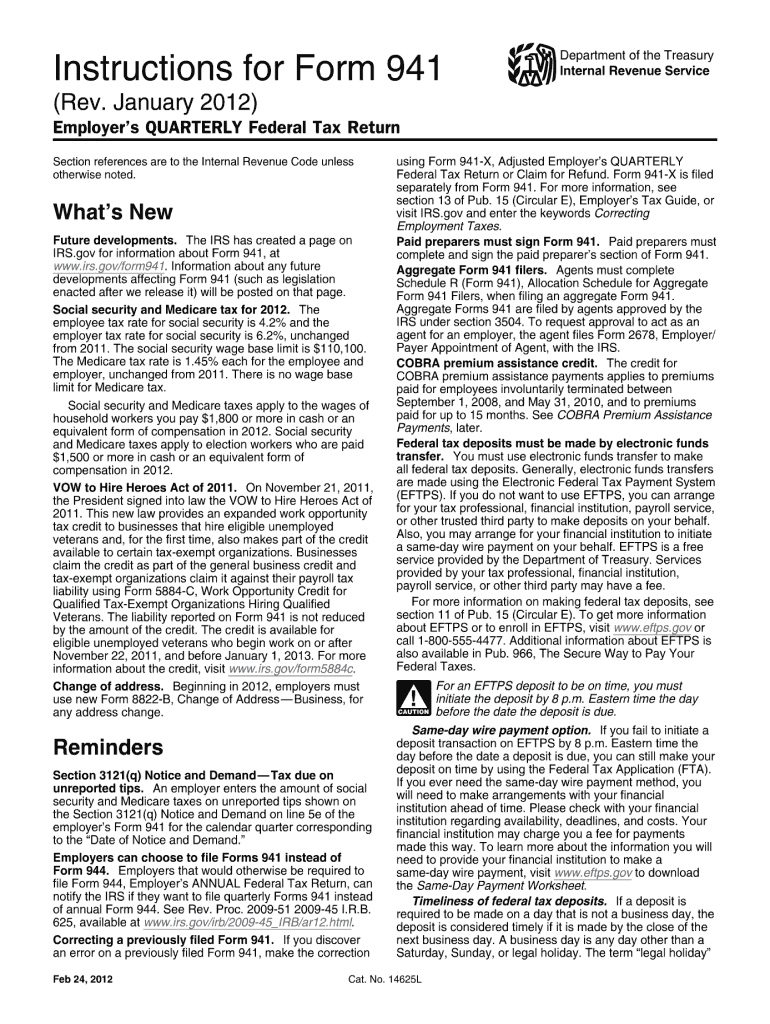
Extended. The work opportunity tax credit is now available for eligible unemployed veterans who begin work before January 1, 2014. Previously, the credit was available for unemployed veterans who began work on or after November 22, 2011, and before January 1, 2013. Qualified tax-exempt organizations that hire eligible unemployed veterans can claim the work opportunity tax credit against their payroll tax liability using Form 5884-C, Work Opportunity Credit for Qualified Tax-Exempt Organizations.
Loading

Open form follow the instructions

Easily sign the form with your finger

Send filled & signed form or save
How to fill out the IRS Instructions 941 online
This guide provides a comprehensive overview of how to complete the IRS Instructions 941, which is the Employer's Quarterly Federal Tax Return. Whether you are new to tax filing or have experience, this step-by-step approach aims to assist you in accurately filling out the form online.
Follow the steps to fill out the form correctly.
- Press the ‘Get Form’ button to access the form and open it in your editor.
- Select the appropriate quarter at the top of the form and check the corresponding box.
- Type or print your Employer Identification Number (EIN), business name, and address in the specified fields.
- Enter the total number of employees who received wages in the reported quarter. Make sure to follow the exact definitions provided for inclusion.
- Fill out the line for wages, tips, and other compensation, ensuring that all amounts align with what will be reported on employees' Forms W-2.
- Complete the tax-related lines, such as taxable social security and Medicare wages. Carefully calculate these amounts based on the wages entered.
- Adjust any previous quarter’s amounts as necessary using the specific adjustment lines provided in the form.
- Total your taxes after adjustments and ensure that the final amount matches your calculated liabilities.
- Review all fields for accuracy. Double-check all entries against your records to ensure no errors exist.
- After confirming all information is correct, save your changes. You can then download, print, or share the completed form.
Complete your tax documents online to ensure timely and accurate submissions.
Experience a faster way to fill out and sign forms on the web. Access the most extensive library of templates available.
Related content
Mar 17, 2025 — Social security and Medicare taxes apply to election workers who are paid...
Jul 8, 2011 — Write “Amended” at the top of Schedule B (Form 941). The IRS Make sure...
May 2, 2017 — Be sure that the payer's name and EIN on Forms W-2 and. W-3 are the same...
Get answers to your most pressing questions about US Legal Forms API.
How do you calculate taxable wages for Social Security?
To calculate taxable wages for Social Security, identify all compensation that falls under the taxable wage base, including salaries, bonuses, and commissions. Deduct any specific exemptions or non-taxable benefits as outlined in the IRS Instructions 941. By ensuring you correctly calculate these wages, you can accurately report and remit Social Security taxes for compliance.
How are taxed Social Security earnings calculated for self-employed?
Self-employed individuals calculate their taxed Social Security earnings using their net self-employment income. After determining your total income, you'll need to account for business deductions before applying the appropriate tax rates. The IRS Instructions 941 can guide you through the specifics of calculating your liability to ensure compliance with Social Security contributions.
How do I submit my 941 to the IRS?
You can submit your Form 941 to the IRS either electronically or by mail. If submitting electronically, many payroll services offer direct filing options, which streamline the process. For paper filing, send your completed form to the address provided in the IRS Instructions 941, based on your location and whether you are making a payment.
Can 941x be filed electronically?
Yes, Form 941-X can be filed electronically, which allows for a faster and more efficient way to correct mistakes on a previously filed Form 941. Many payroll software providers facilitate electronic submission, making it easier for you to stay compliant. Always check with the IRS Instructions 941 for updates regarding electronic filing options and procedures.
How to calculate taxable Social Security wages 941?
Calculating taxable Social Security wages for Form 941 involves identifying all types of employee compensation that are subject to Social Security tax. It's essential to include regular wages, bonuses, and tips while excluding certain payments, like those for health and retirement benefits. Consult the IRS Instructions 941 for specific details on what to include and any applicable exclusions for accurate reporting.
How to calculate taxable social security wages on 941?
To calculate taxable social security wages on Form 941, first gather all employee earnings that fall under Social Security wages. You should include all wages, tips, and other compensation subject to Social Security tax, excluding any income not subject to this tax. Then, refer to the IRS Instructions 941 to ensure accurate calculations, focusing on the guidelines for deducting any allowable exemptions or adjustments.
When must 941 deposits be made?
941 deposits must be made based on your tax liability, which is determined during payroll. The IRS specifies deposit schedules, which can be monthly or semi-weekly, depending on your payroll frequency. Adhering to these timelines keeps your business in line with IRS Instructions 941 and helps avoid penalties.
Do I have to file quarterly 941 if no payroll?
Yes, if you have no payroll during the quarter, you still need to file Form 941. It is important to indicate that there were no wages or tax liabilities for the period to stay compliant with IRS requirements. Following the IRS Instructions 941 for no payment situations helps prevent penalties and keeps your records clear.
Where to mail 941 quarterly no payment?
If you are filing Quarterly Form 941 with no payment due, you can mail it to the address specified in the IRS Instructions 941. Make sure to check the correct address based on your location, as it can differ depending on the state. Using the correct address ensures timely processing and compliance.
How do I access form 941?
To access Form 941, visit the IRS website where you can find current and prior year versions of the form for download. Make sure you also check out IRS Instructions 941 to guide you on how to fill out the form accurately. If you prefer physical copies, you can also request them through the IRS hotline. For a more streamlined process, consider exploring options on uslegalforms to access the latest forms and instructions.
Use professional pre-built templates to fill in and sign documents online faster. Get access to thousands of forms.
If you believe that this page should be taken down, please follow our DMCA take down process here.
This form is available in several versions. Select the version you need from the drop-down list below.