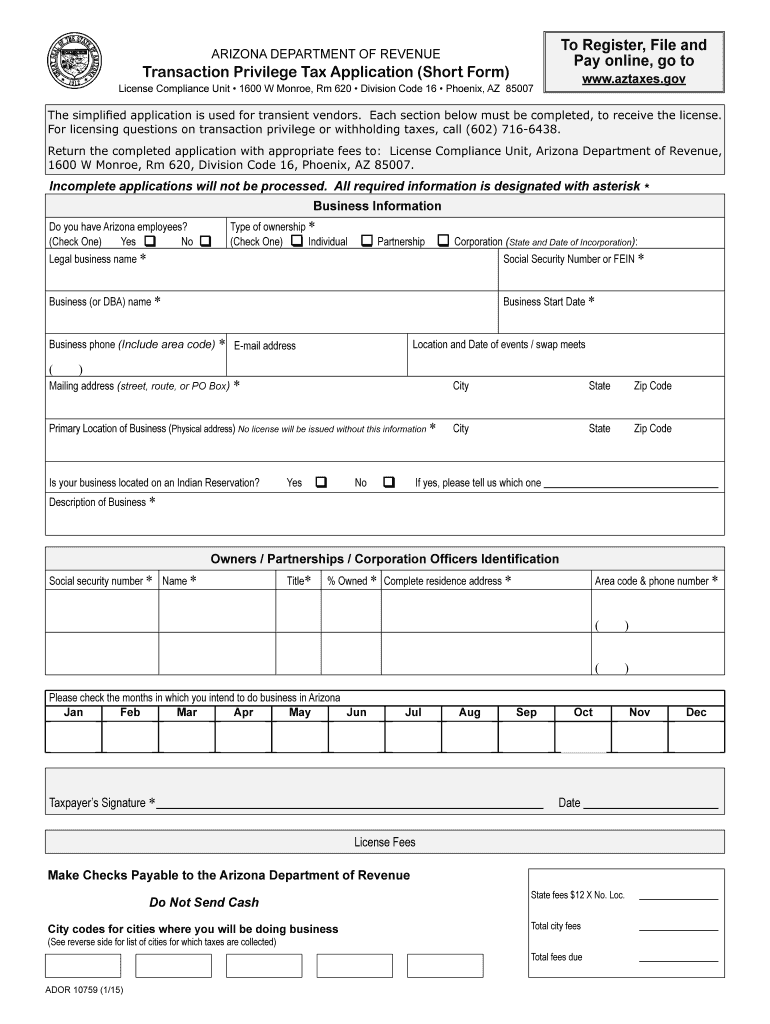
Ivision Code 16 Phoenix, AZ 85007 The simpliied application is used for transient vendors. Each section below must be completed, to receive the license. For licensing questions on transaction privilege or withholding taxes, call (602) 716-6438. Return the completed application with appropriate fees to: License Compliance Unit, Arizona Department of Revenue, 1600 W Monroe, Rm 620, Division Code 16, Phoenix, AZ 85007. Incomplete applications will not be processed. All required information is.
Loading

Open form follow the instructions

Easily sign the form with your finger

Send filled & signed form or save
How to fill out the AZ ADOR 10759 online
The AZ ADOR 10759 is a short form application designed for transient vendors looking to register for transaction privilege tax in Arizona. This guide provides step-by-step instructions to assist users in completing the form accurately and efficiently online.
Follow the steps to complete the AZ ADOR 10759 form online.
- Click the ‘Get Form’ button to access the AZ ADOR 10759 and open it in your preferred editing application.
- Begin by filling out the business information section. Indicate whether your business has Arizona employees by selecting 'Yes' or 'No'.
- Enter your legal business name as it appears on official documents. If you are an individual, include your name and your partner's name if applicable.
- Specify your type of ownership by checking the appropriate box for individual, corporation, partnership, or another business entity.
- Provide your Business (DBA) name if it differs from your legal business name. If they are the same, enter it again.
- Indicate the business start date by entering the date in the required format.
- Fill in your business phone number, including the area code, and your email address for correspondence.
- Specify the location and date of the event or swap meet where you will conduct business. Include the address if known; otherwise, provide the city name.
- Enter your mailing address for any correspondence, ensuring it is suitable for receiving important documents.
- For your primary location of business, provide the physical address. This information is mandatory for processing your application.
- Indicate whether your business is located on an Indian Reservation by selecting 'Yes' or 'No'. If 'Yes', specify which reservation.
- Write a brief description of your business; outline the major activities and products sold to give context for your application.
- List the names and social security numbers of all owners and partners. Reports may require additional attachment if space is insufficient.
- Select the months during which you plan to conduct business within Arizona by checking the applicable boxes.
- Sign and date the application. Ensure that the signature is provided by the appropriate individual as required.
- Calculate your fees based on the number of events and cities you will be doing business in, ensuring to total the city and state fees due.
- Review the completed form for accuracy, and then proceed to save your changes. You may also download, print, or share the form as needed.
Complete your AZ ADOR 10759 application online for efficient processing and compliance.
Experience a faster way to fill out and sign forms on the web. Access the most extensive library of templates available.
Related content
APPEL, MARC [AZ-10759], 1 CA-CV 22-0709, MEDINA v. CHEE, et al. APPEL, MICHAEL ... ADOR et...
Merit List of B.Sc. Engineering and BBA-TM (Admission Test Result 2024-2025). The merit...
Get answers to your most pressing questions about US Legal Forms API.
Can Arizona amended returns be filed electronically?
Indeed, Arizona allows electronic filing of amended returns under AZ ADOR 10759. This process simplifies corrections and is ideal for taxpayers who wish to avoid traditional mail. Make sure to use official platforms or approved software for submission. Always double-check the details of your amendment to ensure proper processing.
How do I file my Arizona transaction privilege tax online?
Filing your Arizona transaction privilege tax online is straightforward with AZ ADOR 10759. Begin by accessing the Arizona Department of Revenue's online services. Set up your account and follow their prompts to enter your business information and tax details. Utilizing this method can save you time and ensure you meet your filing deadlines.
How do I file an amended sales tax return in Arizona?
To file an amended sales tax return in Arizona, refer to the guidelines outlined in AZ ADOR 10759. First, prepare the necessary documentation and forms for the amendment. You can file it electronically through the Arizona Department of Revenue's website or by using compatible tax software. Follow their step-by-step instructions to complete your filing accurately.
Does Arizona accept amended returns electronically?
Arizona does accept amended returns electronically, as specified in AZ ADOR 10759. This feature provides convenience for taxpayers looking to correct their filings without the hassle of paper submissions. By utilizing designated e-filing platforms, you can ensure that your amended return is processed swiftly. Be aware of the necessary forms and details when submitting.
Can amended returns be filed electronically?
Yes, amended returns can be filed electronically under the AZ ADOR 10759 provisions. This process allows you to correct errors on your tax return efficiently. You can use tax software that supports electronic filing for amendments. Ensure you follow all instructions carefully to avoid delays in processing your amended return.
Where do I file AZ form A1 QRT?
You can file AZ form A1 QRT to the Arizona Department of Revenue, following the guidelines set in AZ ADOR 10759. If you prefer to file electronically, use approved e-filing software or the department's online system. If you choose to mail your return, ensure it is sent to the correct address for processing. Always verify the address on the official Arizona Department of Revenue site.
Can I file Arizona state taxes electronically?
Yes, you can file Arizona state taxes electronically using AZ ADOR 10759. The Arizona Department of Revenue supports electronic filing, making it simpler and faster for you. You can file through approved tax software or directly on their platform. Ensure that your tax documents are prepared correctly before submitting.
What tax returns cannot be filed electronically?
Certain tax returns cannot be filed electronically under AZ ADOR 10759 guidelines. Typically, this includes returns with specific attachments or additional forms that require manual processing. Additionally, if there is an issue with your prior year's return, you may need to file by mail. Always check the latest updates from the Arizona Department of Revenue for specific details.
How to get an Arizona TPT license?
Getting an Arizona TPT license involves filling out an application with the AZ Department of Revenue (AZ ADOR 10759). This process can conveniently be completed online by providing your business information and necessary documentation. After your application is processed, you will receive your TPT license, allowing you to operate your business legally and effectively.
How to get an Arizona state tax ID number?
To get an Arizona state tax ID number, complete the registration process via the AZ ADOR 10759 website. You'll need to provide information about your business, including its legal structure and the nature of your activities. This unique identification number is essential for tax purposes and enables you to comply with local regulations.
Use professional pre-built templates to fill in and sign documents online faster. Get access to thousands of forms.
If you believe that this page should be taken down, please follow our DMCA take down process here.